cancel
Showing results for 
Search instead for 
Did you mean: 

We've captured the moments from FabCon & SQLCon that everyone is talking about, and we are bringing them to the community, live and on-demand. Starts on April 14th. Register now

Reply
Anonymous
Not applicable

Button/Filter | Button trigger and filter values

Hello,


short directly question, is it possible to create a button which trigger a measure which only show 3 supplier at my table? 

Or are there other solutions?


File:

https://1drv.ms/u/s!Ar9P7_DTkCuW5W5ELYRAQ877do7Y


Thanks for helping!


Kind regards,

Unkown

1 ACCEPTED SOLUTION

@Anonymous updated file attached with working buttons. 


Subscribe to the @PowerBIHowTo YT channel for an upcoming video on List and Record functions in Power Query!!

Learn Power BI and Fabric - subscribe to our YT channel - Click here: @PowerBIHowTo

If my solution proved useful, I'd be delighted to receive Kudos. When you put effort into asking a question, it's equally thoughtful to acknowledge and give Kudos to the individual who helped you solve the problem. It's a small gesture that shows appreciation and encouragement! ❤


Did I answer your question? Mark my post as a solution. Proud to be a Super User! Appreciate your Kudos 🙂
Feel free to email me with any of your BI needs.

View solution in original post

5 REPLIES 5
Nishantjain
Continued Contributor

Possibly two options

1. Create 2 visuals using 2 measures and hide/unhide them using bookmarks
2. Use a slicer instead of a button. You can create a measure that can use the slicer selection to dynamically filter the number of suppliers you want to show. Look at this post https://community.powerbi.com/t5/Community-Blog/Dynamic-TopN-made-easy-with-What-If-Parameter/ba-p/3...
parry2k
Super User
Super User

@Anonymous thanks for sharing pbix but not very clear what you are actually looking?


Subscribe to the @PowerBIHowTo YT channel for an upcoming video on List and Record functions in Power Query!!

Learn Power BI and Fabric - subscribe to our YT channel - Click here: @PowerBIHowTo

If my solution proved useful, I'd be delighted to receive Kudos. When you put effort into asking a question, it's equally thoughtful to acknowledge and give Kudos to the individual who helped you solve the problem. It's a small gesture that shows appreciation and encouragement! ❤


Did I answer your question? Mark my post as a solution. Proud to be a Super User! Appreciate your Kudos 🙂
Feel free to email me with any of your BI needs.

Anonymous
Not applicable

@Nishantjain  thanks alot for your share your idea and maybe i need this one later ;D. 
And additional if its not so a much work, could you make a sample in a new tab at my Sample1 File? 
I think for other User would be great and for my too ( iam not so the power bi hero ;D) 


@parry2k  sorry for my late writing. 


i have think about it and it right i did not describe it exactly: (BTW: i have updated the file)

Bild1.PNG


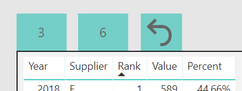
So i have three buttons two of them have numbers, when you click of a button ( for example button with number 3) then you see only 3 suppliers( with ranking 1-3). Same thing when you click button with the number 6 you see only 6 suppliers ( with ranking 1-6) 


The last button with the arrow reset the supplier table and show all values.


I hope i could explain it well. 🙂 


Thanks for helping!


@Anonymous updated file attached with working buttons. 


Subscribe to the @PowerBIHowTo YT channel for an upcoming video on List and Record functions in Power Query!!

Learn Power BI and Fabric - subscribe to our YT channel - Click here: @PowerBIHowTo

If my solution proved useful, I'd be delighted to receive Kudos. When you put effort into asking a question, it's equally thoughtful to acknowledge and give Kudos to the individual who helped you solve the problem. It's a small gesture that shows appreciation and encouragement! ❤


Did I answer your question? Mark my post as a solution. Proud to be a Super User! Appreciate your Kudos 🙂
Feel free to email me with any of your BI needs.

Anonymous
Not applicable

@parry2k  thanks a lot 🙂

Helpful resources

Announcements
New to Fabric survey Carousel

New to Fabric Survey

If you have recently started exploring Fabric, we'd love to hear how it's going. Your feedback can help with product improvements.

Power BI DataViz World Championships carousel

Power BI DataViz World Championships - June 2026

A new Power BI DataViz World Championship is coming this June! Don't miss out on submitting your entry.

Join our Fabric User Panel

Join our Fabric User Panel

Share feedback directly with Fabric product managers, participate in targeted research studies and influence the Fabric roadmap.

March Power BI Update Carousel

Power BI Community Update - March 2026

Check out the March 2026 Power BI update to learn about new features.