cancel
Showing results for 
Search instead for 
Did you mean: 

The Power BI Data Visualization World Championships is back! Get ahead of the game and start preparing now! Learn more

Reply
Anonymous
Not applicable

Business Day Table

I have a calendar table that ranks business days pretty good as follows:


Rank = 
RANKX(
    FILTER(
        'Calendar',
        Calendar[If work day] = 1
            && Calendar[Month] = EARLIER( Calendar[Month] )
    ),
    Calendar[Date],,ASC
) 


My issue comes when there is a weekend as the last day in a month. For example, April 29th and April 30th in 2017 were on the weekend. So the formula above tags 4/29 and 4/30 as business day 21 when there were only 20 business days in April 2017. How can I adjust this formula to have 4/29 and 4/30 be tagged as business day 20?


The only hesitation I have then is the reverse side. Again for April 2017, April 1st was a Saturday. So I would want both 4/1 and 4/2 to show as business day 1 which is actually 4/3 in April 2017.


7 REPLIES 7
Anonymous
Not applicable

The picture below is an example


2018-04-30_14-57-20.jpg

Anonymous
Not applicable

Is this possible?

Hi @Anonymous,


Sorry for the delay.


It should be feasible. Could you please share us your pbix file with One Drive or Google Drive if possible? So that I can make some proper tests.


Thanks,
Xi Jin.

Anonymous
Not applicable

@v-xjiin-msft I have uploaded an example file here: https://1drv.ms/u/s!AnhLSXIUf4QnadPIoMdTswn3tjk


Thanks

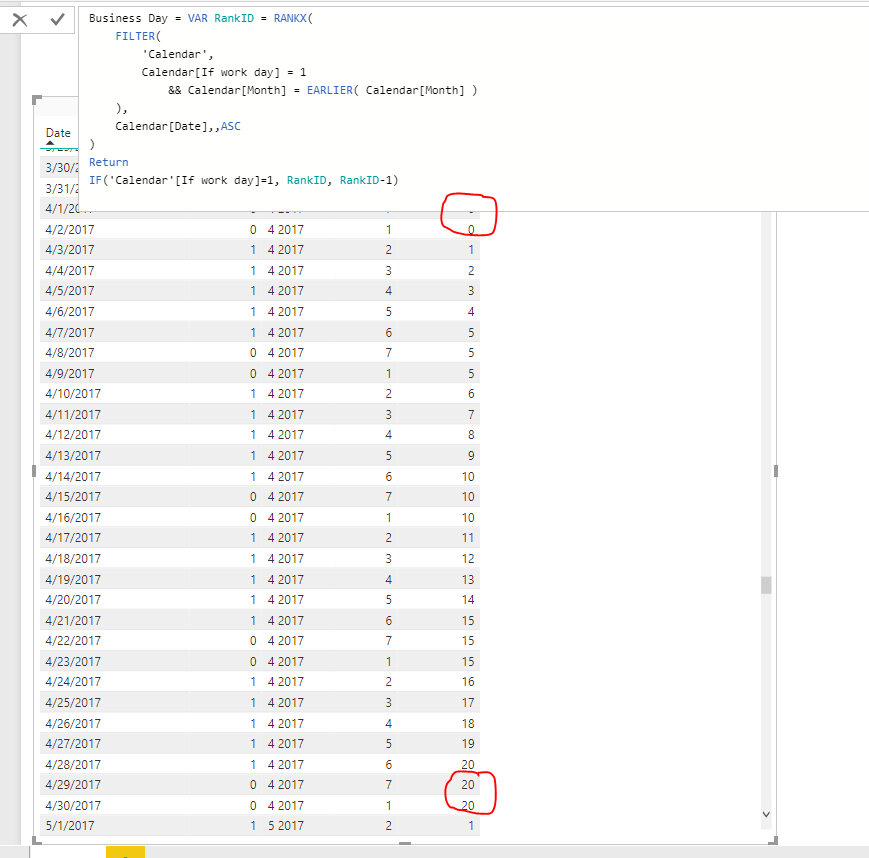
Hi @Anonymous,


Check this, hope it works for you:


Business Day = VAR RankID = RANKX(
    FILTER(
        'Calendar',
        Calendar[If work day] = 1
            && Calendar[Month] = EARLIER( Calendar[Month] )
    ),
    Calendar[Date],,ASC
)
Return
IF('Calendar'[If work day]=1, RankID, RankID-1)

33.PNG


Thanks,
Xi Jin.


Anonymous
Not applicable

@v-xjiin-msft Sorry for the delay and thank you for the response. That works, however, I also need 4/2/2017 which you have circled in your screenshot to show up as 1. So if a month starts on a weekend, then those days should be recognized as business day 1. However, if a month ends on a weekend, those days should recognized as the last valid business day or the max business day for that particular month. 

Anonymous
Not applicable

@v-xjiin-msft Nevermind, I think I answered my own question. Just added one more condition to your example:


Business Day2 = 
VAR RankID =
RANKX(
    FILTER(
        'Calendar',
        Calendar[If work day] = 1
            && Calendar[Month] = EARLIER( Calendar[Month] )
    ),
    Calendar[Date],,ASC
) 
RETURN
VAR RankID2 =
IF('Calendar'[If work day] = 1, RankID, RankID - 1)
RETURN
IF(RankID2 = 0 ,1, RankID2)

Helpful resources

Announcements
Power BI DataViz World Championships

Power BI Dataviz World Championships

The Power BI Data Visualization World Championships is back! Get ahead of the game and start preparing now!

December 2025 Power BI Update Carousel

Power BI Monthly Update - December 2025

Check out the December 2025 Power BI Holiday Recap!

FabCon Atlanta 2026 carousel

FabCon Atlanta 2026

Join us at FabCon Atlanta, March 16-20, for the ultimate Fabric, Power BI, AI and SQL community-led event. Save $200 with code FABCOMM.