cancel
Showing results for 
Search instead for 
Did you mean: 

The Power BI Data Visualization World Championships is back! Get ahead of the game and start preparing now! Learn more

Reply
HEW
Helper III
Helper III

Bullet chart - only show target for one category

Hi.


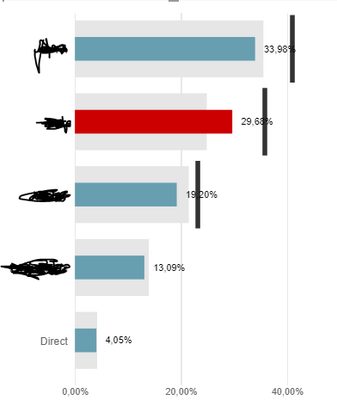
I have a bullet chart where I compare market share for current year (Value) with market share for last year (Comparison). The target is the market share excluding some suppliers and this (the black line) I would like only to be shown for the red category. Is this possible? Or can I show something similar with another visual?


HEW_0-1604475218543.png


Thanks a lot in advance.

Br. Helen

2 REPLIES 2
amitchandak
Super User
Super User

@HEW , In bullet chart visual you can add traget, min , max Target Value 2, I think those you can use

Share with Power BI Enthusiasts: Full Power BI Video (20 Hours) YouTube
Microsoft Fabric Series 60+ Videos YouTube
Microsoft Fabric Hindi End to End YouTube

Unfortunately, I can't make it work... Can you perhaps show me an example? I do get the value (line) for all categories and not only the red...

Br. Helen

Helpful resources

Announcements
Power BI DataViz World Championships

Power BI Dataviz World Championships

The Power BI Data Visualization World Championships is back! Get ahead of the game and start preparing now!

November Power BI Update Carousel

Power BI Monthly Update - November 2025

Check out the November 2025 Power BI update to learn about new features.

FabCon Atlanta 2026 carousel

FabCon Atlanta 2026

Join us at FabCon Atlanta, March 16-20, for the ultimate Fabric, Power BI, AI and SQL community-led event. Save $200 with code FABCOMM.