cancel
Showing results for 
Search instead for 
Did you mean: 

The Power BI Data Visualization World Championships is back! Get ahead of the game and start preparing now! Learn more

Reply
HEW
Helper III
Helper III

Bullet chart - only show target for one category

Hi.


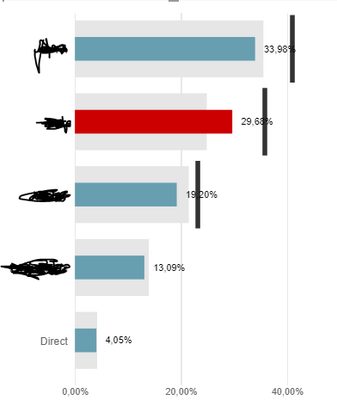
I have a bullet chart where I compare market share for current year (Value) with market share for last year (Comparison). The target is the market share excluding some suppliers and this (the black line) I would like only to be shown for the red category. Is this possible? Or can I show something similar with another visual?


HEW_0-1604475218543.png


Thanks a lot in advance.

Br. Helen

2 REPLIES 2
amitchandak
Super User
Super User

@HEW , In bullet chart visual you can add traget, min , max Target Value 2, I think those you can use

Share with Power BI Enthusiasts: Full Power BI Video (20 Hours) YouTube
Microsoft Fabric Series 60+ Videos YouTube
Microsoft Fabric Hindi End to End YouTube

Unfortunately, I can't make it work... Can you perhaps show me an example? I do get the value (line) for all categories and not only the red...

Br. Helen

Helpful resources

Announcements
November Power BI Update Carousel

Power BI Monthly Update - November 2025

Check out the November 2025 Power BI update to learn about new features.

Fabric Data Days Carousel

Fabric Data Days

Advance your Data & AI career with 50 days of live learning, contests, hands-on challenges, study groups & certifications and more!

FabCon Atlanta 2026 carousel

FabCon Atlanta 2026

Join us at FabCon Atlanta, March 16-20, for the ultimate Fabric, Power BI, AI and SQL community-led event. Save $200 with code FABCOMM.

Top Kudoed Authors