cancel
Showing results for 
Search instead for 
Did you mean: 

The Power BI Data Visualization World Championships is back! It's time to submit your entry. Live now!

Reply
Boja
Advocate II
Advocate II

Building a Custom KPI filter

Hello, 

I got stuck, so I would greatly appreciate your wisdom.


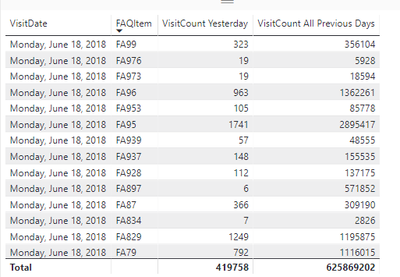
I am trying to create a metric TREND as a calculated column so i can create a filter later from it. It works well as a measure, but no filter can be created from it. To calculate TREND i am using two calculated columns VisitCount Yesterday and VisitCount All Previous Days (sum of all visits from the start date)


TREND = VisitCount Yesterday / VisitCount All previous days


VisitCount Yesterday = 
CALCULATE ( SUMX('Table(2)'[Visits]), 'Table(2)'[VisitDate] >= TODAY()-1 )

VisitCount All previous days =
CALCULATE( SUMX('Table(2)','Table(2)'[Visits]) , ALLEXCEPT('Table(2)', 'Table(2)'[FaId]))

Trend ='Table(2)'[VisitCount Yesterday]/'Table(2)'[VisitCount All Previous Days]

Calculated columns are ok, but when divided, I got an error of Circular dependency:


 2.png

 1.png


Do you have any idea how to solve it?

1 ACCEPTED SOLUTION

Thanks, Prateek!


I realise that this problem is solved by creating calculated table (including only yesterday values) to avoid having emtpy rows. Apparently they were the sourcse of circular dependency. It works well now. Thanks 🙂

View solution in original post

2 REPLIES 2
prateekraina
Memorable Member
Memorable Member

Hi @Boja,


Please go thorugh this article which explains why Circular Dependency occurs and how you should avoid it.


Prateek Raina

Thanks, Prateek!


I realise that this problem is solved by creating calculated table (including only yesterday values) to avoid having emtpy rows. Apparently they were the sourcse of circular dependency. It works well now. Thanks 🙂

Helpful resources

Announcements
Power BI DataViz World Championships

Power BI Dataviz World Championships

The Power BI Data Visualization World Championships is back! It's time to submit your entry.

January Power BI Update Carousel

Power BI Monthly Update - January 2026

Check out the January 2026 Power BI update to learn about new features.

FabCon Atlanta 2026 carousel

FabCon Atlanta 2026

Join us at FabCon Atlanta, March 16-20, for the ultimate Fabric, Power BI, AI and SQL community-led event. Save $200 with code FABCOMM.