cancel
Showing results for 
Search instead for 
Did you mean: 

July 7 - July 17 | Round 2 of the Power BI Dataviz World Championships. Don't miss your chance! Learn more

Reply
QMYork
Regular Visitor

Build Visuals

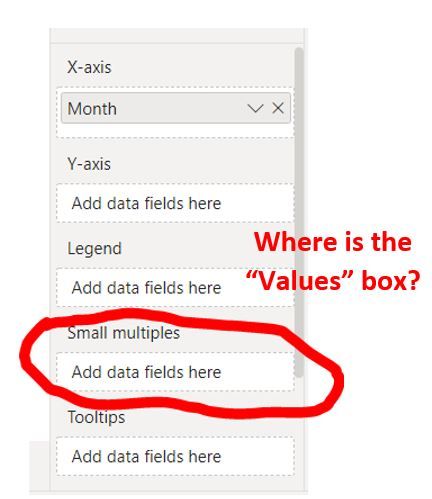
I need some help! When I go to build my visual in PBI the "Values" box is missing. Small multiples has taken its place. How can I get "Values" back" so I can build my visuals? I am sure it is an easy xfix but I am VERY frustrated!Missing Values.JPG

1 ACCEPTED SOLUTION
KerKol
Power Participant
Power Participant

I believe the Values box has been renamed to be the Y-Axis


Did I answer your question? Mark my post as a solution!

Proud to be a Super User!


View solution in original post

5 REPLIES 5
QMYork
Regular Visitor

Thanks for your reply. 

You're right - It seems that the "Values" has been replaced by the "Y-Axis".  It makes sense, really since in vertical graphs the values you are interested in a described or measured on the Y axis. This seems to be a recent change.  I wish Msft had some sort of pop-up or additional description that indicated next to "Y-Axis" that is was alled "Values".   For horizontal graphs things are just reveresed - the detail you are measuring in (formerly "Values") would now be the 'X-Axis". 

Anonymous
Not applicable

Hi @QMYork ,

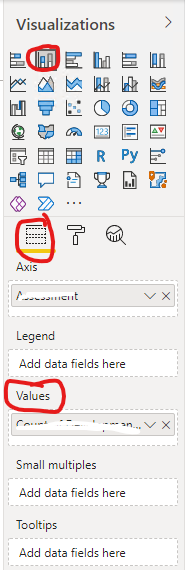
May I ask what type of visual you are using? You seem to be using the new Format pane, where the Y axis option corresponds to the original Values option.

Old Format paneOld Format pane

New Format paneNew Format pane

Best Regards

I seems I am using the new format pane.  I am not sure how I switched - perhaps a product update?  I just turned it one day and the format pane had changed.  I do see now that the "Y-Axis" serves as the "Values" feature did in the past.  I understand why that works as well; it makes sense. 

I would hope that changes like this would be supported with some type of "screen tip" or "tool tip" to illuminate this to the novice user like me.

Anonymous
Not applicable

Hi @QMYork ,

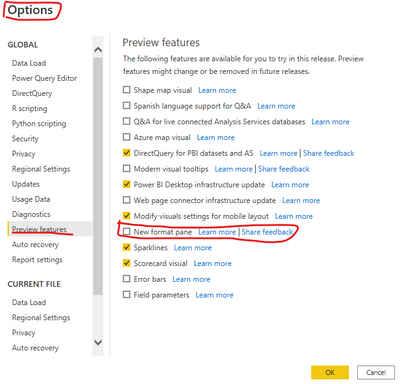
You can select File > Options and settings > Options to open Options page, uncheck the option "New format pane" under the Preview features tab to revert back to old format pane...

yingyinr_0-1653445147456.png

And you can get more details about New format pane in the following official documentation.

The new Format pane in Power BI Desktop (preview)

Best Regards

KerKol
Power Participant
Power Participant

I believe the Values box has been renamed to be the Y-Axis


Did I answer your question? Mark my post as a solution!

Proud to be a Super User!


Helpful resources

Announcements
FabCon and SQLCon Barcelona 2026

FabCon & SQLCon – Barcelona 2026

Join us in Barcelona for FabCon and SQLCon, the Fabric, Power BI, SQL, and AI community event. Save €200 with code FABCMTY200.

60 days of Data Days Carousel

Data Days 2026

Join Data Days 2026: 60 days of free live/on-demand sessions, challenges, study groups, and certification opportunities.

Power BI DataViz World Championships carousel

Power BI DataViz World Championships - June 2026

A new Power BI DataViz World Championship is coming this June! Don't miss out on submitting your entry.

Top Solution Authors