Join us at FabCon Atlanta from March 16 - 20, 2026, for the ultimate Fabric, Power BI, AI and SQL community-led event. Save $200 with code FABCOMM.
Register now!The Power BI Data Visualization World Championships is back! Get ahead of the game and start preparing now! Learn more
Hey, everyone.
I'm having a problem with Calculate and Variables.
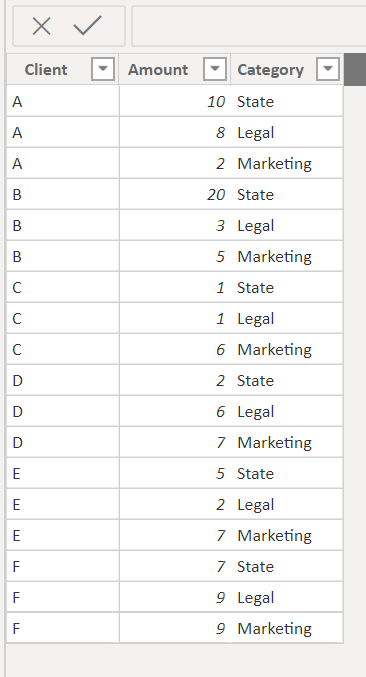
This is the data I generated for the Proof of Concept
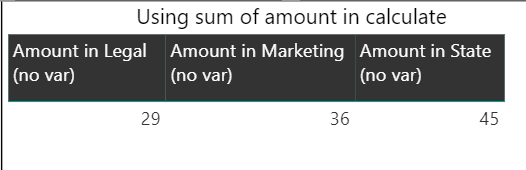
I'm trying to obtain the sum of amount in each category, which is fairly easy using calculate such as:
Amount in Legal (no var) =
CALCULATE(SUM('Planilha1 (2)'[Amount]);FILTER('Planilha1 (2)';'Planilha1 (2)'[Category] = "Legal"))Result:
I can do this for each one and it would work.
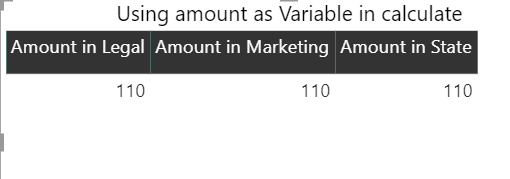
The problem is when I try to use amount as a variable:
Amount in Legal =
var amount = SUM('Planilha1 (2)'[Amount])
return
CALCULATE(amount;FILTER('Planilha1 (2)';'Planilha1 (2)'[Category] = "Legal"))Result:
This is only a silly example, but it has affected me because I like to use lots of variables to keep the code organized and I have about 100 measures in each report.
If someone else has encountered this problem let me know. I'm also uploading this to Power BI Issues.
I can upload my pbix example for anyone who asks me.
Thanks,
Bruno Rodrigues.
Solved! Go to Solution.
@Anonymous -
I might have chosen a different method that you may find useful based off of what you've shown:
Measure =
IF (
ISFILTERED ( Planiha1[Client] ),
SUM ( Planiha1[Amount] ),
CALCULATE (
SUM ( Planiha1[Amount] ),
ALLEXCEPT ( Planiha1, Planiha1[Category] )
)
)Proud to be a Super User!
@Anonymous -
I might have chosen a different method that you may find useful based off of what you've shown:
Measure =
IF (
ISFILTERED ( Planiha1[Client] ),
SUM ( Planiha1[Amount] ),
CALCULATE (
SUM ( Planiha1[Amount] ),
ALLEXCEPT ( Planiha1, Planiha1[Category] )
)
)Proud to be a Super User!
The problem is that variables are evaluated in the context they are initialized, not when they are used. In your example "amount" was already computed before it was used in your calculate function, so it returned the total of the "'Planilha1 (2)'[Amount]" column. ok?
Check out the November 2025 Power BI update to learn about new features.
Advance your Data & AI career with 50 days of live learning, contests, hands-on challenges, study groups & certifications and more!
| User | Count |
|---|---|
| 57 | |
| 43 | |
| 41 | |
| 21 | |
| 17 |
| User | Count |
|---|---|
| 183 | |
| 114 | |
| 93 | |
| 62 | |
| 45 |