Hi all,
I just started with Power BI and did some basic courses to create measures and dashboard and I'm helping a friend now to create a dashboard. He's working in the concrete business and having budget prices on a different hierarchy. I just created this test file to explain the issue:
https://1drv.ms/u/s!Au2iuCVIX0mrgbE6BaK-Z4RX6H_ScA?e=YwBXNj
So these are the data tables I'm using (of course with a datetable):

So he sells items to his customer, but the budgetprices are on productgroup level. I've created the next measure to calculate the Budget Revenue:
Budget Revenue = SUMX(fOrder;fOrder[QtyOrdered]*RELATED(dProductTable[Weight in kg])*MAX(fBudget[Budget Price per kg]))
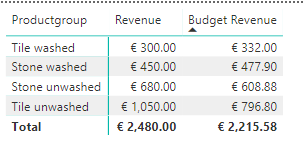
Which returns the next values:
The total should be €2.215,58 instead of €3.506 and it is taking the budgetprice of the highest year. Hopefully anyone can help and don't hesitate to contact for more details, if my question isn't clear.
Thanks for any feedback!