cancel
Showing results for 
Search instead for 
Did you mean: 

Learn from the best! Meet the four finalists headed to the FINALS of the Power BI Dataviz World Championships! Register now

Reply
netanel
Post Prodigy
Post Prodigy

Bridge

Hi All,


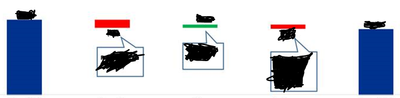
I'm trying to work on Visual from the Bridge configuration like that (see below)


Waterfall Chart is not good for me.


You have any Suggestions?
Capture.PNG


Did I answer your question?
Mark my post as a solution!
Appreciate your Kudos!

Connect on Linkedin
linkedin.com/in/netanel-shriki
3 REPLIES 3
dax
Community Support
Community Support

Hi @netanel , 

I am not clear about your requirement, so if possible could you please inform me more detailed information(such as your expected output and your sample data)? Then I will help you more correctly.

Please do mask sensitive data before uploading.

Thanks for your understanding and support.
Best Regards,
Zoe Zhi

If this post helps, then please consider Accept it as the solution to help the other members find it more quickly.

For example, opening year 2018 = 100, change in price = 20, change in quantity = (30), change in quality = 20, total 2019 = 110

I am looking for a graph in the Bridge configuration that reflected the ups and downs when there is a start and end.
As with any analytics you can find anywhere.


Thank you!


Did I answer your question?
Mark my post as a solution!
Appreciate your Kudos!

Connect on Linkedin
linkedin.com/in/netanel-shriki
dax
Community Support
Community Support

Hi @netanel , 

As I know, there is no built-in chart like your chart. I think you might need to use custom chart to see whether it work or not ,, or if you are professional in R, you also could create visual by R.

By the way, you also could inform me more detailed information (such as your sample data and your expected output). And If you want to how the trend of value, I think you could try to create a date column, then you could calculate cumulative value and show this in chart which will show the trend.

Best Regards,
Zoe Zhi

If this post helps, then please consider Accept it as the solution to help the other members find it more quickly.


Helpful resources

Announcements
Join our Fabric User Panel

Join our Fabric User Panel

Share feedback directly with Fabric product managers, participate in targeted research studies and influence the Fabric roadmap.

February Power BI Update Carousel

Power BI Monthly Update - February 2026

Check out the February 2026 Power BI update to learn about new features.

FabCon Atlanta 2026 carousel

FabCon Atlanta 2026

Join us at FabCon Atlanta, March 16-20, for the ultimate Fabric, Power BI, AI and SQL community-led event. Save $200 with code FABCOMM.