FabCon is coming to Atlanta
Join us at FabCon Atlanta from March 16 - 20, 2026, for the ultimate Fabric, Power BI, AI and SQL community-led event. Save $200 with code FABCOMM.
Register now!- Power BI forums
- Get Help with Power BI
- Desktop
- Service
- Report Server
- Power Query
- Mobile Apps
- Developer
- DAX Commands and Tips
- Custom Visuals Development Discussion
- Health and Life Sciences
- Power BI Spanish forums
- Translated Spanish Desktop
- Training and Consulting
- Instructor Led Training
- Dashboard in a Day for Women, by Women
- Galleries
- Data Stories Gallery
- Themes Gallery
- Contests Gallery
- QuickViz Gallery
- Quick Measures Gallery
- Visual Calculations Gallery
- Notebook Gallery
- Translytical Task Flow Gallery
- TMDL Gallery
- R Script Showcase
- Webinars and Video Gallery
- Ideas
- Custom Visuals Ideas (read-only)
- Issues
- Issues
- Events
- Upcoming Events
The Power BI Data Visualization World Championships is back! Get ahead of the game and start preparing now! Learn more
- Power BI forums
- Forums
- Get Help with Power BI
- Desktop
- Re: Breaking down the normal distribution by attri...
- Subscribe to RSS Feed
- Mark Topic as New
- Mark Topic as Read
- Float this Topic for Current User
- Bookmark
- Subscribe
- Printer Friendly Page

- Mark as New
- Bookmark
- Subscribe
- Mute
- Subscribe to RSS Feed
- Permalink
- Report Inappropriate Content
Breaking down the normal distribution by attributes
Hey,
We have just conducted a survey and I'm looking to understand if the respondents who answered the survey are representitive of our population as a whole. Mainly, are we getting the same proportion of learner in our sample as in the population at large
I want to conduct a two tailed Significance Test for a Proportion. I have started by looking to lift the Norm.Dist() formula from Excel.. but I can't get it to break down by sector
for the left tailed hypothesis
But when drop this measure in a table, all sectors return the same result.
Any ideas?
Solved! Go to Solution.


- Mark as New
- Bookmark
- Subscribe
- Mute
- Subscribe to RSS Feed
- Permalink
- Report Inappropriate Content
Hi @Anonymous ,
First of all, your model relationship may be a bit problematic, it should be like this:
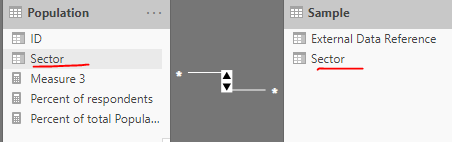
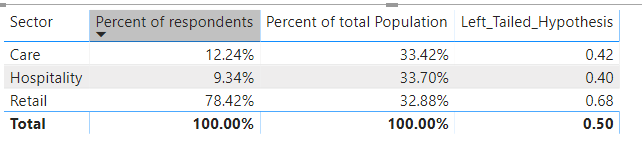
Secondly, the results returned by your two percentage measures may have problems, please refer to the following formula:
Percent of respondents =
VAR x =
CALCULATE(
    DISTINCTCOUNT('Sample'[External Data Reference]),
    ALLEXCEPT(
        'Sample',
        'Sample'[Sector]
    )
)
VAR y =
CALCULATE(
    DISTINCTCOUNT('Sample'[External Data Reference]),
    ALL('Sample')
)
RETURN
DIVIDE(
    x,
    y,
    BLANK()
)

Percent of total Population =
VAR x =
CALCULATE(
    DISTINCTCOUNT(Population[ID]),
    ALLEXCEPT(
        'Population',
        'Population'[Sector]
    )
)
VAR y =
CALCULATE(
    DISTINCTCOUNT(Population[ID]),
    ALLSELECTED('Sample'[Sector])
)
RETURN
 DIVIDE(
    x,
    y,
    BLANK()
)
Left_Tailed_Hypothesis =
NORM.DIST(
[Percent of respondents],
[Percent of total Population],
1,
TRUE()
)
Best regards,
Lionel Chen
If this post helps, then please consider Accept it as the solution to help the other members find it more quickly.
- Mark as New
- Bookmark
- Subscribe
- Mute
- Subscribe to RSS Feed
- Permalink
- Report Inappropriate Content
Hi @Anonymous ,
As @sturlaws said, we may need the formulas of [Percentage of respondents by sector] and [Percentage in population by sector] to research the problem.
Best regards,
Lionel Chen
If this post helps, then please consider Accept it as the solution to help the other members find it more quickly.


- Mark as New
- Bookmark
- Subscribe
- Mute
- Subscribe to RSS Feed
- Permalink
- Report Inappropriate Content
Hi, @Anonymous
I assume [Percentage of respondents by sector] and [Percentage in population by sector] are measures. Could provide a screeen shot of a table visual with the sectors on the rows, with the measures and the norm distribution as values?
What are you do want to achieve with the ALLSELECTED-statement? The ALLSELECTED is a tricky function, and sometimes yields unexpected results.
Cheers,
Sturla
- Mark as New
- Bookmark
- Subscribe
- Mute
- Subscribe to RSS Feed
- Permalink
- Report Inappropriate Content
hey @sturlaws ,
thanks for the response and your help, the [Percentage of...] are measures and yes I am using an ALLSELECTED(). I have posted the formulas and table below

- Mark as New
- Bookmark
- Subscribe
- Mute
- Subscribe to RSS Feed
- Permalink
- Report Inappropriate Content
Sorry, really bad spelling on my behalf in my previous post. What I meant to ask was, why have you included ALLSELECTED in your measures?
I created a sample report, and I can't replicate the behaviour you are experiencing. Could you share your report, or create sample report where you reproduce the behaviour you are experiencing?
Cheers,
Sturla
- Mark as New
- Bookmark
- Subscribe
- Mute
- Subscribe to RSS Feed
- Permalink
- Report Inappropriate Content
Hey @sturlaws ,
I was using the ALLSELECT() to gain a dynamic percentage of total.
I've created a dummy replicar in the PBI file where I am still experiencing the same issue :(... can't seem to figure out how to attach it to the thred though?
Thanks again!
Polly
- Mark as New
- Bookmark
- Subscribe
- Mute
- Subscribe to RSS Feed
- Permalink
- Report Inappropriate Content
- Mark as New
- Bookmark
- Subscribe
- Mute
- Subscribe to RSS Feed
- Permalink
- Report Inappropriate Content
Hi @sturlaws ,
Ah i see, here you go go https://www.dropbox.com/s/chdqh4454426nvt/Normal%20Distribution.pbix?dl=0
Thanks,
Polly
- Mark as New
- Bookmark
- Subscribe
- Mute
- Subscribe to RSS Feed
- Permalink
- Report Inappropriate Content
Great.
If you don't have it already in your report, create a section-table/dimension, and change you measures to this:
Percentage of respondents =
DIVIDE (
    [Number respondents];
    CALCULATE ( [Number respondents]; ALL ( 'dimSector' ) )
)
And as @v-lionel-msft mentions, the value you are using for standard deviation does not make any sense. I can't really see how you should calculate the standard deviation the way you are trying to do. I am not that experienced in statistics, but is perhaps the chi-square test is more appropriate?
Cheers,
Sturla
- Mark as New
- Bookmark
- Subscribe
- Mute
- Subscribe to RSS Feed
- Permalink
- Report Inappropriate Content
Hi @Anonymous ,
First of all, your model relationship may be a bit problematic, it should be like this:
Secondly, the results returned by your two percentage measures may have problems, please refer to the following formula:
Percent of respondents =
VAR x =
CALCULATE(
    DISTINCTCOUNT('Sample'[External Data Reference]),
    ALLEXCEPT(
        'Sample',
        'Sample'[Sector]
    )
)
VAR y =
CALCULATE(
    DISTINCTCOUNT('Sample'[External Data Reference]),
    ALL('Sample')
)
RETURN
DIVIDE(
    x,
    y,
    BLANK()
)

Percent of total Population =
VAR x =
CALCULATE(
    DISTINCTCOUNT(Population[ID]),
    ALLEXCEPT(
        'Population',
        'Population'[Sector]
    )
)
VAR y =
CALCULATE(
    DISTINCTCOUNT(Population[ID]),
    ALLSELECTED('Sample'[Sector])
)
RETURN
 DIVIDE(
    x,
    y,
    BLANK()
)
Left_Tailed_Hypothesis =
NORM.DIST(
[Percent of respondents],
[Percent of total Population],
1,
TRUE()
)Best regards,
Lionel Chen
If this post helps, then please consider Accept it as the solution to help the other members find it more quickly.
Helpful resources

Power BI Dataviz World Championships
The Power BI Data Visualization World Championships is back! Get ahead of the game and start preparing now!

Power BI Monthly Update - December 2025
Check out the December 2025 Power BI Holiday Recap!

FabCon Atlanta 2026
Join us at FabCon Atlanta, March 16-20, for the ultimate Fabric, Power BI, AI and SQL community-led event. Save $200 with code FABCOMM.

| User | Count |
|---|---|
| 39 | |
| 38 | |
| 38 | |
| 28 | |
| 27 |


| User | Count |
|---|---|
| 124 | |
| 88 | |
| 73 | |
| 66 | |
| 65 |


