cancel
Showing results for 
Search instead for 
Did you mean: 

The Power BI Data Visualization World Championships is back! Get ahead of the game and start preparing now! Learn more

Reply
Chapin4u
Microsoft Employee
Microsoft Employee

Bookmarks options

Hi, I have become a big fan and user bookmarks for my Power BI but I would like to know more about the options after Delete, when to leave it to check and when to uncheck them? Thanks in advance for any help in my inquiry. 2018-07-28_4-53-46.jpg


1 ACCEPTED SOLUTION

Here is an article that has a lot about how they used bookmarking:

https://powerbi.microsoft.com/en-us/blog/building-our-report-on-the-opioid-crisis-for-the-gartner-ba...


There are also lots of videos on it:

https://www.bing.com/videos/search?q=power+bi+bookmarks&qpvt=power+bi+bookmarks&FORM=VDRE


In short though, Data is going to preserve slicer and filter selections.

Display will preserve spotlighting and whether or not visuals are visible or not

Page will take the user to the specified page that is visible at the time of the bookmark


It's a lot of trial and error to get the specific effects that you want. For example, I have never had a reason to not check Page. But, you might want to uncheck Data if you want to spotlight and hide certain visuals but want the user's slicer and filter selections to be preserved when you do so.


Follow on LinkedIn
@ me in replies or I'll lose your thread!!!
Instead of a Kudo, please vote for this idea
Become an expert!: Enterprise DNA
External Tools: MSHGQM
YouTube Channel!: Microsoft Hates Greg
Latest book!:
DAX For Humans

DAX is easy, CALCULATE makes DAX hard...

View solution in original post

5 REPLIES 5
Greg_Deckler
Community Champion
Community Champion

From: 

https://community.powerbi.com/t5/Desktop/Bookmarks-options/m-p/474349


"You can also select whether each bookmark will apply data properties, such as filters and slicers, the display properties such as spotlight and its visibility, and page changes that presents the page that was visible when the bookmark was added. These capabilities are useful when you use bookmarks to switch between visual types - in which case you would likely want to turn data properties off, so filters aren't reset as users change visual types."


Emphasis added.


Follow on LinkedIn
@ me in replies or I'll lose your thread!!!
Instead of a Kudo, please vote for this idea
Become an expert!: Enterprise DNA
External Tools: MSHGQM
YouTube Channel!: Microsoft Hates Greg
Latest book!:
DAX For Humans

DAX is easy, CALCULATE makes DAX hard...

Thanks, Greg, were can read more about these checked marked options or is just a trial and error experience?

Here is an article that has a lot about how they used bookmarking:

https://powerbi.microsoft.com/en-us/blog/building-our-report-on-the-opioid-crisis-for-the-gartner-ba...


There are also lots of videos on it:

https://www.bing.com/videos/search?q=power+bi+bookmarks&qpvt=power+bi+bookmarks&FORM=VDRE


In short though, Data is going to preserve slicer and filter selections.

Display will preserve spotlighting and whether or not visuals are visible or not

Page will take the user to the specified page that is visible at the time of the bookmark


It's a lot of trial and error to get the specific effects that you want. For example, I have never had a reason to not check Page. But, you might want to uncheck Data if you want to spotlight and hide certain visuals but want the user's slicer and filter selections to be preserved when you do so.


Follow on LinkedIn
@ me in replies or I'll lose your thread!!!
Instead of a Kudo, please vote for this idea
Become an expert!: Enterprise DNA
External Tools: MSHGQM
YouTube Channel!: Microsoft Hates Greg
Latest book!:
DAX For Humans

DAX is easy, CALCULATE makes DAX hard...
Anonymous
Not applicable

Hi @Greg_Deckler,


I'm just tagging onto the end of this as it's related to what I'm trying to do.


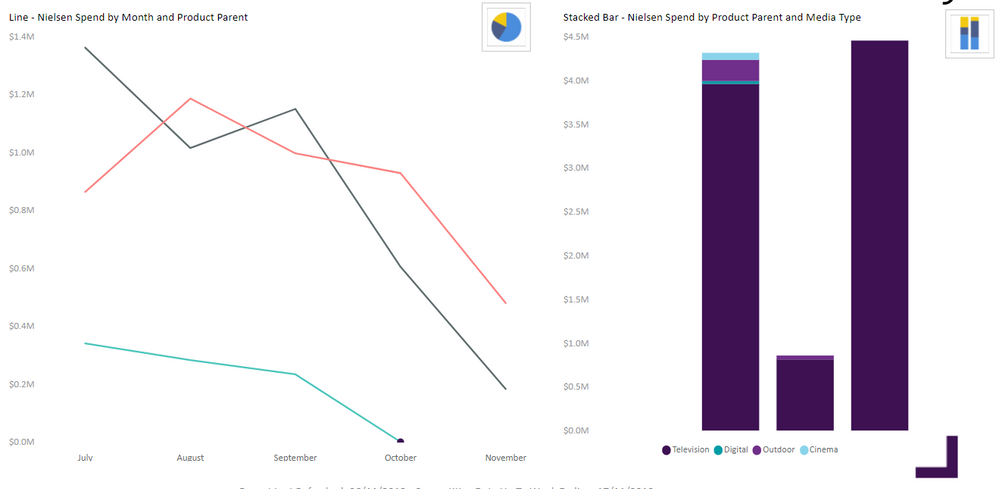
I have one page with 2 charts on it. I want to set up a small button/icon next to each chart that will allow me to show the data in a different chart type. I've added some images to illustrate what I'm looking to do:


01.PNG


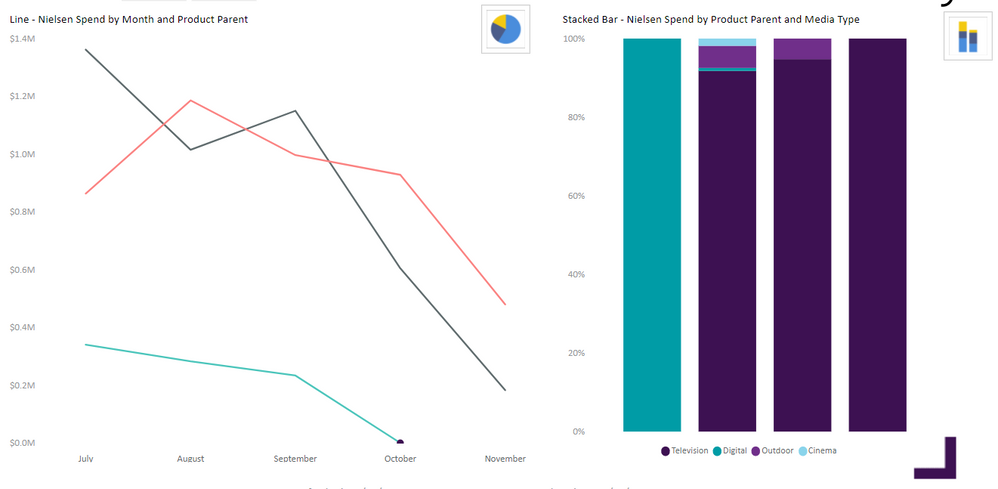
This would be my default view. If I click on the icon to the top right of the stacked bar chart I want it to change to a 100% stacked and leave the line chart intact, like this:


02.PNG


There's also an icon at the top right of the line chart that I would like to use to amend it. So in the following image I've swapped around both charts:


03.PNG


I wonder if there's any combination of bookmark options I could use to achieve this? Data would be deselected, but if I deselected Current Page and All Visuals, would that work? What happens when you deselect All Visuals?


Any suggestions?

Anonymous
Not applicable

@Greg_Deckler I was able to get the answer I needed from the following YouTube clip:


https://www.youtube.com/watch?v=cserABSnXzk


Which was posted on the following thread:


https://community.powerbi.com/t5/Desktop/Bookmark-property-quot-Selected-Visuals-quot-vs-quot-All-Vi...


Thanks,

MarkJames

Helpful resources

Announcements
Power BI DataViz World Championships

Power BI Dataviz World Championships

The Power BI Data Visualization World Championships is back! Get ahead of the game and start preparing now!

December 2025 Power BI Update Carousel

Power BI Monthly Update - December 2025

Check out the December 2025 Power BI Holiday Recap!

FabCon Atlanta 2026 carousel

FabCon Atlanta 2026

Join us at FabCon Atlanta, March 16-20, for the ultimate Fabric, Power BI, AI and SQL community-led event. Save $200 with code FABCOMM.