cancel
Showing results for 
Search instead for 
Did you mean: 

The Power BI Data Visualization World Championships is back! Get ahead of the game and start preparing now! Learn more

Reply
sd782
Frequent Visitor

Blank value appears on Slicer visual for Dimension when i connect to Fact table

Hi All,


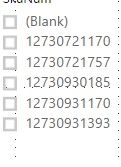
I see a blank value appear on the slicer from a dimension column (i manually created the Dimension table) only when i connect it to the fact table in the data model.
This is causing an issue in my measure on the Fact table. Is there a reason for the Blank to appear on my slicer ?

How can i avoid it ?


blank_on_slicer.jpg


Thank you.


1 ACCEPTED SOLUTION
Bordalos
Helper I
Helper I

@sd782 it might be because you have values in your fact table thar are not in the slicer. 


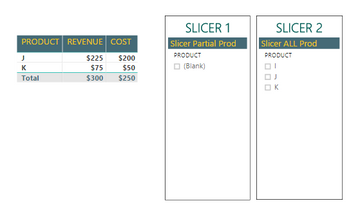
See the following example.

  • Fact table has 10 procucts A-K (excluding I by purpose)  
  • Slicer 1  has 8 Prod: A-H
  • Slicer 2 has 11 Prod: A-K ( including I ) 

 Slicer Image PBI Community.PNG

As J and K are not  on Slicer 1 it is automatically showing a blank. It doesnt happen for Slicer 2 as it includes all the Prod. in fact table.

In this situation you need to be careful if you filter the visualization or page by removing the blank because it will "remove" J and K from the table.

Slicer Image PBI Community2.PNG

View solution in original post

4 REPLIES 4
Bordalos
Helper I
Helper I

@sd782 it might be because you have values in your fact table thar are not in the slicer. 


See the following example.

  • Fact table has 10 procucts A-K (excluding I by purpose)  
  • Slicer 1  has 8 Prod: A-H
  • Slicer 2 has 11 Prod: A-K ( including I ) 

 Slicer Image PBI Community.PNG

As J and K are not  on Slicer 1 it is automatically showing a blank. It doesnt happen for Slicer 2 as it includes all the Prod. in fact table.

In this situation you need to be careful if you filter the visualization or page by removing the blank because it will "remove" J and K from the table.

Slicer Image PBI Community2.PNG

@BordalosThank you for your inputs. I was able recreate and verify what you said.

Can you create another product table with just those products and use that for slicer 1 and use the base table for slicer 2?  


What about using a page level filter for products marking it as is not blank?

SivaMani
Resident Rockstar
Resident Rockstar

@sd782,


Could you please share sample data? 

Helpful resources

Announcements
Power BI DataViz World Championships

Power BI Dataviz World Championships

The Power BI Data Visualization World Championships is back! Get ahead of the game and start preparing now!

December 2025 Power BI Update Carousel

Power BI Monthly Update - December 2025

Check out the December 2025 Power BI Holiday Recap!

FabCon Atlanta 2026 carousel

FabCon Atlanta 2026

Join us at FabCon Atlanta, March 16-20, for the ultimate Fabric, Power BI, AI and SQL community-led event. Save $200 with code FABCOMM.