Join us at FabCon Atlanta from March 16 - 20, 2026, for the ultimate Fabric, Power BI, AI and SQL community-led event. Save $200 with code FABCOMM.
Register now!The Power BI Data Visualization World Championships is back! Get ahead of the game and start preparing now! Learn more
Hi everybody
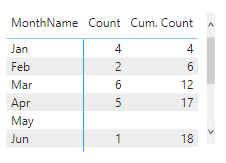
I am trying to do a YTD calculation, the measure works well till it find a blank count in a date. The key points are:
Measure
**bleep**. Count =
Thanks a lot.
Solved! Go to Solution.
@Anonymous , check one more thing. Join is single directional
If this does not help
Can you share a sample pbix after removing sensitive data.
@Anonymous , the month name in the visual is coming from the date table? if not then its should come from that. Also, make sure you marked the date table as date table
Why Time Intelligence Fails - Powerbi 5 Savior Steps for TI :https://youtu.be/OBf0rjpp5Hw
https://amitchandak.medium.com/power-bi-5-key-points-to-make-time-intelligence-successful-bd52912a5bd4
Hi @amitchandak yes the month comes from the Date Table and the table is marked as date table
Hi @amitchandak thanks a lot, the Cross Filter Direction of the relation was set to both I changed to single and it solved my problem.
@Anonymous , Good it get solved.
There can 6 reasons - Listed in this blog-https://amitchandak.medium.com/power-bi-5-key-points-to-make-time-intelligence-successful-bd52912a5bd4
Use Date Table (Join with Fact Date)
The date table is marked as a date table
Use columns from the date table
The date does not have a timestamp
The date table has all dates
Other than these, bidirectional join with date table can also cause failure, because this can filter dates on date table and we might lose continuous dates.
The Power BI Data Visualization World Championships is back! Get ahead of the game and start preparing now!
| User | Count |
|---|---|
| 38 | |
| 36 | |
| 33 | |
| 30 | |
| 28 |
| User | Count |
|---|---|
| 128 | |
| 88 | |
| 79 | |
| 67 | |
| 62 |