cancel
Showing results for 
Search instead for 
Did you mean: 

Learn from the best! Meet the four finalists headed to the FINALS of the Power BI Dataviz World Championships! Register now

Reply
MHTANK
Helper III
Helper III

Blank Rows showing

DataData

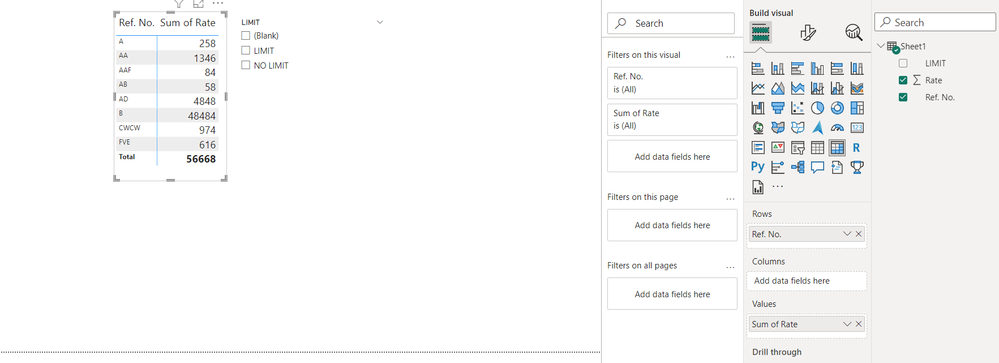
This is my Data.

report blank.png

I make this matrix in power bi.

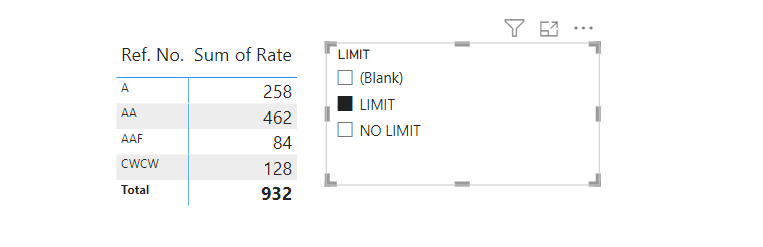
If i select any option from slicer like 'LIMIT' it gives me this(below) result

result blank.png

Some Ref. No. are disappear beacause there is no define "LIMIT or NO LIMIT".

But I want blank row also like this ⬇️

wish blank.png

Please suggest me how bring the solution.

2 REPLIES 2
Anonymous
Not applicable

Hi @MHTANK ,


According to your description, here are my steps you can follow as a solution.

(1) My test data is the same as yours.

(2) We can create a table and a measure.

Table 2 = {"LIMIT","NO LIMIT",BLANK()}
Total = CALCULATE (
    SUM ( 'Table'[Rate] ),
    FILTER (
        'Table',
        [LIMIT] IN SELECTCOLUMNS ( 'Table 2', "Limit", 'Table 2'[Limit] )
    )
)

(3) Then the result is as follows.
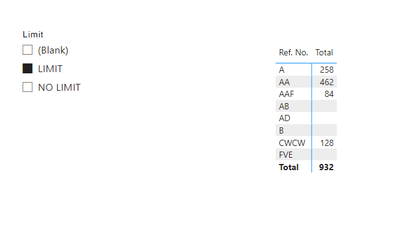
vtangjiemsft_0-1685004341124.png


If the above one can't help you get the desired result, please provide some sample data in your tables (exclude sensitive data) with Text format and your expected result with backend logic and special examples. It is better if you can share a simplified pbix file. Thank you.


Best Regards,

Neeko Tang

If this post  helps, then please consider Accept it as the solution  to help the other members find it more quickly. 

Ahmedx
Super User
Super User

you need to write measure like this

SUMofRate = SUM('Sheet1'[Rate])&""


Helpful resources

Announcements
Join our Fabric User Panel

Join our Fabric User Panel

Share feedback directly with Fabric product managers, participate in targeted research studies and influence the Fabric roadmap.

March Power BI Update Carousel

Power BI Community Update - March 2026

Check out the March 2026 Power BI update to learn about new features.