
Join us at FabCon Atlanta from March 16 - 20, 2026, for the ultimate Fabric, Power BI, AI and SQL community-led event. Save $200 with code FABCOMM.
Register now!The Power BI Data Visualization World Championships is back! It's time to submit your entry. Live now!
I was able to create an hierarchy following this guide: Parent-child hierarchies – DAX Patterns
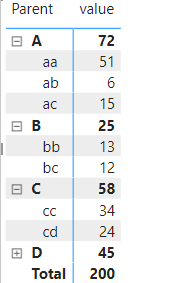
Please see the image below:
What happens here is that the Parent shows the accumulated values. Which is exactly what i want. BUT in some cases
the parent also has values.
Thus power Bi creates an blank row with its values.
This is the code ive got - that creates the level.
Level1 =
VAR LevelNumber = 1
VAR LevelKey = PATHITEM ( stats[path], LevelNumber, INTEGER )
VAR LevelName = LOOKUPVALUE ( stats[name], Stats[ID], LevelKey )
VAR Result = LevelName
RETURN
Result
Ive tried to create some sort of IF statement - but did not succeed as im not familiar with DAX.
Hi, @Anonymous ;
Hi, @Anonymous ;
I am not very clear about your collective needs. I have carefully checked your link and created a simple case. If you use the parent-child structure, you can directly use the matrix;
Maybe you can correct my understanding, you can share a simple example and hopefully the output?
Looking forwarding to your reply!
Best Regards,
Community Support Team_ Yalan Wu
If this post helps, then please consider Accept it as the solution to help the other members find it more quickly.
@Anonymous , I think you should use isinscope
https://www.kasperonbi.com/use-isinscope-to-get-the-right-hierarchy-level-in-dax/
You can check value and isinscope
The Power BI Data Visualization World Championships is back! It's time to submit your entry.
Check out the January 2026 Power BI update to learn about new features.
| User | Count |
|---|---|
| 60 | |
| 49 | |
| 30 | |
| 25 | |
| 23 |
| User | Count |
|---|---|
| 128 | |
| 102 | |
| 57 | |
| 39 | |
| 31 |