cancel
Showing results for 
Search instead for 
Did you mean: 

Get Fabric Certified for FREE during Fabric Data Days. Don't miss your chance! Request now

Reply
d_rioux
Regular Visitor

Best approach for compiling week-based report

Hello:

I am looking for the simplest approach in Power BI to address a requirement to compile a week based report for a slicer-selectable reference week (and year) along with comparisons to the prior week and the same week last year, for example:


Reference Week Dates, Reference Week Sales, Reference Week Stock, Last Week Dates, Last Week Sales, Last Week Stock, Last Year Same Week Dates, Last Year Same Week Sales, Last Year Same Week Stock
19-dec-2016,635,2003,19-dec-2016,614,2003,21-dec-2015,631,1659
...data for 90 day period...
10-apr-2017,237,2003,10-apr-2017,214,2003,11-apr-2016,258,1677

It is simple enough to assign year and week numbers through a custom column and filter... but I am unsure about:

- dynamically filtering for the prior week and same week last year

- appending the reference week / last week / last year sets of columns side-by-side, aligned by relative dates rather than calendar dates to permit valid % change comparisons etc. in a table or chart


I have looked at the articles including Week-Based Time Intelligence in DAX, and Dynamic Column Calculations based on Slicers but while standard calendar-based filters are simple enough, this compilation of week-based periods of sums and calculations is eluding me in Power BI.  I could program something simply enough to put this together, but I would rather have something easily maintainable and modifiable.  


Any leads would be greatly appreciated.  Thanks in advance.  - David Rioux.


Also, the data are in a simple table:

Reference Week,Reservation Date,Location,Reserved,Available
21-nov-2016,21-nov-2016,Location1,133,236
21-nov-2016,22-nov-2016,Location1,125,236
...
21-nov-2016,20-mar-2017,Location1,0,236
21-nov-2016,21-nov-2016,Location2,59,64
...
1 ACCEPTED SOLUTION
Anonymous
Not applicable

Hi @d_rioux


I am assuming you have a Calendar Table created based on the Reservation dates


In the calendar table create a column

a) WeekNum=WEEKNUM(Calendar[Date])

b) WeekYearNumber=[WeekNum]*10000+[Year]

c) Create a measure SumReserved = Sum(FactTable[Reserved])

d) Create a measure LYReservedSameWeek =

                  Calculate([SumReserved ], Filter(ALL(Calendar),Calendar[YearWeek] = Max( Calendar[YearWeek]) -1 ))

e) Now create a table report and see the results.


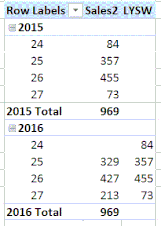
This should work. A screen shot of the approach in powerpivot.

.Capture.GIF


If this works for you please accept this as a solution and also give KUDOS.


Cheers


CheenuSing


View solution in original post

3 REPLIES 3
Anonymous
Not applicable

Hi @d_rioux,


CheenuSing's solution seems well. You can also try to use below method.


1. Write two measures to calculate the current year value and previous value.

2. Create a visual to drag Week number, current value, previous value.


Formula:

CurrentValue=
var currWeek=LastNoBlank(Table[Reference Week],[Reference Week])
var weeknumber=LEFT(currWeek,SEARCH("-",currWeek)-1)
return
SUMX(FILTER(ALL(Table), Year([Reservation Date])=Year(MAX([Reservation Date]))&&LEFT([Reference Week],SEARCH("-",[Reference Week])-1)=weeknumber),[Reserved])


PerviousValue=
var currWeek=LastNoBlank(Table[Reference Week],[Reference Week])
var weeknumber=LEFT(currWeek,SEARCH("-",currWeek)-1)
return
SUMX(FILTER(ALL(Table), Year([Reservation Date])=Year(MAX([Reservation Date]))-1&&LEFT([Reference Week],SEARCH("-",[Reference Week])-1)=weeknumber),[Reserved])


Regards,

Xiaoxin Sheng

Thanks to these postings which not only recommended an approach but provided simple solutions.  

The only aspect of the original (manual) reports not replicated here is aligning the reservations dates from reference week / same week last year / last week to the reference week's dates.  I have calculated offsets of the reservation dates from the reference week dates which would work, but date labels are still required and so the prior week measure picks up multiple dates for each offset number.  I will check with the report users to see if this is an issue, or if the slight shifts in week days between reference weeks and year are acceptable.  I may yet need to replicate the ISO Date calculations in another date table joined to the reservation dates to align weeks and years.  Thanks again for the help!


- David Rioux.

Anonymous
Not applicable

Hi @d_rioux


I am assuming you have a Calendar Table created based on the Reservation dates


In the calendar table create a column

a) WeekNum=WEEKNUM(Calendar[Date])

b) WeekYearNumber=[WeekNum]*10000+[Year]

c) Create a measure SumReserved = Sum(FactTable[Reserved])

d) Create a measure LYReservedSameWeek =

                  Calculate([SumReserved ], Filter(ALL(Calendar),Calendar[YearWeek] = Max( Calendar[YearWeek]) -1 ))

e) Now create a table report and see the results.


This should work. A screen shot of the approach in powerpivot.

.Capture.GIF


If this works for you please accept this as a solution and also give KUDOS.


Cheers


CheenuSing


Helpful resources

Announcements
November Power BI Update Carousel

Power BI Monthly Update - November 2025

Check out the November 2025 Power BI update to learn about new features.

Fabric Data Days Carousel

Fabric Data Days

Advance your Data & AI career with 50 days of live learning, contests, hands-on challenges, study groups & certifications and more!

FabCon Atlanta 2026 carousel

FabCon Atlanta 2026

Join us at FabCon Atlanta, March 16-20, for the ultimate Fabric, Power BI, AI and SQL community-led event. Save $200 with code FABCOMM.

Top Solution Authors
Top Kudoed Authors