Join us at FabCon Atlanta from March 16 - 20, 2026, for the ultimate Fabric, Power BI, AI and SQL community-led event. Save $200 with code FABCOMM.
Register now!The Power BI Data Visualization World Championships is back! Get ahead of the game and start preparing now! Learn more
Thanks for your patience with a beginner question. I'm creating a simple dashboard for email metrics. The data spans 2019-2020 YTD, and looks like this:
| Date | Delivered | Opens | Clicks |
| Thursday, January 24, 2019 | 4719 | 1752 | 229 |
| Thursday, April 23, 2020 | 4775 | 1844 | 233 |
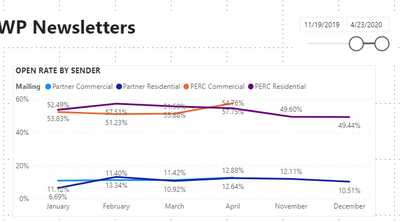
When you set the slider timeline to span the year, such as "12/1/2019 - 4/30/2020," the visual puts the December 2019 data to the right of the April 2020 data, as if it is ignoring the year. What did I do wrong?
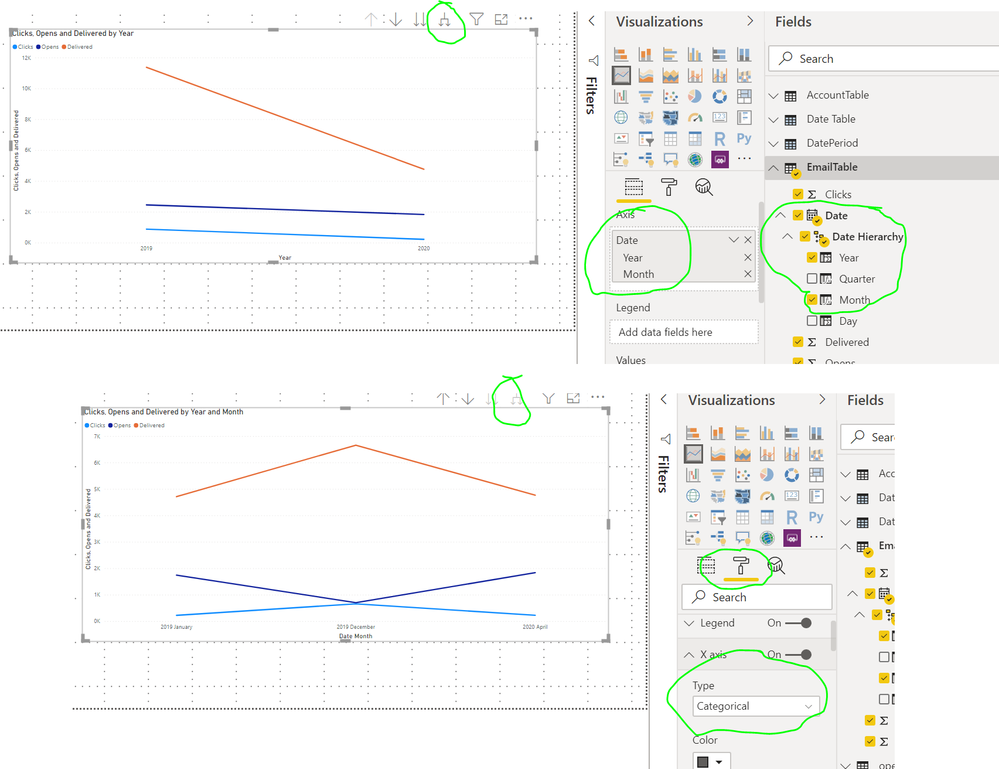
@Anonymous Please add the Year and Month both from the Date Hierachy to the X-axis of the visual. Then expand the hierachy using the tree option on the visual. Finally, set the X-Axis type to categorical. Image attached below showing these steps.
Thanks so much for your help!
Yes, let me try again. My data spans 1/1/19 - 4/30/20.
The graph is putting the Nov and Dec 2019 data to the right of Apr 2020. Why is this happening?
It looks like your visual is using a month column without using a year column too. I would suggest you add a Year column also the x axis. If you are using the default Date hierarchy, there should also be a Year column with each Date column. It is recommended to disable that feature and have a separate Date table. But in your case, you should just need to add a Year column also to X axis. Without it, it is agreggating all the Aprils, Novembers, etc. together for all years.
To learn more about Power BI, follow me on Twitter or subscribe on YouTube.
The Power BI Data Visualization World Championships is back! Get ahead of the game and start preparing now!
| User | Count |
|---|---|
| 38 | |
| 37 | |
| 33 | |
| 32 | |
| 29 |
| User | Count |
|---|---|
| 132 | |
| 88 | |
| 82 | |
| 68 | |
| 64 |