cancel
Showing results for 
Search instead for 
Did you mean: 

We've captured the moments from FabCon & SQLCon that everyone is talking about, and we are bringing them to the community, live and on-demand. Starts on April 14th. Register now

Reply
Anonymous
Not applicable

Basic Control Chart creation in Power BI

Hello,


I am new to Power BI and have some success with basic calculations and reports only with 2x Global Knowledge training classes and advice with others within this Power BI forum.


Laterly there been a request to produce a control chart using 2019 rejected results based on previous 2018 rejections.  Needless to say I can easily produce this type of request using excel and to be honest currently I am importing excel figures to achieve this request . 


I am just not satisfied having to use excel and would love to see a real solution in Power BI.


Below is a snapshot and example of data being used to product the control chart, Any advice & help would be greatly appreciated,


Kind regards,

Don


ControlChartExample.png


CLOSED_DATE   CHANGE_ID            ACTION    Year    Week

7/1/2019 13:16CRQ000000657520Approved201927
7/4/2018 6:44CRQ000000081596Approved201827
1/14/2019 2:17CRQ000000663989Approved20193
9/25/2018 8:15CRQ000000105257Approved201839
5/16/2018 14:14CRQ000000140710Approved201820
7/23/2018 15:49CRQ000000142235Approved201830
10/9/2018 12:17CRQ000000469675Approved201841
11/29/2018 9:07CRQ000000650609Approved201848
5/31/2018 13:47CRQ000000323110Rejected201822
1/20/2018 8:43CRQ000000342207Approved20183
6/5/2018 13:00CRQ000000346351Approved201823
3/16/2018 10:50CRQ000000350383Approved201811
5/18/2018 6:54CRQ000000346903Approved201820
2/19/2018 13:33CRQ000000351456Approved20188
11/30/2018 21:16CRQ000000375003Approved201848
8/10/2018 14:19CRQ000000386243Approved201832
5/24/2018 16:06CRQ000000394727Approved201821
3/8/2018 6:44CRQ000000403527Rejected201810
6/21/2018 15:06CRQ000000403227Approved201825
1 ACCEPTED SOLUTION
v-juanli-msft
Community Support
Community Support

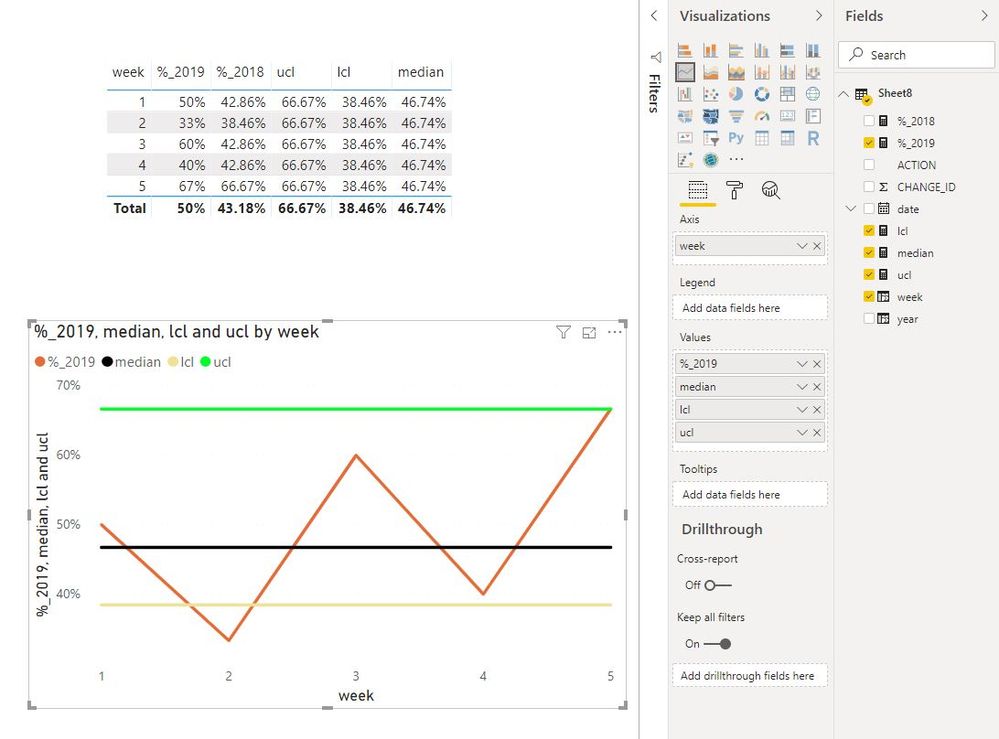
Hi @Anonymous 

I find a similar thread of yours and replied there.

https://community.powerbi.com/t5/Desktop/Control-Chart-UCL-LCL-of-Rejected-Category/td-p/812867

Please check if my understanding is correct, if it doesn't solve your problem, please let me know.


Capture16.JPG

Best Regards
Maggie
Community Support Team _ Maggie Li
If this post helps, then please consider Accept it as the solution to help the other members find it more quickly.

View solution in original post

2 REPLIES 2
v-juanli-msft
Community Support
Community Support

Hi @Anonymous 

I find a similar thread of yours and replied there.

https://community.powerbi.com/t5/Desktop/Control-Chart-UCL-LCL-of-Rejected-Category/td-p/812867

Please check if my understanding is correct, if it doesn't solve your problem, please let me know.


Capture16.JPG

Best Regards
Maggie
Community Support Team _ Maggie Li
If this post helps, then please consider Accept it as the solution to help the other members find it more quickly.
Anonymous
Not applicable

Maggie,


Using the same information posted in this thread would you know how I can calculate Std Deviation?


Below example does not work at all:

StdDev=calculate(STDEV.P(RejectedClosure[%_2018]), ALL(RejectedClosure[Week of Year]))


Thanks again,

Don

Helpful resources

Announcements
New to Fabric survey Carousel

New to Fabric Survey

If you have recently started exploring Fabric, we'd love to hear how it's going. Your feedback can help with product improvements.

Power BI DataViz World Championships carousel

Power BI DataViz World Championships - June 2026

A new Power BI DataViz World Championship is coming this June! Don't miss out on submitting your entry.

Join our Fabric User Panel

Join our Fabric User Panel

Share feedback directly with Fabric product managers, participate in targeted research studies and influence the Fabric roadmap.

March Power BI Update Carousel

Power BI Community Update - March 2026

Check out the March 2026 Power BI update to learn about new features.