cancel
Showing results for 
Search instead for 
Did you mean: 

The Power BI Data Visualization World Championships is back! Get ahead of the game and start preparing now! Learn more

Reply
punati33
Regular Visitor

Based on selection chart for Month vs YTD

I have a table where my data is based on Month level , for the same i am planning to generate below DashBoard


columns in table

#customersMonth[MM/DD/YYYY]segment


CurrentMnthCustomers       YeartoDateCustomers

65                                                  200

Based on above   selection i would like to perform interactions on the below chart i am planning in the same Dashboard


For reference i am showing on separate tables however based on above selection i want to provide these numbers in on table


currentmnthselection should update below table dynamically 

customers in segment Acustomers in segment Bcustomers in segment C
152030


Similarly YeartoDatecustomers should update dynamically 


Customer segment ACustomer segment BCustomer segment C
5010050
6 REPLIES 6
Anonymous
Not applicable

Hi @punati33 ,

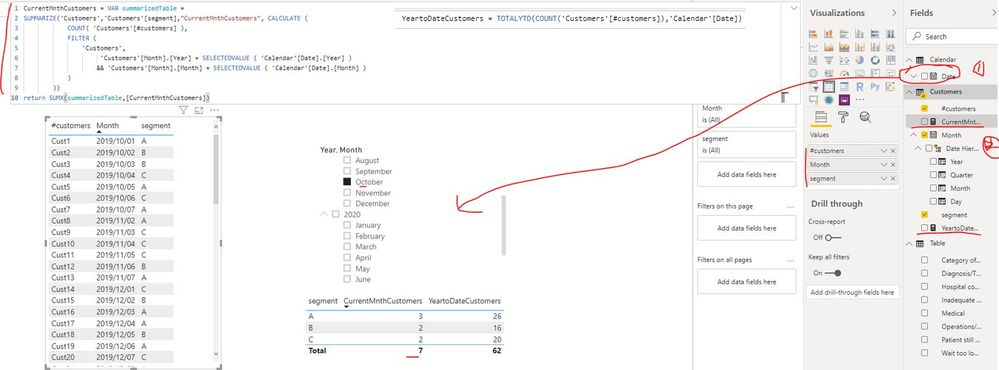
Please create one date dimension table first and create two measures as below:

CurrentMnthCustomers =
VAR summarizedTable =
    SUMMARIZE (
        'Customers',
        'Customers'[segment],
        "CurrentMnthCustomers", CALCULATE (
            COUNT ( 'Customers'[#customers] ),
            FILTER (
                'Customers',
                'Customers'[Month].[Year] = SELECTEDVALUE ( 'Calendar'[Date].[Year] )
                    && 'Customers'[Month].[Month] = SELECTEDVALUE ( 'Calendar'[Date].[Month] )
            )
        )
    )
RETURN
    SUMX ( summarizedTable, [CurrentMnthCustomers] )
YeartoDateCustomers = TOTALYTD(COUNT('Customers'[#customers]),'Calendar'[Date])  

customercount.JPG

Best Regards

Rena

Thank you Rena,


I  implemented the below solution by creating calendar dim , however after implementing changes i don't see YTD[ its not chaging according to the month i am selecing ] and currentmonth data displayed expecpt for January & Decemeber


Below is the DAX i am using


CurrentMnthCustomers =
VAR summarizedTable =
SUMMARIZE (
'Query2',
'Query2'[fns],
"CurrentMnthCustomers", CALCULATE (
sum ( 'Query2'[num_subs] ),
FILTER (
'Query2',
YEAR('Query2'[mnth]) = SELECTEDVALUE ( 'calendar'[Date].[Year] ) && FORMAT(MONTH('Query2'[date]),"mmmm") = SELECTEDVALUE ( 'calendar'[mnth].[Month] )
)
)
)
RETURN
SUMX ( summarizedTable, [CurrentMnthCustomers] )


Anonymous
Not applicable

Hi @punati33 ,

The field applied on slicer which used to filter month is from table "calendar"  or the fact table "Query2" in your report? It should be from table calendar...

Best Regards

Rena

Thank you for Quick response i am using calendar filter

Anonymous
Not applicable

Hi @punati33 ,

Could you please provide some sample data in Query2? It is better if you can provide your sample PBIX file if it is convenient. Then I make troubleshooting based on the provided information. Thank you.

Best Regards

Rena

Anonymous
Not applicable


It seems that your fact table has a date column (Month[MM/DD/YYYY]) but I am assuming you do not have a date table in your model.

By adding a date table and creating a relationship to your fact table on the date column, you will be able to use time intelligence functions for things like year-to-date.

Let me know if this helps?

Thanks


Helpful resources

Announcements
Power BI DataViz World Championships

Power BI Dataviz World Championships

The Power BI Data Visualization World Championships is back! Get ahead of the game and start preparing now!

December 2025 Power BI Update Carousel

Power BI Monthly Update - December 2025

Check out the December 2025 Power BI Holiday Recap!

FabCon Atlanta 2026 carousel

FabCon Atlanta 2026

Join us at FabCon Atlanta, March 16-20, for the ultimate Fabric, Power BI, AI and SQL community-led event. Save $200 with code FABCOMM.