cancel
Showing results for 
Search instead for 
Did you mean: 

The Power BI Data Visualization World Championships is back! It's time to submit your entry. Live now!

Reply
jeoosma
Helper II
Helper II

Bar chart

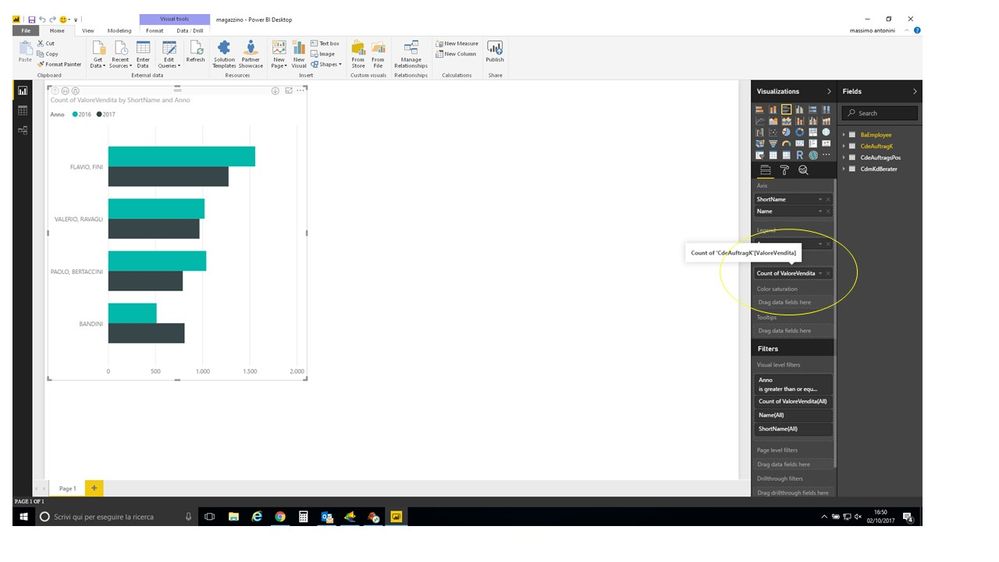
Hi. In the chart the value on the bar in the count of element while I want to see the sum of value of column. How can I change the value? Thank you.


 bar.jpg

1 ACCEPTED SOLUTION
v-caliao-msft
Microsoft Employee
Microsoft Employee

@jeoosma,


Generally, in a bar chart.

  • For integer data type value, the default aggregate function is sum. 
  • For string data type value, the default aggregate function is count. 

So in your scenario, please check CdeAufragK[ValoreVendita] data type. Please refer to the scrresnhot to see how to check your column's data type.

Capture.PNG


Regards,

Charlie Liao


View solution in original post

1 REPLY 1
v-caliao-msft
Microsoft Employee
Microsoft Employee

@jeoosma,


Generally, in a bar chart.

  • For integer data type value, the default aggregate function is sum. 
  • For string data type value, the default aggregate function is count. 

So in your scenario, please check CdeAufragK[ValoreVendita] data type. Please refer to the scrresnhot to see how to check your column's data type.

Capture.PNG


Regards,

Charlie Liao


Helpful resources

Announcements
Power BI DataViz World Championships

Power BI Dataviz World Championships

The Power BI Data Visualization World Championships is back! It's time to submit your entry.

January Power BI Update Carousel

Power BI Monthly Update - January 2026

Check out the January 2026 Power BI update to learn about new features.

FabCon Atlanta 2026 carousel

FabCon Atlanta 2026

Join us at FabCon Atlanta, March 16-20, for the ultimate Fabric, Power BI, AI and SQL community-led event. Save $200 with code FABCOMM.