cancel
Showing results for 
Search instead for 
Did you mean: 

Learn from the best! Meet the four finalists headed to the FINALS of the Power BI Dataviz World Championships! Register now

Reply
jeoosma
Helper II
Helper II

Bar chart

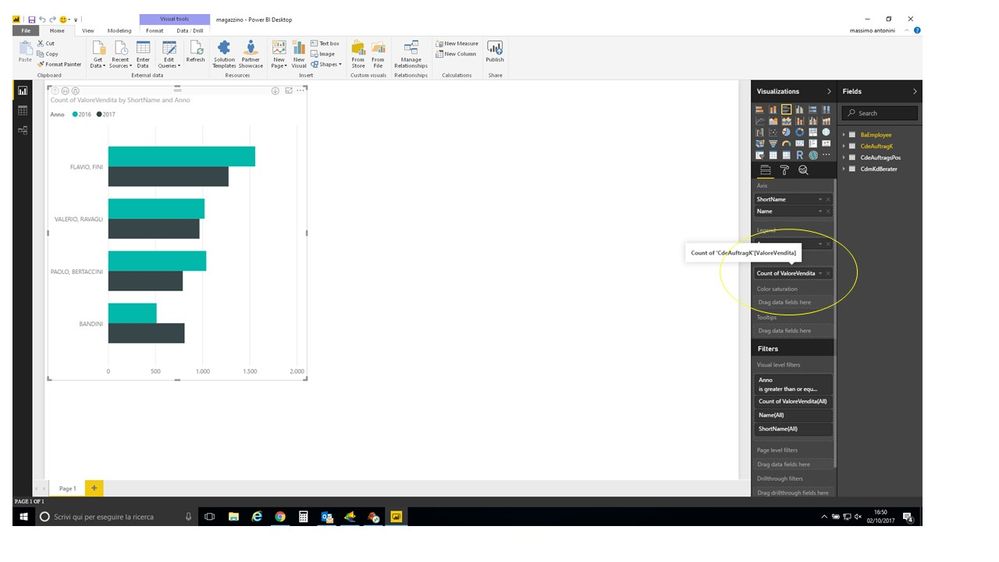
Hi. In the chart the value on the bar in the count of element while I want to see the sum of value of column. How can I change the value? Thank you.


 bar.jpg

1 ACCEPTED SOLUTION
v-caliao-msft
Microsoft Employee
Microsoft Employee

@jeoosma,


Generally, in a bar chart.

  • For integer data type value, the default aggregate function is sum. 
  • For string data type value, the default aggregate function is count. 

So in your scenario, please check CdeAufragK[ValoreVendita] data type. Please refer to the scrresnhot to see how to check your column's data type.

Capture.PNG


Regards,

Charlie Liao


View solution in original post

1 REPLY 1
v-caliao-msft
Microsoft Employee
Microsoft Employee

@jeoosma,


Generally, in a bar chart.

  • For integer data type value, the default aggregate function is sum. 
  • For string data type value, the default aggregate function is count. 

So in your scenario, please check CdeAufragK[ValoreVendita] data type. Please refer to the scrresnhot to see how to check your column's data type.

Capture.PNG


Regards,

Charlie Liao


Helpful resources

Announcements
Join our Fabric User Panel

Join our Fabric User Panel

Share feedback directly with Fabric product managers, participate in targeted research studies and influence the Fabric roadmap.

March Power BI Update Carousel

Power BI Community Update - March 2026

Check out the March 2026 Power BI update to learn about new features.