Share feedback directly with Fabric product managers, participate in targeted research studies and influence the Fabric roadmap.
Sign up nowGet Fabric certified for FREE! Don't miss your chance! Learn more
I'm new to power bi, request your help in fulfilling this requirement.
Table design:
Ticket-id | Status | Ticketcreateddate | Ticketcloseddate | Ticketlastresolveddate |
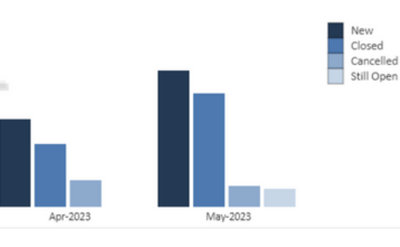
Idea is to create a chart based on status count by:
New - No of tickets which is created on that month(ref column name: ticketcreateddate) – status value should not be considered here
Closed: No of tickets with "closed" status for that month(ref column name: Status , ticketcloseddate),
Cancelled : No of tickets with "cancelled" status for that month (ref column name: Status , Ticketlastresolveddate).
Still Open: No of tickets with status "WIP" for the current month (ref column name: Status)
Status can hold values like Closed, cancelled, WIP . How to achieve this?
Need chart with x axis as months of the year. For an example need a representation similar to this for all months of current year:
Solved! Go to Solution.
@Anonymous , refer the approach in blog and the attached file
Power BI: HR Analytics - Employees as on Date : https://youtu.be/e6Y-l_JtCq4
https://community.powerbi.com/t5/Community-Blog/HR-Analytics-Active-Employee-Hire-and-Termination-trend/ba-p/882970
@Anonymous , refer the approach in blog and the attached file
Power BI: HR Analytics - Employees as on Date : https://youtu.be/e6Y-l_JtCq4
https://community.powerbi.com/t5/Community-Blog/HR-Analytics-Active-Employee-Hire-and-Termination-trend/ba-p/882970
Share feedback directly with Fabric product managers, participate in targeted research studies and influence the Fabric roadmap.
If you love stickers, then you will definitely want to check out our Community Sticker Challenge!
Check out the January 2026 Power BI update to learn about new features.
| User | Count |
|---|---|
| 63 | |
| 62 | |
| 42 | |
| 20 | |
| 18 |