cancel
Showing results for 
Search instead for 
Did you mean: 

Vote for your favorite vizzies from the Power BI Dataviz World Championship submissions. Vote now!

Reply
w100ewd
Frequent Visitor

Bar Chart w/specific % calculation


I'm trying to calculate the overall "In Stock" % for the following.  Within excel this would be a simple calculation for me using a COUNTIFS statement, however trying to use Power BI and DAX I'm struggling.  The goal I have is to be able to put this into a bar chart to automatically see out in stock % of items based on a refreshable SQL link for given items in a parameter.


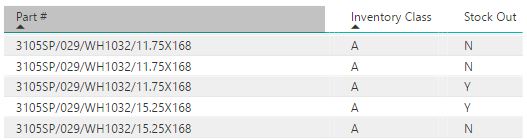
In the attached chart I want to count all items that have an 'Inventory Class' = "A" and Stock Out = "N".  Then I want to divide that number by the over count of Inventory Class = "A" items.  In the example the final in stock % would equal 60%. 


SL% Question.PNG


I love the visual tools in Power BI, it's that I just need to get better with DAX.

1 ACCEPTED SOLUTION
Greg_Deckler
Community Champion
Community Champion

In general, COUNTIF is replaced with CALCULATE in DAX. Something like this:


Measure 4 = CALCULATE(COUNT([Part #]),FILTER(Inventory,Inventory[Stock Out]="N")) / CALCULATE(COUNT([Part #]),ALLEXCEPT(Inventory,Inventory[Inventory Class])) 

 Make sure the measure is formatted as % in your model.


Follow on LinkedIn
@ me in replies or I'll lose your thread!!!
Instead of a Kudo, please vote for this idea
Become an expert!: Enterprise DNA
External Tools: MSHGQM
YouTube Channel!: Microsoft Hates Greg
Latest book!:
DAX For Humans

DAX is easy, CALCULATE makes DAX hard...

View solution in original post

3 REPLIES 3
v-huizhn-msft
Microsoft Employee
Microsoft Employee

Hi @w100ewd,

Have you resolved your issue? Please follow @Greg_Deckler's DAX format and try. Don't feel to ask if you have any other issue.

Best Regards,
angelia

Greg_Deckler
Community Champion
Community Champion

In general, COUNTIF is replaced with CALCULATE in DAX. Something like this:


Measure 4 = CALCULATE(COUNT([Part #]),FILTER(Inventory,Inventory[Stock Out]="N")) / CALCULATE(COUNT([Part #]),ALLEXCEPT(Inventory,Inventory[Inventory Class])) 

 Make sure the measure is formatted as % in your model.


Follow on LinkedIn
@ me in replies or I'll lose your thread!!!
Instead of a Kudo, please vote for this idea
Become an expert!: Enterprise DNA
External Tools: MSHGQM
YouTube Channel!: Microsoft Hates Greg
Latest book!:
DAX For Humans

DAX is easy, CALCULATE makes DAX hard...

This works great when using the formula this morning.  It's very different right now, but in time I'm sure I will figure out the new formula types.


Thank you for the help.

Helpful resources

Announcements
Power BI DataViz World Championships

Power BI Dataviz World Championships

Vote for your favorite vizzies from the Power BI World Championship submissions!

Sticker Challenge 2026 Carousel

Join our Community Sticker Challenge 2026

If you love stickers, then you will definitely want to check out our Community Sticker Challenge!

January Power BI Update Carousel

Power BI Monthly Update - January 2026

Check out the January 2026 Power BI update to learn about new features.

FabCon Atlanta 2026 carousel

FabCon Atlanta 2026

Join us at FabCon Atlanta, March 16-20, for the ultimate Fabric, Power BI, AI and SQL community-led event. Save $200 with code FABCOMM.