Join us at FabCon Atlanta from March 16 - 20, 2026, for the ultimate Fabric, Power BI, AI and SQL community-led event. Save $200 with code FABCOMM.
Register now!The Power BI Data Visualization World Championships is back! Get ahead of the game and start preparing now! Learn more
Hi
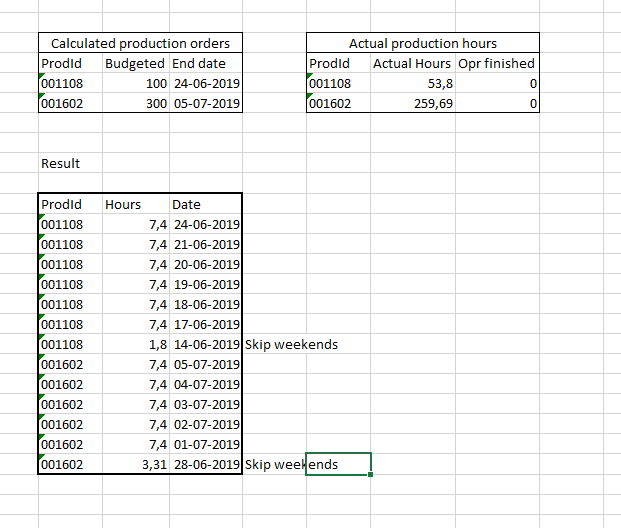
I'm doing some productions planning, and i need show how many hours of production is planned for each day.
Example Production 001108 is budgeted with 100 hours and needs to be done at 24-06-2019, as seen from the left table. The right table indicates, that 53,8 hours have already been clocked. So i need to spread out 46,2 hours over (46,2/7,4) = 7 days, aka. 7,4; 7,4; 7,4; 7,4; 7,4; 7,4, 1,8
Both tables are already connected to a common lookup table for a calender and for a production order
Hi, @Anonymous
I have created a report by you specs and the sample data you have provided. Based on the sample data I have created a few 1-to-1 relationships. If this is not how your data is, you would have to make som changes in some of the calculated columns. It is a bit messy to skip weekends, so some more testing with more data should probably be done. But that I leave to you 🙂
hours =
VAR weekendays =
CALCULATE (
SUM ( dates[IsWeekend] );
FILTER (
ALL ( dates );
dates[Date]
> MIN ( 'Production Orders'[EndDate] )
- MIN ( 'Production Orders'[Number of days left] )
&& dates[Date] <= MIN ( 'Production Orders'[EndDate] )
)
)
VAR startDateIsWeekend1 =
IF (
COUNTROWS (
FILTER (
ALL ( dates );
dates[Date]
= MIN ( 'Production Orders'[EndDate] )
- MIN ( 'Production Orders'[Number of days left] ) - weekendays
&& dates[IsWeekend] = 1
)
) > 0;
1;
BLANK ()
)
VAR startDateIsWeekend2 =
IF (
COUNTROWS (
FILTER (
ALL ( dates );
dates[Date]
= MIN ( 'Production Orders'[EndDate] )
- MIN ( 'Production Orders'[Number of days left] ) - weekendays - 1
&& dates[IsWeekend] = 1
)
) > 0;
1;
BLANK ()
)
+ IF ( ISBLANK ( startDateIsWeekend1 ); 1; 0 )
RETURN
SWITCH (
TRUE ();
MIN ( dates[Date] )
> MIN ( 'Production Orders'[EndDate] )
- MIN ( 'Production Orders'[Number of days left] ) - weekendays - startDateIsWeekend1
&& MIN ( dates[Date] ) <= MIN ( 'Production Orders'[EndDate] ); 7,4;
MIN ( dates[Date] )
= MIN ( 'Production Orders'[EndDate] )
- MIN ( 'Production Orders'[Number of days left] ) - weekendays - startDateIsWeekend1 - startDateIsWeekend2; SUM ( [Number of hours left] );
BLANK ()
)cheers,
The Power BI Data Visualization World Championships is back! Get ahead of the game and start preparing now!
Check out the November 2025 Power BI update to learn about new features.
| User | Count |
|---|---|
| 59 | |
| 43 | |
| 42 | |
| 23 | |
| 17 |
| User | Count |
|---|---|
| 190 | |
| 122 | |
| 96 | |
| 66 | |
| 47 |