Hi Michael,
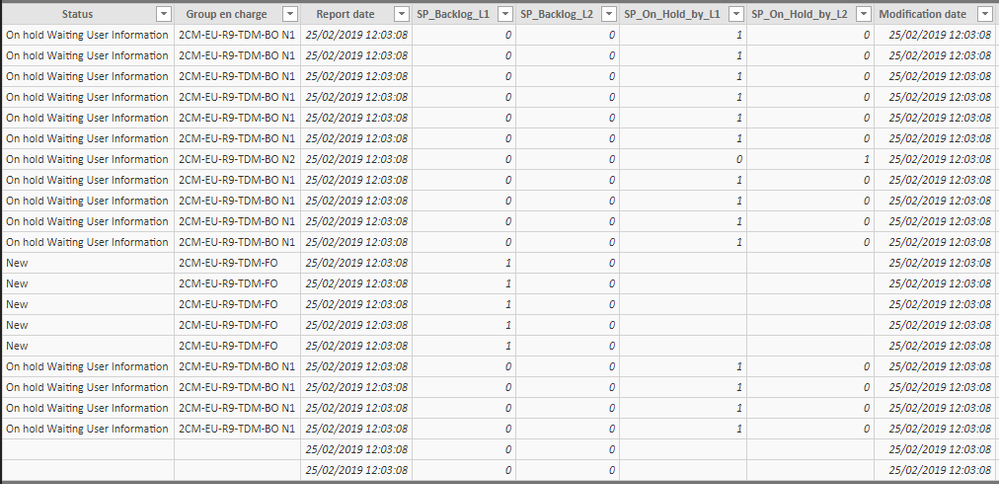
The data sources of my report are 2 excel files :
- « 11 fichier à plat en cours »

This table is daily generated, in fact every day this table change.
There is 6 columns calculated : Report Date/Modification Date/SP_Backlog_L1/ SP_Backlog_L2/SP_On_Hold_by_L1/ SP_On_Hold_by_L2
- Report Date and Modification Date are just a today function (because this table is calculated every day)
- SP_Backlog_L1 = (if('fichier à plat en cours'[Status]="Redirected";if('fichier à plat en cours'[Group en charge]="2CM-EU-R9-TDM-BO N1";1;0)))+(if('fichier à plat en cours'[Status]="New";1;0))+(IF('fichier à plat en cours'[Status]="TDM In Progress N1";1;0))
After have created these columns (SP_Backlog_L1/ SP_Backlog_L2/SP_On_Hold_by_L1/ SP_On_Hold_by_L2) I created a sum measure for each columns to have the backlog of the day.

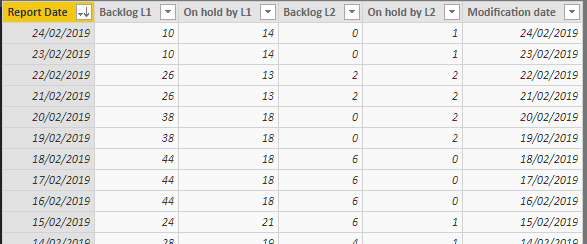
This table is an excel extract of a QlikView report but in the future this report will be delete so this is just to keep the historical data.
My issue is that we want to keep the historical data and add the daily value calculated by the other table.
I can do it for one day (the 27/02/2019 for example), so I got the historical data and the 27 February row from the other table.
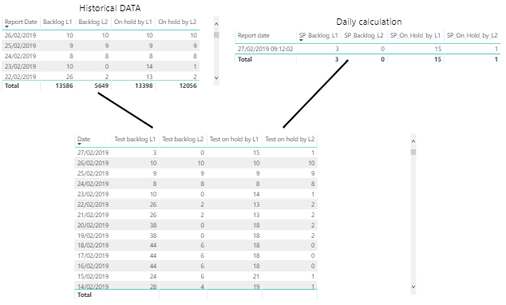
To build this KPI I created this measure :
Test backlog L1 = IF (SELECTEDVALUE ( 'Calendrier'[Date]) < TODAY(); SELECTEDVALUE ( Historic[Backlog L1] );[Sum backlog L1])
However, tomorrow 28 February row will replace the 27 February row.
So, I try to find a way to avoid this.
Moreover I use a Calendar table.
Cordialement / Regards
Luca BOROME