cancel
Showing results for 
Search instead for 
Did you mean: 

The Power BI Data Visualization World Championships is back! Get ahead of the game and start preparing now! Learn more

Reply
Anonymous
Not applicable

BUG - Unexpected DAX measures behavior with Slicers

Hi,

I'm using PowerBI Desktop: Version: 2.49.4831.521 64-bit (agosto 2017).


I'm working with an import-data report and I think it doesn't evaluate correctly my DAX measures.

I have tested my measures also with DAX Studio: here they work has expected.

Follows context description.


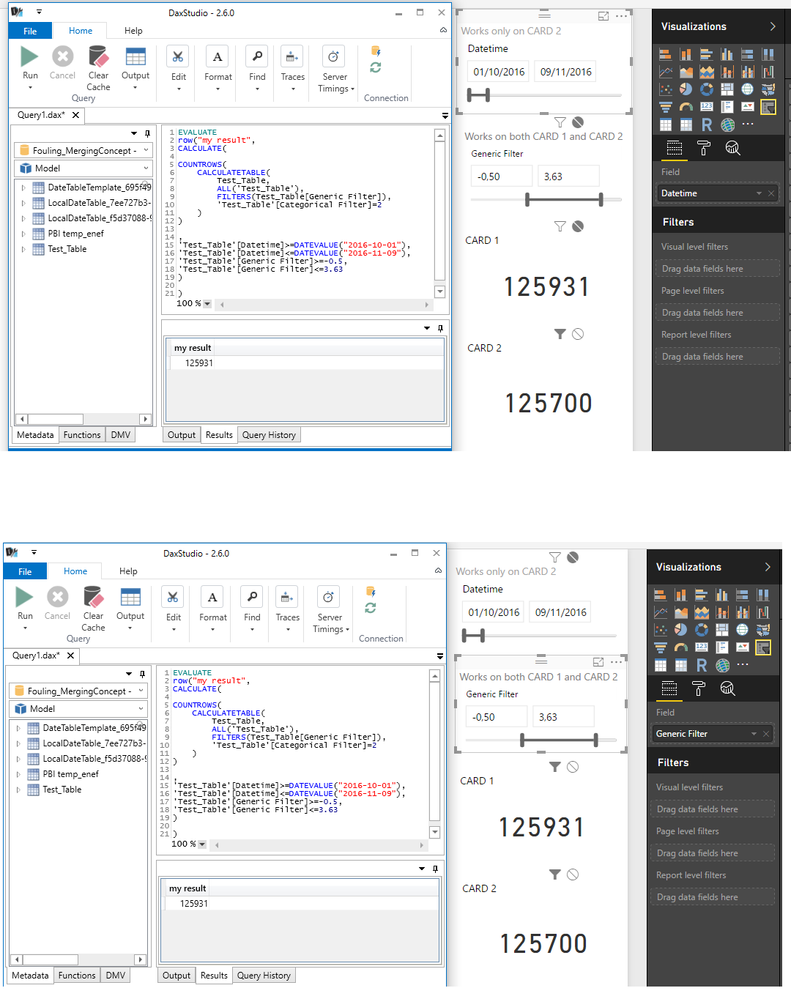
My report has two slicers: "Datetime", "Generic Filter".

My report has two cards: "CARD 1", "CARD 2".

Slicer "Datetime" filters only "CARD 2", while slicer "Generic Filter" filters both "CARD 1" and "CARD 2".


My measure is defined as follows (red text used in DAX Studio to reproduce the behaviour of slicers😞

EVALUATE
row("my result",
CALCULATE(
COUNTROWS(
    CALCULATETABLE(
        Test_Table,
        ALL('Test_Table'),
        FILTERS(Test_Table[Generic Filter]),
        'Test_Table'[Categorical Filter]=2
    )
),
'Test_Table'[Datetime]>=DATEVALUE("2016-10-01"),
'Test_Table'[Datetime]<=DATEVALUE("2016-11-09"),
'Test_Table'[Generic Filter]>=-0.5,
'Test_Table'[Generic Filter]<=3.63
)
)


The "Categorical Filter" field has value 2 for datetimes greater than "2017-01-20".

Both the visual "CARD 1" and DAX Studio give as result 125931 (which corresponds to data-source result).

The visual "CARD 2" gives as result 125700, but I cannot figure out how it can be possible since the only difference with "CARD 1" is the dependency on "Datetime" filter (which should be cleaned up by the function ALL('Test_Table')).

Following some pictures.
Test_Image.png


Thanks

Francesco 


4 REPLIES 4
v-haibl-msft
Microsoft Employee
Microsoft Employee

@Anonymous


Please try following measure formula to see if it works in Power BI Desktop.


Measure =
CALCULATE (
    COUNTROWS ( Test_Table ),
    FILTER ( ALL ( 'Test_Table' ), 'Test_Table'[Categorical Filter] = 2 )
)

If issue still persists, could you please share your PBIX file through online file service like OneDrive, and provide the expected result in Card visual?


Best Regards,
Herbert

Anonymous
Not applicable

@v-haibl-msft


I've tried your suggested measure, unfortunately it does not work as expected.

I suspect the issue in this new case is due to the following function: it cleans up all filters on all columns of the table.

ALL ( 'Test_Table' )


I've tried to modify your measure as follows, but the problem still persist.

I've also noticed the used function (FILTERS) may does not work as expected or it is not the correct one to be used (just looking to the comment section of its documentation).

Measure =
CALCULATE (
    COUNTROWS ( Test_Table ),
    FILTER ( ALL ( 'Test_Table' ), 'Test_Table'[Categorical Filter] = 2 ),
FILTERS ( 'Test_Table'[Generic Filter] ) )


Here you can find the test report.

The correct value is the one showed by "CARD 1 - Test_Measure".


Thanks,

Francesco

@Anonymous


I don't understand why the correct value should be 125700 here. I'd like to give a simple sample with my attached PBIX file.

Actually a simple measure like below can get desired result.


Measure =
CALCULATE (
    COUNTROWS ( Table1 ),
    FILTER (
        ALLSELECTED ( Table1 ),
        Table1[Categorical Filter] = 2
            && ISNUMBER ( Table1[Generic Filter] )
    )
)


BUG - Unexpected DAX measures behavior with Slicers_1.jpg


Best Regards,
Herbert

Anonymous
Not applicable

@v-haibl-msft


Sorry, I've made a mistake.

The correct value is the one given by the "CARD 1 - Test_Measure".


I need to be able to obtain the same result in "CARD 2 - Test_Measure" (using the same measure in both the cards).

Since the measure should be able to ignore the filters on datetime, I'm not able to understand the different behavior of the measure in the two cards.


Thanks,

Francesco


Helpful resources

Announcements
Power BI DataViz World Championships

Power BI Dataviz World Championships

The Power BI Data Visualization World Championships is back! Get ahead of the game and start preparing now!

December 2025 Power BI Update Carousel

Power BI Monthly Update - December 2025

Check out the December 2025 Power BI Holiday Recap!

FabCon Atlanta 2026 carousel

FabCon Atlanta 2026

Join us at FabCon Atlanta, March 16-20, for the ultimate Fabric, Power BI, AI and SQL community-led event. Save $200 with code FABCOMM.