Don't miss your chance to take the Fabric Data Engineer (DP-700) exam on us!
Learn moreWe've captured the moments from FabCon & SQLCon that everyone is talking about, and we are bringing them to the community, live and on-demand. Starts on April 14th. Register now
hi,
I have 3 tables:
1. Product Master data as dimension table for all material code
2. BOM: 1 Material contains many child components
3. Sales Order table: as fact table for orders of each parent material codes
--> what is the approach for calculating child components requirement from the Sales orders?
Material requirement of Purchased Item = Requested Quantity (from Sales orders) x Usage (from BOM table)
Thanks,
Solved! Go to Solution.
hi,
I found the solution through Many to Many relationship topic.
https://exceleratorbi.com.au/many-many-relationships-dax-explained/#comment-23150
thanks for helping anyway.
@Iamnvt,
Please create a measure in the BOMReport table using DAX below.
Material requirement of Purchased Item = SUM ( 'BOMReport'[Usage] ) * SUMX ( RELATEDTABLE (OB), OB[Requested Quantity] ) )
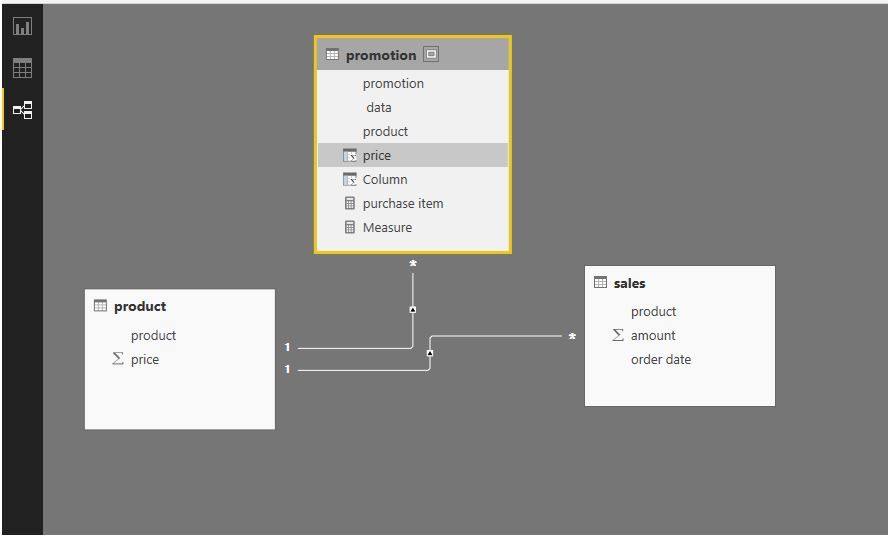
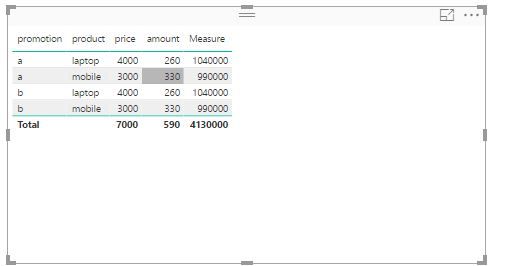
And you can review the example in my environment.
Measure = SUM ( 'product'[price] ) * SUMX ( RELATEDTABLE ( sales ), sales[amount] ) )
However, if you don't get expeted result using the above DAX, please share sample data of your tables. Do mask sensitive data before uploading sample data.
Regards,
Lydia
hi,
thanks for your answer. It seems not working.
I attached a sample with the expected result. This can be done through merge function in PQ, however, I don't want to flatten the material requirement in BOM table.
https://1drv.ms/x/s!Aps8poidQa5zku5ZWW9lT_x6em_EZA
Just want to find a DAX solution to calculate the component requirements.
Thanks again,
@Iamnvt,
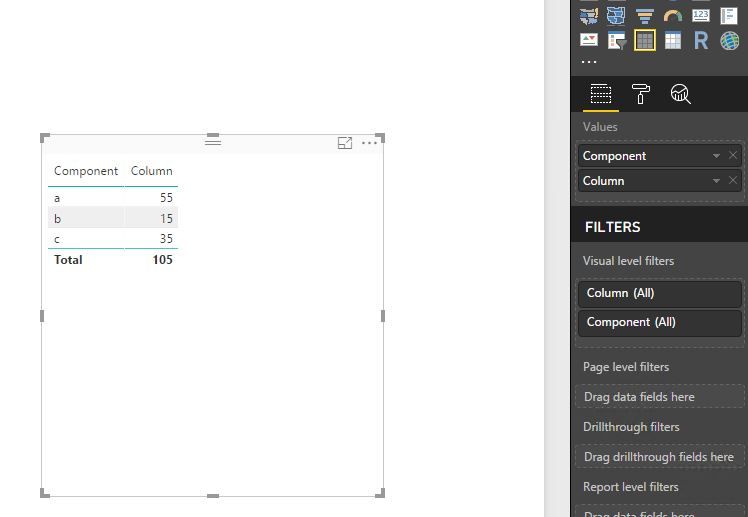
Create a new table using DAX below.
Table = GENERATEALL(BOM,var productid =BOM[Product] return SELECTCOLUMNS(CALCULATETABLE(Sales,Sales[Product]=productid),"sales",Sales[Sales]))
Then create a table visual as follows.
Regards,
Lydia
hi,
I found the solution through Many to Many relationship topic.
https://exceleratorbi.com.au/many-many-relationships-dax-explained/#comment-23150
thanks for helping anyway.
If you have recently started exploring Fabric, we'd love to hear how it's going. Your feedback can help with product improvements.
A new Power BI DataViz World Championship is coming this June! Don't miss out on submitting your entry.
Share feedback directly with Fabric product managers, participate in targeted research studies and influence the Fabric roadmap.
| User | Count |
|---|---|
| 55 | |
| 40 | |
| 35 | |
| 19 | |
| 18 |
| User | Count |
|---|---|
| 71 | |
| 70 | |
| 38 | |
| 35 | |
| 23 |