
This time we’re going bigger than ever. Fabric, Power BI, SQL, AI and more. We're covering it all. You won't want to miss it.
Learn moreLevel up your Power BI skills this month - build one visual each week and tell better stories with data! Get started
Hello 🙂
I am new to powerbi and I am stuck at a problem. I have fetched the data from Azure Tables to PowerBI using SAS connection string as shown below:
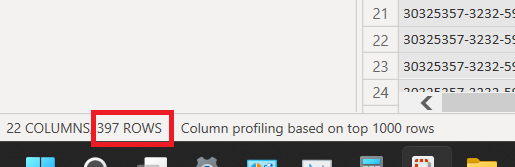
But every time the query refreshes, it only loads 397 Rows. And I know there are more than 397 rows because I can also fetch them in Azure Storage Explorer.
Can anyone please help me here and let me know if I have missed anything..? Any help would be really appreciated. Thanks.
@hjoshi4u26 ,I do not think we have such a small limit. Can you share all the power query steps? just want to check if there is any filter in the steps
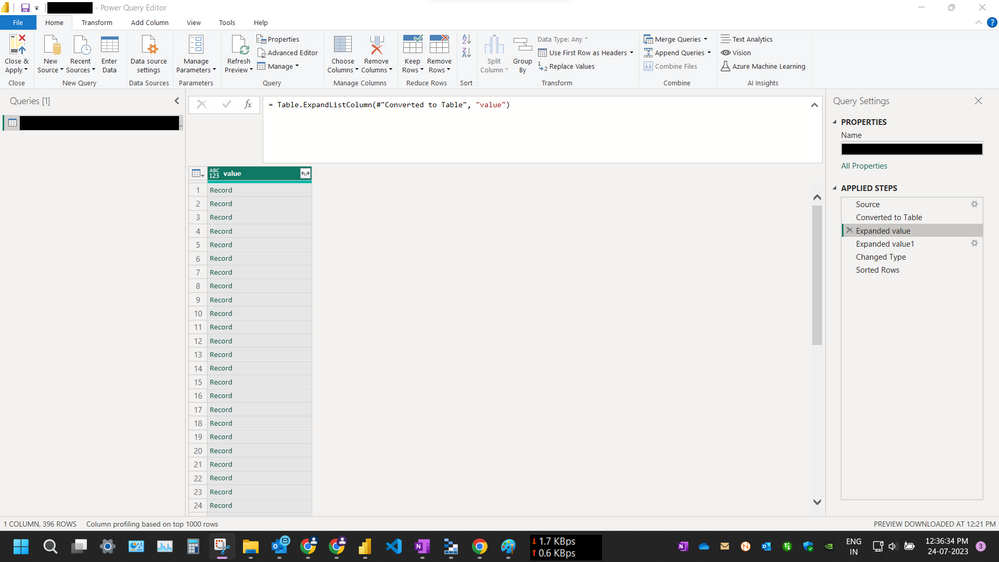
Hi @amitchandak. I have not applied any filter steps in the Power Query, sharing screenshots below:
Fetching the data from SAS Connection String provides me a single Row of a List. Expanding the List provides me 369 Rows of Records which contains the data from Azure Table Storage.
I have refreshed the data just now and still the problem persists.
Sorry for all the Black Redaction of data, I have to stay ISO compliant (security policy).
Do you know why this occurs..? Every time I refresh the dataset, the rows count stays same 396. Is it possible it is some kind of pagination issue or a countinuation token issue..?
Check out the April 2026 Power BI update to learn about new features.
Sign up to receive a private message when registration opens and key events begin.
If you have recently started exploring Fabric, we'd love to hear how it's going. Your feedback can help with product improvements.
| User | Count |
|---|---|
| 35 | |
| 32 | |
| 26 | |
| 21 | |
| 18 |
| User | Count |
|---|---|
| 68 | |
| 37 | |
| 32 | |
| 25 | |
| 23 |