Join us at FabCon Atlanta from March 16 - 20, 2026, for the ultimate Fabric, Power BI, AI and SQL community-led event. Save $200 with code FABCOMM.
Register now!The Power BI Data Visualization World Championships is back! Get ahead of the game and start preparing now! Learn more
Hi,
I'm trying to render custom polygons on the Azure Map. I'm able to do this pretty easily in the Shape Map using a topojson. But the Azure Map is proving more difficult (using a geosjon).
I am:
1) Using a geojson file formatted by MapShaper.org
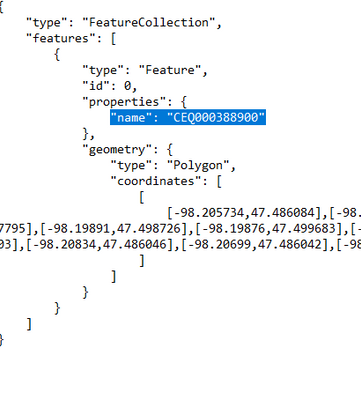
2) Adding a name property to the geojson (ie - "name": "Area A")
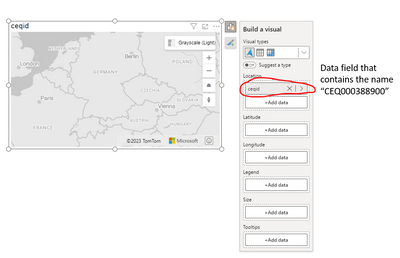
3) In the Azure Map visual, adding the field that contains the area names into the Location field
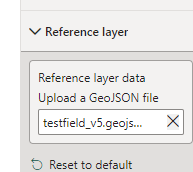
4) Uploading the geojson into the Reference Layer of the visual
When I do this, nothing renders on the map. Any thoughts?
GeoJson:
Solved! Go to Solution.
Hi @kewaynes,
Current it seems not support to full modify the basic azure map shape. If you mean to add a layer with specific shape to show on map, you can refer to the following links:
Layers in an Azure Maps Power BI visual - Microsoft Azure Maps | Microsoft Learn
Add a reference layer to Azure Maps Power BI visual - Microsoft Azure Maps | Microsoft Learn
Regards,
Xiaoxin Sheng
Hi @kewaynes,
Current it seems not support to full modify the basic azure map shape. If you mean to add a layer with specific shape to show on map, you can refer to the following links:
Layers in an Azure Maps Power BI visual - Microsoft Azure Maps | Microsoft Learn
Add a reference layer to Azure Maps Power BI visual - Microsoft Azure Maps | Microsoft Learn
Regards,
Xiaoxin Sheng
The Power BI Data Visualization World Championships is back! Get ahead of the game and start preparing now!
| User | Count |
|---|---|
| 40 | |
| 37 | |
| 33 | |
| 29 | |
| 27 |
| User | Count |
|---|---|
| 134 | |
| 104 | |
| 63 | |
| 60 | |
| 55 |