Join us at FabCon Atlanta from March 16 - 20, 2026, for the ultimate Fabric, Power BI, AI and SQL community-led event. Save $200 with code FABCOMM.
Register now!Learn from the best! Meet the four finalists headed to the FINALS of the Power BI Dataviz World Championships! Register now
Hi,
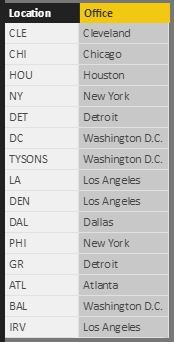
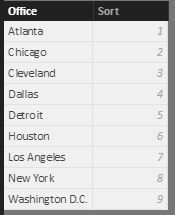
I know it's best practice to avoid multiple levels of lookup tables. However, how is this generally done in practice? I have abbreviated city names coming from the fact table, some of which get consolidate (Baltimore into Washington, D.C., for example). I also want to sort these in situations where I don't want the fields in alpha order. Please see below:
Unique values from fact table on left, desired rollup on right
I want to use this table as a slicer and have the ability to modify the sort order
Any way of doing this without creating two tables?
Thanks!
Solved! Go to Solution.
Hi @jl20
You can create a Sort calculated column in your FACT table if you want to avoid the extra table and then use this as your sort col for your main table
Sort = SWITCH(
TRUE() ,
-- IF/THEN ---
'Table'[Office] = "Atlanta" , 1 ,
'Table'[Office]= "Chicago" , 2 ,
'Table'[Office] = "Cleveland" , 3 ,
-- ELSE --
999 )
Hi @jl20
You can create a Sort calculated column in your FACT table if you want to avoid the extra table and then use this as your sort col for your main table
Sort = SWITCH(
TRUE() ,
-- IF/THEN ---
'Table'[Office] = "Atlanta" , 1 ,
'Table'[Office]= "Chicago" , 2 ,
'Table'[Office] = "Cleveland" , 3 ,
-- ELSE --
999 )
Share feedback directly with Fabric product managers, participate in targeted research studies and influence the Fabric roadmap.
Check out the February 2026 Power BI update to learn about new features.
| User | Count |
|---|---|
| 62 | |
| 54 | |
| 40 | |
| 17 | |
| 14 |
| User | Count |
|---|---|
| 96 | |
| 83 | |
| 36 | |
| 30 | |
| 25 |