Join us at FabCon Atlanta from March 16 - 20, 2026, for the ultimate Fabric, Power BI, AI and SQL community-led event. Save $200 with code FABCOMM.
Register now!The Power BI Data Visualization World Championships is back! Get ahead of the game and start preparing now! Learn more
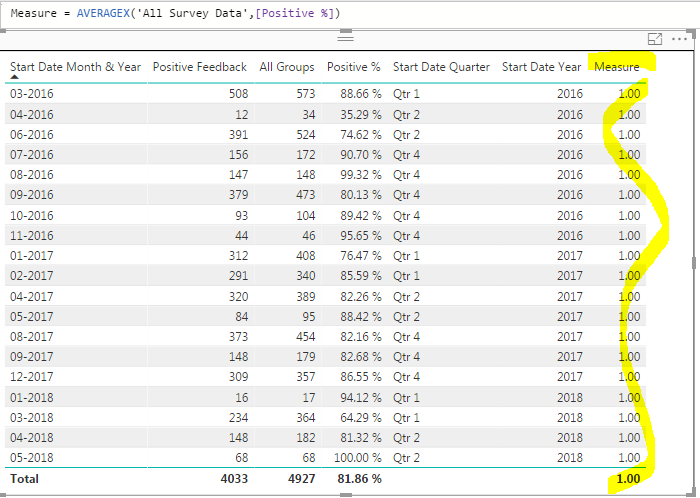
How can I build DAX that will give me the average of the highlighted measure? I need to get this to a point where I can see the average by any year or quarter I need to see it by:
NOTE: This data is coming from a table that has unpivoted columns. Everything I've tried so far only returns a average of 100% for each row and I'm assuming the unpivot factor is why it cannot compute correctly.
HI @Anonymous
Sounds like a job for the AVERAGEX function. Something along the lines of...
New Measure = AVERAGEX ( 'table'[fieldname] , [Positive %] )
Hi @Anonymous
What number would you like to see in the top row of the highlighted [Measure] column? An average of the Year or Quarter?
@Phil_Seamark So the percentages you see is a count of how much positive feedback there was for that month/year. I'm getting those percentages through a formula that looks like this:

This is how that data looks in my query editor:
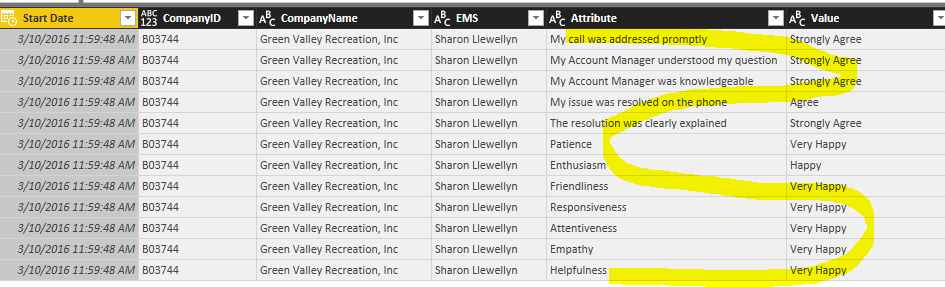
So everything in the last two columns are unpivoted columns. Here is how the data looked in its original state:
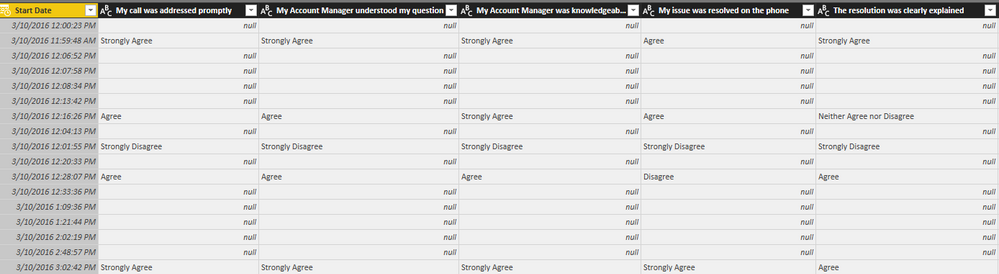
The original requirement was to get counts and percentages of everything considered a "positive", "negative" or "neutral" value. I was not sure how to count these values across columns, so that's why I took the unpivot route.
Now the next requirement is to get a trailing 12 month average of the "positive" % over time. Then using those trailing 12 month percentages, creating a measure that averages those %'s for the previous quarter. I was told by someone else the AVERAGEX function may not work in conjunction with an unpivoted table, but I'm not sure if that's true or not...
The Power BI Data Visualization World Championships is back! Get ahead of the game and start preparing now!
| User | Count |
|---|---|
| 40 | |
| 36 | |
| 34 | |
| 31 | |
| 27 |
| User | Count |
|---|---|
| 136 | |
| 103 | |
| 66 | |
| 65 | |
| 56 |