Join us at FabCon Atlanta from March 16 - 20, 2026, for the ultimate Fabric, Power BI, AI and SQL community-led event. Save $200 with code FABCOMM.
Register now!View all the Fabric Data Days sessions on demand. View schedule
Hi,
I need to show an average at the top level of a matrix and a sum for the lower 2 levels.
The values is a measure and is:
The 1st and 2nd part works, it shows sums.
The 3rd part does not,
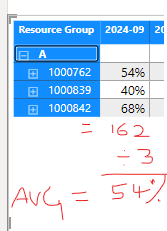
Expected state is:
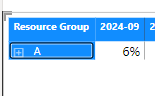
but I get:
https://drive.google.com/file/d/1msrpR6l5mK8zXqU-F_JyM5dHQ4JsK0Rp/view?usp=drive_link
Solved! Go to Solution.
Use the following modified mesaure:
Planned Loading % =
SWITCH(
TRUE(),
HASONEVALUE(Sheet1[PROJECT_ID]), SUMX('Sheet1',(Sheet1[PLANNED_HOURS])/(Sheet1[Working Hours Per Week Per Employee])),
HASONEVALUE(Sheet1[RESOURCE_ID]), SUMX(Sheet1,(Sheet1[PLANNED_HOURS])/(Sheet1[Working Hours Per Week Per Employee])),
AVERAGEX(
VALUES( Sheet1[RESOURCE_ID] ),
CALCULATE(SUMX(Sheet1,(Sheet1[PLANNED_HOURS])/(Sheet1[Working Hours Per Week Per Employee]))))
)
⭕ Subscribe and learn Power BI from these videos
⚪ Website ⚪ LinkedIn ⚪ PBI User Group
Use the following modified mesaure:
Planned Loading % =
SWITCH(
TRUE(),
HASONEVALUE(Sheet1[PROJECT_ID]), SUMX('Sheet1',(Sheet1[PLANNED_HOURS])/(Sheet1[Working Hours Per Week Per Employee])),
HASONEVALUE(Sheet1[RESOURCE_ID]), SUMX(Sheet1,(Sheet1[PLANNED_HOURS])/(Sheet1[Working Hours Per Week Per Employee])),
AVERAGEX(
VALUES( Sheet1[RESOURCE_ID] ),
CALCULATE(SUMX(Sheet1,(Sheet1[PLANNED_HOURS])/(Sheet1[Working Hours Per Week Per Employee]))))
)
⭕ Subscribe and learn Power BI from these videos
⚪ Website ⚪ LinkedIn ⚪ PBI User Group
Awsome, this seems to be working as required - thanks!
@4778
You can save your Power BI file in OneDrive, Google Drive or any other cloud storage and share the link here.
⭕ Subscribe and learn Power BI from these videos
⚪ Website ⚪ LinkedIn ⚪ PBI User Group
Please grant access
⭕ Subscribe and learn Power BI from these videos
⚪ Website ⚪ LinkedIn ⚪ PBI User Group
Check out the November 2025 Power BI update to learn about new features.
Advance your Data & AI career with 50 days of live learning, contests, hands-on challenges, study groups & certifications and more!