This is best Fabric, Power BI, SQL and AI community event. How do we know? The last event sold out! Save €200 with code FABCMTY200.
Register nowA new Data Days event is coming soon! This time we’re going bigger than ever. Fabric, Power BI, SQL, AI and more. Don't miss out.
Hello all,
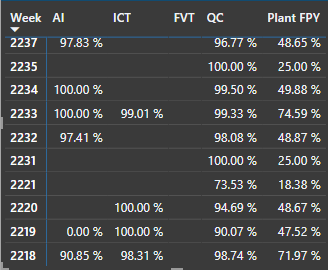
Below is shown a matrix of 5 different matrixes "PLANT FPY" is an average of the first four.
the blanks shown have zero data as no product was ran in the area thus resulting in zero data and the average is taking it as zero.
Is there any way i can have the average not count areas that have no data?
Solved! Go to Solution.
Hi , @afos111
Here are the steps you can refer to :
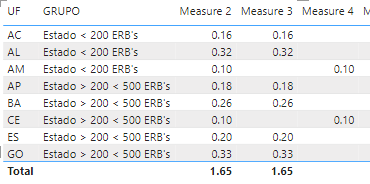
(1)This is my test data , i put three measures in the visual :
(2)We can create a measure :
Measure 5 = var _count =IF( [Measure 2] <> BLANK() ,1 ,0)+IF( [Measure 3] <> BLANK() ,1 ,0)+IF( [Measure 4] <> BLANK() ,1 ,0)
return
DIVIDE( [Measure 2]+[Measure 3]+[Measure 4] , _count)
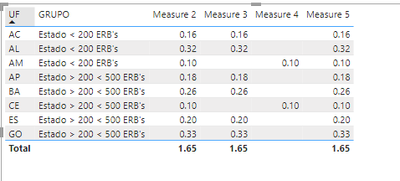
(3)Then we can ignore the BLANK() data to calculate the average of the three measures:
Best Regards,
Aniya Zhang
If this post helps, then please consider Accept it as the solution to help the other members find it more quickly
*five different measures
Hi , @afos111
Here are the steps you can refer to :
(1)This is my test data , i put three measures in the visual :
(2)We can create a measure :
Measure 5 = var _count =IF( [Measure 2] <> BLANK() ,1 ,0)+IF( [Measure 3] <> BLANK() ,1 ,0)+IF( [Measure 4] <> BLANK() ,1 ,0)
return
DIVIDE( [Measure 2]+[Measure 3]+[Measure 4] , _count)
(3)Then we can ignore the BLANK() data to calculate the average of the three measures:
Best Regards,
Aniya Zhang
If this post helps, then please consider Accept it as the solution to help the other members find it more quickly
thank you! this worked great, ill definetly be using this in the future.
Check out the May 2026 Power BI update to learn about new features.
Sign up to receive a private message when registration opens and key events begin.
If you have recently started exploring Fabric, we'd love to hear how it's going. Your feedback can help with product improvements.
| User | Count |
|---|---|
| 27 | |
| 26 | |
| 22 | |
| 19 | |
| 17 |
| User | Count |
|---|---|
| 45 | |
| 43 | |
| 41 | |
| 21 | |
| 20 |