Join us at FabCon Atlanta from March 16 - 20, 2026, for the ultimate Fabric, Power BI, AI and SQL community-led event. Save $200 with code FABCOMM.
Register now!The Power BI Data Visualization World Championships is back! Get ahead of the game and start preparing now! Learn more
Hi Support,
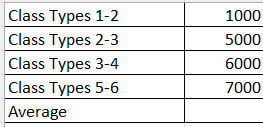
The below are measures which I have created in PBI
Class Types 1-2 =
CALCULATE([User Learner Types],ga4_data[audience]="1-2")
Class Types 2-3 =
CALCULATE([User Learner Types],ga4_data[audience]="2-3")
Class Types 3-4 =
CALCULATE([User Learner Types],ga4_data[audience]="3-4")
Class Types 5-6 =
CALCULATE([User Learner Types],ga4_data[audience]="5-6")
1) What measure in dax can I create to get the average from these 4 measures and display them in a table
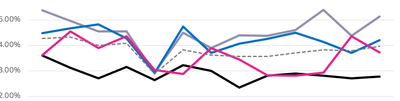
2) How can I get all all 4 measure on one Line chart graph as per below with the average as line number 5 which is the dotted graph
The bottom axis of the chart will have weeks and class types.
Thanks
Solved! Go to Solution.
@Anonymous ,
To achieve this in Power BI, you can follow these steps:
1 - Create a new measure to calculate the average of the four measures:
Average_Class_Types = (([Class Types 1-2]) + ([Class Types 2-3]) + ([Class Types 3-4]) + ([Class Types 5-6])) / 4
2 - Create a line chart with all four measures and the average measure:
[Class Types 1-2], [Class Types 2-3], [Class Types 3-4], [Class Types 5-6]) to the Values area of the line chart.Average_Class_Types measure to the Values area as well.This setup will give you a line chart with all four measures displayed as lines, and the average displayed as a fifth line. You can customize the visual further to adjust the colors, styles, and other formatting options as desired.
Regards,
Marcel Magalhães
Microsoft Power BI Official Partner
MCT | Certified PL-300 Power BI
You cannot measure a measure directly. Either materialize it first, or create a separate measure that implements the entire business logic.
@Anonymous ,
To achieve this in Power BI, you can follow these steps:
1 - Create a new measure to calculate the average of the four measures:
Average_Class_Types = (([Class Types 1-2]) + ([Class Types 2-3]) + ([Class Types 3-4]) + ([Class Types 5-6])) / 4
2 - Create a line chart with all four measures and the average measure:
[Class Types 1-2], [Class Types 2-3], [Class Types 3-4], [Class Types 5-6]) to the Values area of the line chart.Average_Class_Types measure to the Values area as well.This setup will give you a line chart with all four measures displayed as lines, and the average displayed as a fifth line. You can customize the visual further to adjust the colors, styles, and other formatting options as desired.
Regards,
Marcel Magalhães
Microsoft Power BI Official Partner
MCT | Certified PL-300 Power BI
The Power BI Data Visualization World Championships is back! Get ahead of the game and start preparing now!
| User | Count |
|---|---|
| 39 | |
| 38 | |
| 38 | |
| 28 | |
| 27 |
| User | Count |
|---|---|
| 124 | |
| 88 | |
| 73 | |
| 66 | |
| 65 |