FabCon is coming to Atlanta
Join us at FabCon Atlanta from March 16 - 20, 2026, for the ultimate Fabric, Power BI, AI and SQL community-led event. Save $200 with code FABCOMM.
Register now!- Power BI forums
- Get Help with Power BI
- Desktop
- Service
- Report Server
- Power Query
- Mobile Apps
- Developer
- DAX Commands and Tips
- Custom Visuals Development Discussion
- Health and Life Sciences
- Power BI Spanish forums
- Translated Spanish Desktop
- Training and Consulting
- Instructor Led Training
- Dashboard in a Day for Women, by Women
- Galleries
- Data Stories Gallery
- Themes Gallery
- Contests Gallery
- QuickViz Gallery
- Quick Measures Gallery
- Visual Calculations Gallery
- Notebook Gallery
- Translytical Task Flow Gallery
- TMDL Gallery
- R Script Showcase
- Webinars and Video Gallery
- Ideas
- Custom Visuals Ideas (read-only)
- Issues
- Issues
- Events
- Upcoming Events
The Power BI Data Visualization World Championships is back! Get ahead of the game and start preparing now! Learn more
- Power BI forums
- Forums
- Get Help with Power BI
- Desktop
- Average of averages
- Subscribe to RSS Feed
- Mark Topic as New
- Mark Topic as Read
- Float this Topic for Current User
- Bookmark
- Subscribe
- Printer Friendly Page

- Mark as New
- Bookmark
- Subscribe
- Mute
- Subscribe to RSS Feed
- Permalink
- Report Inappropriate Content
Average of averages
Hello,
I'm trying to achieve something that shouldn't be that hard, but I can't figure it out.
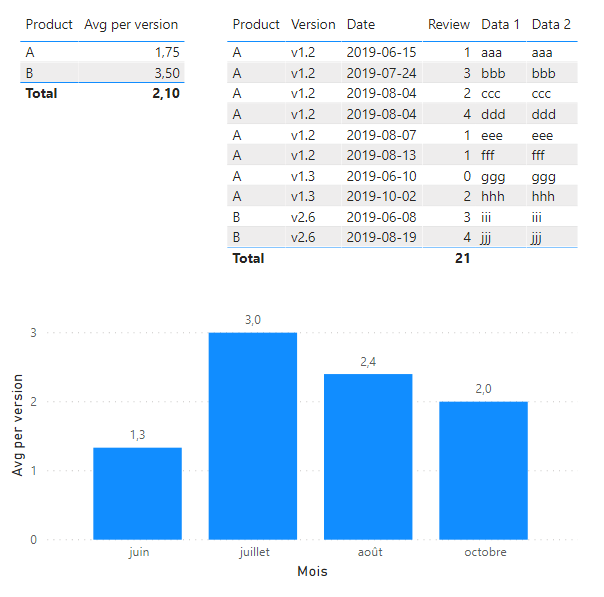
I have a table of product reviews by version. I want to display in another table the average of the average per version by product.
My current measure:
Avg per version = CALCULATE(AVERAGEX(Products, Products[Review]), ALL(Products[product_version]))
(product_version is the concatenation of product and version)
When aggregated by product, it should give me 1.5 for A (average of 2 for v1.2 and 1 for v1.3), but here I have 1.75, the average of all rows of A.
PS : I need the measure to work as expected when rows are filtered by the bar chart
Solved! Go to Solution.


- Mark as New
- Bookmark
- Subscribe
- Mute
- Subscribe to RSS Feed
- Permalink
- Report Inappropriate Content
Hi @Anonymous ,
You can try to use the following measure:
Measure = var a = SUMMARIZE(Products,Products[Product],Products[Version],"averagebyproduct_version",AVERAGE(Products[Review])) return AVERAGEX(a,[averagebyproduct_version])

If this post helps, then please consider Accept it as the solution to help the other members find it more quickly.
Best Regards,
Dedmon Dai

- Mark as New
- Bookmark
- Subscribe
- Mute
- Subscribe to RSS Feed
- Permalink
- Report Inappropriate Content
I have been looking for this solution since a long time. Finally, you resolved it. Thanks a lot.
- Mark as New
- Bookmark
- Subscribe
- Mute
- Subscribe to RSS Feed
- Permalink
- Report Inappropriate Content
Hi @Anonymous ,
You can try to use the following measure:
Measure = var a = SUMMARIZE(Products,Products[Product],Products[Version],"averagebyproduct_version",AVERAGE(Products[Review])) return AVERAGEX(a,[averagebyproduct_version])
If this post helps, then please consider Accept it as the solution to help the other members find it more quickly.
Best Regards,
Dedmon Dai
- Mark as New
- Bookmark
- Subscribe
- Mute
- Subscribe to RSS Feed
- Permalink
- Report Inappropriate Content
Thank you, that works perfectly! It was not complicated after all...

- Mark as New
- Bookmark
- Subscribe
- Mute
- Subscribe to RSS Feed
- Permalink
- Report Inappropriate Content
@Anonymous
Shouldn't the total average be 2.5 (and not 2.17)? (1.5 + 3.5 = 5; 5/2 = 2.5)
Did I answer your question? Mark my post as a solution!
In doing so, you are also helping me. Thank you!
Proud to be a Super User!
Paul on Linkedin.
- Mark as New
- Bookmark
- Subscribe
- Mute
- Subscribe to RSS Feed
- Permalink
- Report Inappropriate Content
This solution fits my need because I need the total to be the average of all versions regardless the average per product.
- Mark as New
- Bookmark
- Subscribe
- Mute
- Subscribe to RSS Feed
- Permalink
- Report Inappropriate Content
@Anonymous
I must have misunderstood your quest then. Btw, how are you getting the total average by month for the bar chart? Is it just the average by version (regardless of the product)?
Did I answer your question? Mark my post as a solution!
In doing so, you are also helping me. Thank you!
Proud to be a Super User!
Paul on Linkedin.
- Mark as New
- Bookmark
- Subscribe
- Mute
- Subscribe to RSS Feed
- Permalink
- Report Inappropriate Content
@Anonymous
Try:
Avg per version =
AVERAGEX (
    ALLEXCEPT ( Products, Products[Products], Products[Version] ),
    SUM ( Products[Review] )
)
Did I answer your question? Mark my post as a solution!
In doing so, you are also helping me. Thank you!
Proud to be a Super User!
Paul on Linkedin.
- Mark as New
- Bookmark
- Subscribe
- Mute
- Subscribe to RSS Feed
- Permalink
- Report Inappropriate Content
- Mark as New
- Bookmark
- Subscribe
- Mute
- Subscribe to RSS Feed
- Permalink
- Report Inappropriate Content
@Anonymous
Can you provide the data you posted above in a file (upload to Onedrive, Google Drive, Dropbox ...and share from there)?
Did I answer your question? Mark my post as a solution!
In doing so, you are also helping me. Thank you!
Proud to be a Super User!
Paul on Linkedin.
- Mark as New
- Bookmark
- Subscribe
- Mute
- Subscribe to RSS Feed
- Permalink
- Report Inappropriate Content
- Mark as New
- Bookmark
- Subscribe
- Mute
- Subscribe to RSS Feed
- Permalink
- Report Inappropriate Content
@Anonymous
Thank you for the sample. I've added a calendar table and dimension tables. These measures seems to work (you need to select them based on the filter context - see image.
Average by product =
AVERAGEX (
    SUMMARIZE (
        'Products',
        'Dim Product'[Product],
        'Dim Version'[Version],
        "_product",
            AVERAGEX (
                SUMMARIZE (
                    'Products',
                    'Calendar Table'[Date],
                    'Dim Product'[Product],
                    'Dim Version'[Version],
                    "Reviews", AVERAGE ( 'Products'[Review] )
                ),
                [Reviews]
            )
    ),
    [_product]
)
Average totals =
AVERAGEX (
    SUMMARIZE (
        'Products',
        'Dim Product'[Product],
        "_totals", [Average by product]
    ),
    [_totals]
)

I've attached the sample file
Did I answer your question? Mark my post as a solution!
In doing so, you are also helping me. Thank you!
Proud to be a Super User!
Paul on Linkedin.
Helpful resources

Power BI Dataviz World Championships
The Power BI Data Visualization World Championships is back! Get ahead of the game and start preparing now!

Power BI Monthly Update - November 2025
Check out the November 2025 Power BI update to learn about new features.

FabCon Atlanta 2026
Join us at FabCon Atlanta, March 16-20, for the ultimate Fabric, Power BI, AI and SQL community-led event. Save $200 with code FABCOMM.

| User | Count |
|---|---|
| 59 | |
| 46 | |
| 42 | |
| 23 | |
| 18 |


| User | Count |
|---|---|
| 190 | |
| 122 | |
| 96 | |
| 66 | |
| 47 |


