cancel
Showing results for 
Search instead for 
Did you mean: 

The Power BI Data Visualization World Championships is back! Get ahead of the game and start preparing now! Learn more

Reply
Anonymous
Not applicable

Average of average from the same column

  • Shiva_12343_0-1679118786807.png

     Hi Experts, As you can see in first table i have calculated the average by row level and in the second table we have the Average by platform level.

  • Now what i need is to calculate the average by Platform wherein it will search the entire rows of average (efficiency column) of 1st table and write a condition that whatever the Average by Platform which we have arrived in the 2nd table, we have to get the greater than that from the first table and calculate the average of those all greater thens, for your reference i have wrote the condition in the image clearly.

Please help me on this 

Thank You 

3 REPLIES 3
MohammadLoran25
Solution Sage
Solution Sage

Hi,

Follow these steps:


1-Create a measure as below:


Average By Platform =
VAR _PLATFORM =
    SELECTEDVALUE ( PlatformEffTable[Platform] )
RETURN
    DIVIDE (
        CALCULATE (
            SUM ( PlatformEffTable[Efficiency] ),
            FILTER ( ALL ( PlatformEffTable ), PlatformEffTable[Platform] = _PLATFORM )
        ),
        CALCULATE (
            COUNTROWS ( PlatformEffTable ),
            FILTER ( ALL ( PlatformEffTable ), PlatformEffTable[Platform] = _PLATFORM )
        )
    )


2- Create another measure as below to get what you asked for:


Average of Greater than averages =
VAR _PLATFORM =
    SELECTEDVALUE ( PlatformEffTable[Platform] )
RETURN
    DIVIDE (
        CALCULATE (
            SUM ( PlatformEffTable[Efficiency] ),
            FILTER (
                ALL ( PlatformEffTable ),
                PlatformEffTable[Efficiency] > [Average By Platform]
                    && PlatformEffTable[Platform] = _PLATFORM
            )
        ),
        COUNTROWS (
            FILTER (
                ALL ( PlatformEffTable ),
                PlatformEffTable[Efficiency] > [Average By Platform]
                    && PlatformEffTable[Platform] = _PLATFORM
            )
        )
    )


Then the result would be like the attached photo.


If it solves your problem, then please consider Accepting it as the solution
Regards,

Loran
AVERAGEPC.JPG

Anonymous
Not applicable

Hi,


Thanks for the reply, 

But there is some issue>>


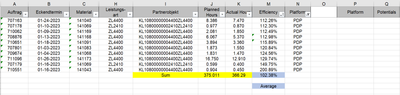
Please look into the below screenshot where we have "Efficiency" which is nothing but Division in (%) of  'Planned Hours' and 'Actual Hours' which should be the average on row level.


And the ask is if we filter on any specific platform, then we will have average "Efficiency", then we need to calculate the "Potential'>>>

For e.g>> We have filter on "Platform" = PDP, and then Average of "Efficiency" is =102.38% which we arrived from 375/366
2. And then we will select all the cells which are greater then 102.38% and get the average of all those greater percents (as compared to 102.38% should be greater) in the another table which will be another percentage.

Shiva_12343_0-1679222065795.png


Please note i have already created 

Efficiency = Iferror(DIVIDE(SUM([Plan Hours] ,SUM([Actual hours],0) please see if we can apply the Average of greater averages from this measure.

If I understand correctly, you want to make the calculation based on your efficiency measure. You need to change my previous answer a bit as below:


1-

EfficiencyMeasure = IFERROR(DIVIDE(SUM(PlatformEffTable[Planned]),SUM(PlatformEffTable[Actuals])),0)
 
2-
Average By Platform =
VAR _PLATFORM =
    SELECTEDVALUE ( PlatformEffTable[Platform] )
RETURN
    DIVIDE (
        CALCULATE (
            SUMX ( PlatformEffTable, PlatformEffTable[EfficiencyMeasure]),
            FILTER ( ALL ( PlatformEffTable ), PlatformEffTable[Platform] = _PLATFORM )
        ),
        CALCULATE (
            COUNTROWS ( PlatformEffTable ),
            FILTER ( ALL ( PlatformEffTable ), PlatformEffTable[Platform] = _PLATFORM )
        )
    )
 
 
3-
Average of Greater than averages =
VAR _PLATFORM =
    SELECTEDVALUE ( PlatformEffTable[Platform] )
RETURN
    DIVIDE (
        CALCULATE (
            SUMX ( PlatformEffTable,[EfficiencyMeasure] ),
            FILTER (
                ALL ( PlatformEffTable ),
                PlatformEffTable[Efficiency] > [Average By Platform]
                    && PlatformEffTable[Platform] = _PLATFORM
            )
        ),
        COUNTROWS (
            FILTER (
                ALL ( PlatformEffTable ),
                PlatformEffTable[Efficiency] > [Average By Platform]
                    && PlatformEffTable[Platform] = _PLATFORM
            )
        )
    )
 

If it solves your problem, then please consider Accepting it as the solution
Regards,

Loran

Helpful resources

Announcements
Power BI DataViz World Championships

Power BI Dataviz World Championships

The Power BI Data Visualization World Championships is back! Get ahead of the game and start preparing now!

December 2025 Power BI Update Carousel

Power BI Monthly Update - December 2025

Check out the December 2025 Power BI Holiday Recap!

FabCon Atlanta 2026 carousel

FabCon Atlanta 2026

Join us at FabCon Atlanta, March 16-20, for the ultimate Fabric, Power BI, AI and SQL community-led event. Save $200 with code FABCOMM.