Join us at FabCon Atlanta from March 16 - 20, 2026, for the ultimate Fabric, Power BI, AI and SQL community-led event. Save $200 with code FABCOMM.
Register now!The Power BI Data Visualization World Championships is back! Get ahead of the game and start preparing now! Learn more
Hello BI World,
I've been using power BI for a bout 2 months now and love it! I'm hoping someone with M or DAX super powers can help me with a snag I ran into.
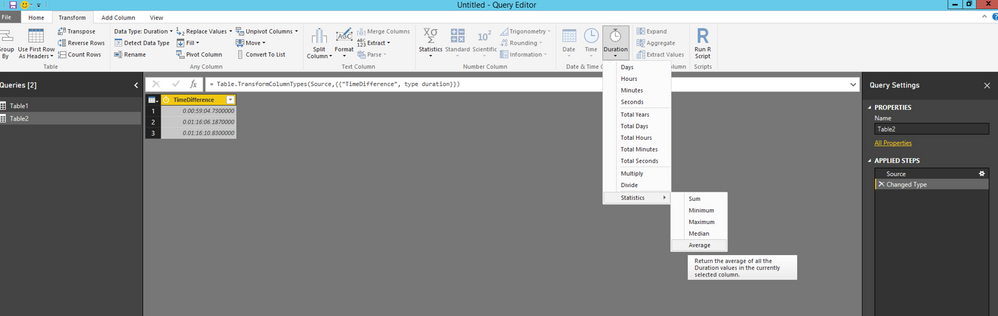
I have a column representing the difference between two times in format days:hours:minutes:seconds (See Screenshot).
I would like to have a column in a different table to reflect the average difference based on the value of another column.
Thanks in advance!!!
Eric
P.S. - In query editor the column looks like it does in the screen shot. In data view it's formatted 00:00:00 AM/PM???
Hi @Eric_JL,
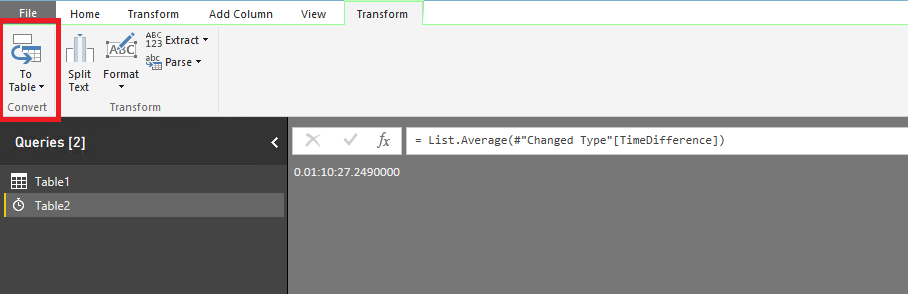
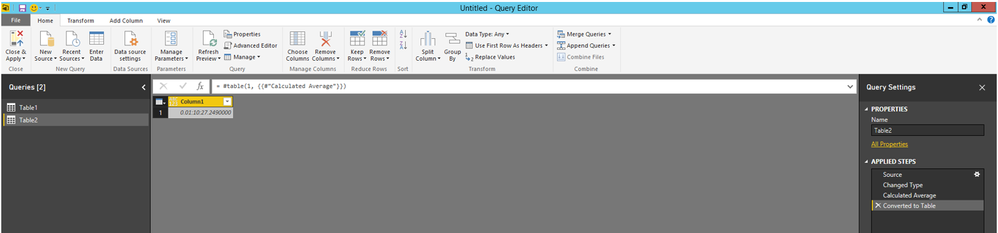
Do you want to calculate average value of the TimeDifference column? If that is the case, duplicate your current query in Query editor, then choose the TimeDifference column, select “Duration->Statistics->Average” under Transform ribbon, then you will get average value as shown in the second screenshot, and you can put the value in a column by clicking “To Table”.
Thanks,
Lydia Zhang
The Power BI Data Visualization World Championships is back! Get ahead of the game and start preparing now!
| User | Count |
|---|---|
| 38 | |
| 38 | |
| 37 | |
| 28 | |
| 28 |
| User | Count |
|---|---|
| 124 | |
| 89 | |
| 73 | |
| 66 | |
| 65 |