cancel
Showing results for 
Search instead for 
Did you mean: 

Vote for your favorite vizzies from the Power BI Dataviz World Championship submissions. Vote now!

Reply
Anonymous
Not applicable

Average of 12 months plus last month of previous year

Hey guys,


I want to calculate an average of monthly values of GAV for a year. But instead of starting at January, start at December of the previous year and include all months of year (and for ongoing year all months to date) + december last year. It was so simple in excel, and I can't figure out a solution on PBI.
Here is a simple example of what I am trying to do:


https://www.dropbox.com/s/m8m312om0tfffxg/Example6.xlsx?dl=0


Any ideas how to set up the time inteligence for this?


2 ACCEPTED SOLUTIONS
Vera_33
Resident Rockstar
Resident Rockstar

Hi @Anonymous 


Do you have Year column in your table, or you use a Date table? I am using the same to show you one way


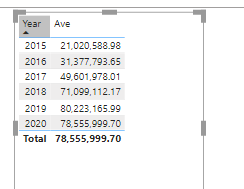
Vera_33_0-1626253015714.png

Ave = 
VAR CurY=MAX(factTable[Year])
RETURN
AVERAGEX(FILTER(ALL('factTable'),factTable[Data]>=DATE(CurY-1,12,1)&&factTable[Data]<=DATE(CurY,12,31)),[GAV])


View solution in original post

Hi @Anonymous 


Yes, your case is different from the simple Excel sample, so modified a little bit

Vera_33_0-1626311297835.png

Average GAV = 
VAR CurY=MAX(Dates[Year])
VAR T1 = CALCULATETABLE(ADDCOLUMNS(ALL(Dates[EndOfMonth]),"TEST",[GAV]),ALL(Dates[Year]))
RETURN
AVERAGEX(FILTER(T1,[EndOfMonth]>=DATE(CurY-1,12,1)&&[EndOfMonth]<=DATE(CurY,12,31)),[TEST])


View solution in original post

4 REPLIES 4
Vera_33
Resident Rockstar
Resident Rockstar

Hi @Anonymous 


Do you have Year column in your table, or you use a Date table? I am using the same to show you one way


Vera_33_0-1626253015714.png

Ave = 
VAR CurY=MAX(factTable[Year])
RETURN
AVERAGEX(FILTER(ALL('factTable'),factTable[Data]>=DATE(CurY-1,12,1)&&factTable[Data]<=DATE(CurY,12,31)),[GAV])


Anonymous
Not applicable

Hey, thank you a lot it does seem to work with the excel data, but my PBI model has a few extra details and for some reason it does not include the december of last year it seams. I am attaching an example file:
https://www.dropbox.com/s/a006u6lay2mnsvl/Example7.pbix?dl=0
In this case the expected value for 2021 would be 27176766,83.

Hi @Anonymous 


Yes, your case is different from the simple Excel sample, so modified a little bit

Vera_33_0-1626311297835.png

Average GAV = 
VAR CurY=MAX(Dates[Year])
VAR T1 = CALCULATETABLE(ADDCOLUMNS(ALL(Dates[EndOfMonth]),"TEST",[GAV]),ALL(Dates[Year]))
RETURN
AVERAGEX(FILTER(T1,[EndOfMonth]>=DATE(CurY-1,12,1)&&[EndOfMonth]<=DATE(CurY,12,31)),[TEST])


Anonymous
Not applicable

Worked like a charm, thank you 🙂 

Helpful resources

Announcements
Power BI DataViz World Championships

Power BI Dataviz World Championships

Vote for your favorite vizzies from the Power BI World Championship submissions!

Sticker Challenge 2026 Carousel

Join our Community Sticker Challenge 2026

If you love stickers, then you will definitely want to check out our Community Sticker Challenge!

January Power BI Update Carousel

Power BI Monthly Update - January 2026

Check out the January 2026 Power BI update to learn about new features.

FabCon Atlanta 2026 carousel

FabCon Atlanta 2026

Join us at FabCon Atlanta, March 16-20, for the ultimate Fabric, Power BI, AI and SQL community-led event. Save $200 with code FABCOMM.