Join us in Barcelona for FabCon and SQLCon, September 28 - October 1, 2026.
This is best Fabric, Power BI, SQL and AI community event. How do we know? The last event sold out! Save €200 with code FABCMTY200.
Register now- Power BI forums
- Get Help with Power BI
- Desktop
- Service
- Report Server
- Power Query
- Mobile Apps
- Developer
- DAX Commands and Tips
- Custom Visuals Development Discussion
- Health and Life Sciences
- Power BI Spanish forums
- Translated Spanish Desktop
- Training and Consulting
- Instructor Led Training
- Dashboard in a Day for Women, by Women
- Galleries
- Data Stories Gallery
- Themes Gallery
- Contests Gallery
- QuickViz Gallery
- Quick Measures Gallery
- Visual Calculations Gallery
- Notebook Gallery
- Translytical Task Flow Gallery
- TMDL Gallery
- R Script Showcase
- Webinars and Video Gallery
- Ideas
- Custom Visuals Ideas (read-only)
- Issues
- Issues
- Events
- Upcoming Events
A new Data Days event is coming soon! This time we’re going bigger than ever. Fabric, Power BI, SQL, AI and more. Don't miss out.
- Power BI forums
- Forums
- Get Help with Power BI
- Desktop
- Re: Average by family
- Subscribe to RSS Feed
- Mark Topic as New
- Mark Topic as Read
- Float this Topic for Current User
- Bookmark
- Subscribe
- Printer Friendly Page


- Mark as New
- Bookmark
- Subscribe
- Mute
- Subscribe to RSS Feed
- Permalink
- Report Inappropriate Content
Average by family
Hi,
i've a dataset with an id and a family.
i want to calculate the kms average by id so far so good
My issue is when i want to display in front of each id, the family average like below.
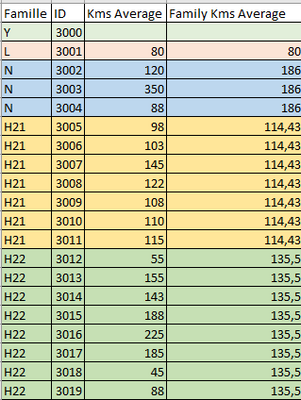
i don't find the dax code to stay at the family level
Solved! Go to Solution.
- Mark as New
- Bookmark
- Subscribe
- Mute
- Subscribe to RSS Feed
- Permalink
- Report Inappropriate Content
Thanks @Arul
I finally managed to display what i want
it was the wrong columns i assume...
i now display the column of the calculate table, with the column of the vehicle just be

For those who are inserested, if you want to display the value in a card you muste create a measure :
kms quotidien moyen famille =
LOOKUPVALUE('Données par Famille'[Kms / jour], 'Données par Famille'[Famille], SELECTEDVALUE('Paramètres Véhicules'[Famille]))
- Mark as New
- Bookmark
- Subscribe
- Mute
- Subscribe to RSS Feed
- Permalink
- Report Inappropriate Content
- Mark as New
- Bookmark
- Subscribe
- Mute
- Subscribe to RSS Feed
- Permalink
- Report Inappropriate Content
Here is the data model
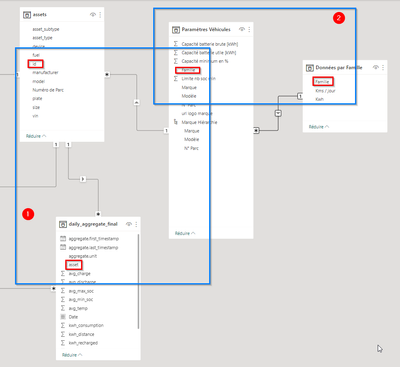
in 1 you can see the links between the id and the family.
in 2 i tried to sumarize the date by family in a separated table. i also tried a lookupvalue, but without success.
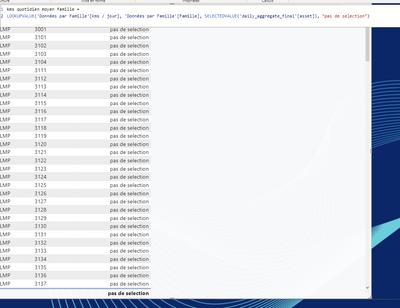


- Mark as New
- Bookmark
- Subscribe
- Mute
- Subscribe to RSS Feed
- Permalink
- Report Inappropriate Content
What are all the columns that you are using in your visual?
Thanks,
Arul
- Mark as New
- Bookmark
- Subscribe
- Mute
- Subscribe to RSS Feed
- Permalink
- Report Inappropriate Content
i use
'Paramètres Véhicules'[Famille], 'Paramètres Véhicules'[N° Parc] and the measure
kms quotidien moyen famille =
CALCULATE(
	AVERAGE('daily_aggregate_final'[max_distance])
	,ALLEXCEPT('Paramètres Véhicules', 'Données par Famille'[Famille])
)- Mark as New
- Bookmark
- Subscribe
- Mute
- Subscribe to RSS Feed
- Permalink
- Report Inappropriate Content
Am asking the columns and measures used in the visual.
Thanks,
Arul
- Mark as New
- Bookmark
- Subscribe
- Mute
- Subscribe to RSS Feed
- Permalink
- Report Inappropriate Content
Thanks @Arul
I finally managed to display what i want
it was the wrong columns i assume...
i now display the column of the calculate table, with the column of the vehicle just be
For those who are inserested, if you want to display the value in a card you muste create a measure :
kms quotidien moyen famille =
LOOKUPVALUE('Données par Famille'[Kms / jour], 'Données par Famille'[Famille], SELECTEDVALUE('Paramètres Véhicules'[Famille]))
- Mark as New
- Bookmark
- Subscribe
- Mute
- Subscribe to RSS Feed
- Permalink
- Report Inappropriate Content
i'm not sure that i well understood the question, but here is a screenshot of my visual :
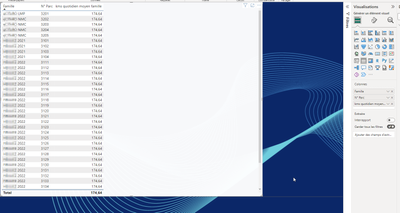


- Mark as New
- Bookmark
- Subscribe
- Mute
- Subscribe to RSS Feed
- Permalink
- Report Inappropriate Content
Hello, see the formulas below and the outcomes in the image:
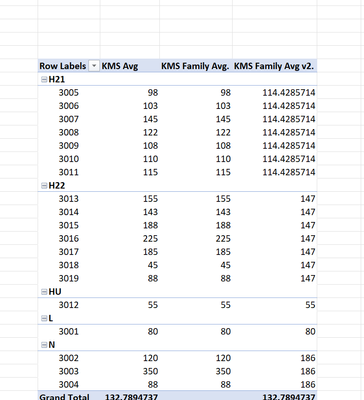
KMS Avg:=AVERAGE([Kms Average])

KMS Family Avg.:=CALCULATE([KMS Avg],FILTER(ALLSELECTED('Table1'[Famille]),'Table1'[Famille]=MAX(Table1[Famille])))

KMS Family Avg v2.:=CALCULATE([KMS Avg],ALLEXCEPT('Table1','Table1'[Famille]))
, but the formula you want is the v2:
KMS Family Avg v2.:=CALCULATE([KMS Avg],ALLEXCEPT('Table1','Table1'[Famille]))
- Mark as New
- Bookmark
- Subscribe
- Mute
- Subscribe to RSS Feed
- Permalink
- Report Inappropriate Content
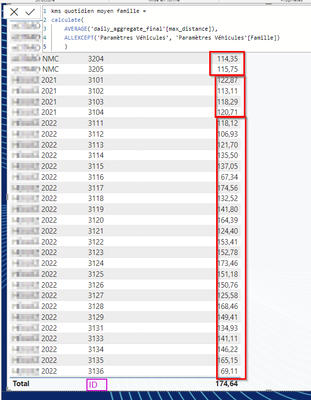
Hello @BrianConnelly ,
Thanks for your answer, unfortunately, when i display the measure in a table, the average is recalculed by id
- Mark as New
- Bookmark
- Subscribe
- Mute
- Subscribe to RSS Feed
- Permalink
- Report Inappropriate Content
Are the ID column and Famille column comes from different table? If yes, do they have reltionship and what is it?
Thanks,
Arul

Helpful resources

Data Days 2026 coming soon!
Sign up to receive a private message when registration opens and key events begin.

New to Fabric Survey
If you have recently started exploring Fabric, we'd love to hear how it's going. Your feedback can help with product improvements.

Power BI DataViz World Championships - June 2026
A new Power BI DataViz World Championship is coming this June! Don't miss out on submitting your entry.

| User | Count |
|---|---|
| 33 | |
| 25 | |
| 23 | |
| 20 | |
| 15 |


| User | Count |
|---|---|
| 64 | |
| 41 | |
| 27 | |
| 22 | |
| 22 |


