cancel
Showing results for 
Search instead for 
Did you mean: 

The Power BI Data Visualization World Championships is back! Get ahead of the game and start preparing now! Learn more

Reply
Anonymous
Not applicable

Average by Days

Hi Team,

 Need help in solving the below problem.

City	Day	Hrs
A 	2-Jan-19	8
A 	3-Jan-19	4
A 	7-Jan-19	4
A 	10-Jan-19	6
A 	14-Jan-19	2
A 	15-Jan-19	6
A 	23-Jan-19	10
A 	28-Jan-19	6
A 	29-Jan-19	2
A 	31-Jan-19	4
A 	8-Jan-19	18
B	1-Jan-19	8
B	2-Jan-19	10
B	4-Jan-19	10
		
Out put		
A	6.36	
B	9.33	
Result	7.845	
1 ACCEPTED SOLUTION

In matrix table you will get that in grant total.

Other way is summarize and union

union (summarize(table,city,"Avg Value"average(value)),summarize(table,"city","Overall","Avg Value"average(value)))


Appreciate your Kudos. In case, this is the solution you are looking for, mark it as the Solution. In case it does not help, please provide additional information and mark me with @
Thanks. My Recent Blog -
https://community.powerbi.com/t5/Community-Blog/Winner-Topper-on-Map-How-to-Color-States-on-a-Map-wi...
https://community.powerbi.com/t5/Community-Blog/HR-Analytics-Active-Employee-Hire-and-Termination-tr...
https://community.powerbi.com/t5/Community-Blog/Power-BI-Working-with-Non-Standard-Time-Periods/ba-p...
https://community.powerbi.com/t5/Community-Blog/Comparing-Data-Across-Date-Ranges/ba-p/823601

Share with Power BI Enthusiasts: Full Power BI Video (20 Hours) YouTube
Microsoft Fabric Series 60+ Videos YouTube
Microsoft Fabric Hindi End to End YouTube

View solution in original post

4 REPLIES 4
Anonymous
Not applicable

Hi @Anonymous ,

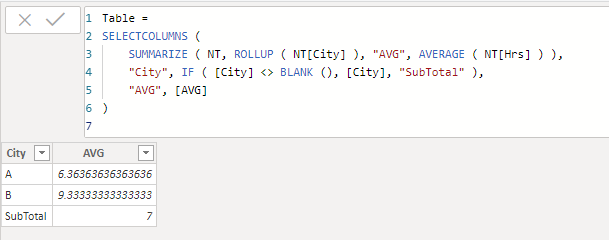
In fact, you can simply use summarize function with rollup to create new table ith summarize result with its subtotal:

Table =
SELECTCOLUMNS (
    SUMMARIZE ( NT, ROLLUP ( NT[City] ), "AVG", AVERAGE ( NT[Hrs] ) ),
    "City", IF ( [City] <> BLANK (), [City], "SubTotal" ),
    "AVG", [AVG]
)

Notice: rollup function will add a new row with a blank label, selectcolumns function is used to replace the blank part as 'SubTotal'.

4.png

Regards,

Xiaoxin Sheng

amitchandak
Super User
Super User

what is the problem . Is Average(table[hours]) not working properly ?

Share with Power BI Enthusiasts: Full Power BI Video (20 Hours) YouTube
Microsoft Fabric Series 60+ Videos YouTube
Microsoft Fabric Hindi End to End YouTube
Anonymous
Not applicable

The problem is i want to show the average by city and then overall average.

In matrix table you will get that in grant total.

Other way is summarize and union

union (summarize(table,city,"Avg Value"average(value)),summarize(table,"city","Overall","Avg Value"average(value)))


Appreciate your Kudos. In case, this is the solution you are looking for, mark it as the Solution. In case it does not help, please provide additional information and mark me with @
Thanks. My Recent Blog -
https://community.powerbi.com/t5/Community-Blog/Winner-Topper-on-Map-How-to-Color-States-on-a-Map-wi...
https://community.powerbi.com/t5/Community-Blog/HR-Analytics-Active-Employee-Hire-and-Termination-tr...
https://community.powerbi.com/t5/Community-Blog/Power-BI-Working-with-Non-Standard-Time-Periods/ba-p...
https://community.powerbi.com/t5/Community-Blog/Comparing-Data-Across-Date-Ranges/ba-p/823601

Share with Power BI Enthusiasts: Full Power BI Video (20 Hours) YouTube
Microsoft Fabric Series 60+ Videos YouTube
Microsoft Fabric Hindi End to End YouTube

Helpful resources

Announcements
Power BI DataViz World Championships

Power BI Dataviz World Championships

The Power BI Data Visualization World Championships is back! Get ahead of the game and start preparing now!

December 2025 Power BI Update Carousel

Power BI Monthly Update - December 2025

Check out the December 2025 Power BI Holiday Recap!

FabCon Atlanta 2026 carousel

FabCon Atlanta 2026

Join us at FabCon Atlanta, March 16-20, for the ultimate Fabric, Power BI, AI and SQL community-led event. Save $200 with code FABCOMM.