This time we’re going bigger than ever. Fabric, Power BI, SQL, AI and more. We're covering it all. You won't want to miss it.
Learn moreLevel up your Power BI skills this month - build one visual each week and tell better stories with data! Get started
Hi,
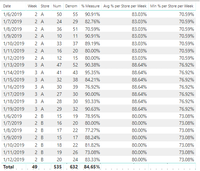
Have data below for each day of week for a shop and have 7 days of data for each shop each week.
Can calculate normal % age o.k but wondering how best to calculate what the average and minimum percentage is for each shop each week.
when try do min (<%age measure>) or average (%measure) get error
e.g below minimum would be 85.40, average would be adding the 7 percentages and diving by 7.
How can we best achieve this?
Can possibly look to use summarize to create table grouped by week and shop name but wonder if better /other approaches?
Thanks
Solved! Go to Solution.
Ok, I think I have a solution. I hope I am not misunderstanding or making bad assumptions about your data structure. I have mocked up some sample data for 2 stores, A and B. Store A has two weeks of data and store B has one week of data. In the data source, there is one record per day, per store as we clarified:
Next, due of the grain of the data, we can add a calculated column for our % calc into the Power BI dataset. Typically, having % calculation columns can lead to issues with aggregation, but for our purposes we can leverage this:
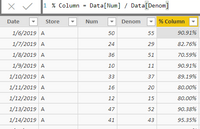
I also added a "Week" calculated column based on the WEEKNUM function that we will need to use later on as well.
To get our Min % calculation, we will rely on this % calculated column we just created. Here is what I used for the syntax, which resulted in what I expected for that value:
Is this the grain of your data? E.g. one record per day, per store? Or is your data more granular, and you intend to roll it up to this level in your visuals?
Ok, I think I have a solution. I hope I am not misunderstanding or making bad assumptions about your data structure. I have mocked up some sample data for 2 stores, A and B. Store A has two weeks of data and store B has one week of data. In the data source, there is one record per day, per store as we clarified:
Next, due of the grain of the data, we can add a calculated column for our % calc into the Power BI dataset. Typically, having % calculation columns can lead to issues with aggregation, but for our purposes we can leverage this:
I also added a "Week" calculated column based on the WEEKNUM function that we will need to use later on as well.
To get our Min % calculation, we will rely on this % calculated column we just created. Here is what I used for the syntax, which resulted in what I expected for that value:
Your solution works - just one question is it possible for the mimimum filter to exclude rows which have a certain value
e.g if % measure is 0% exlcude these rows when calculating the minimum for that store for the week - finding we have some shops where no data supplied on a certian day and these skewing the minimum calculation - looking to refine to calculate the minimum for the shop that week based on where they have supplied a figure for the measure for the day
Have added another filter to start of it and
Thanks for suggestion.
Another possibility when wish to jsut show data at store/week level could look to use is calculated measure of %age on the table and then include this twice on the table and select as average and as minimum in each case.
Check out the April 2026 Power BI update to learn about new features.
Sign up to receive a private message when registration opens and key events begin.
If you have recently started exploring Fabric, we'd love to hear how it's going. Your feedback can help with product improvements.
| User | Count |
|---|---|
| 31 | |
| 25 | |
| 21 | |
| 18 | |
| 17 |
| User | Count |
|---|---|
| 62 | |
| 34 | |
| 33 | |
| 25 | |
| 24 |