FabCon is coming to Atlanta
Join us at FabCon Atlanta from March 16 - 20, 2026, for the ultimate Fabric, Power BI, AI and SQL community-led event. Save $200 with code FABCOMM.
Register now!- Power BI forums
- Get Help with Power BI
- Desktop
- Service
- Report Server
- Power Query
- Mobile Apps
- Developer
- DAX Commands and Tips
- Custom Visuals Development Discussion
- Health and Life Sciences
- Power BI Spanish forums
- Translated Spanish Desktop
- Training and Consulting
- Instructor Led Training
- Dashboard in a Day for Women, by Women
- Galleries
- Data Stories Gallery
- Themes Gallery
- Contests Gallery
- QuickViz Gallery
- Quick Measures Gallery
- Visual Calculations Gallery
- Notebook Gallery
- Translytical Task Flow Gallery
- TMDL Gallery
- R Script Showcase
- Webinars and Video Gallery
- Ideas
- Custom Visuals Ideas (read-only)
- Issues
- Issues
- Events
- Upcoming Events
Learn from the best! Meet the four finalists headed to the FINALS of the Power BI Dataviz World Championships! Register now
- Power BI forums
- Forums
- Get Help with Power BI
- Desktop
- Re: Average and Forecasting
- Subscribe to RSS Feed
- Mark Topic as New
- Mark Topic as Read
- Float this Topic for Current User
- Bookmark
- Subscribe
- Printer Friendly Page

- Mark as New
- Bookmark
- Subscribe
- Mute
- Subscribe to RSS Feed
- Permalink
- Report Inappropriate Content
Average and Forecasting
I have the table below:
Month Budget Realized
Oct $489943,13 $515707,20
Nov $883368,63 $643675,04
Dec $637668,28 $681661,99
Jan $1931667,93 $626560,46
Fev $1289529,29 $748939,90
Mar $2372920,47 $739028,26
Apr ($289462,65) $667915,29
May $759686,98 $920683,26
Jun $603624,00 $800318,55
Jul $633832,05 $697527,81
Aug $655151,28 $51019,12
Sep $556045,26 $0,00
1) average of realized = sum total realized / quantity of distinct months where sum done of month> 0;
Which would be = 7,093,036.88 / 11 = 644,821.53I need two pieces of information:
2) Forecast at closing = Sum of the realized + result of the application of the forecast function for the remaining months.
For example:
I have 10 months of execution and 2 is missing by the end of the year. So I have to make a prognosis of the others according to the ones I already have, that is, to make the projection for the others. In the table above, I have 11 months running and 1 is left, I need the projection of that last month according to what has already been done.
Can someone help me?
Tnks,
Edson.
Solved! Go to Solution.


- Mark as New
- Bookmark
- Subscribe
- Mute
- Subscribe to RSS Feed
- Permalink
- Report Inappropriate Content
Hi @edson_souza,
Create the following measures:
Forecast_Total =
IF (
    SUM ( Average_Forecast[Realized] ) = 0;
    CALCULATE ( [Average realized]; ALLSELECTED ( Average_Forecast ) );
    SUM ( Average_Forecast[Realized] )
)
Forecast =
IF (
    SUM ( Average_Forecast[Realized] ) = 0;
    CALCULATE ( [Average realized]; ALLSELECTED ( Average_Forecast ) );
    SUMX (
        SUMMARIZE (
            Average_Forecast;
            Average_Forecast[Month];
            "Forecasted"; Average_Forecast[Forecast_Total]
        );
        [Forecasted]
    )
)
The first one is just auxiliary to calculate the total value for the year, then just add the Forecast to your table should give expected result.
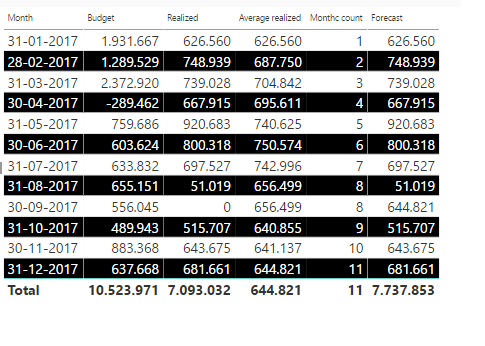
Regards,
MFelix
Regards
Miguel Félix
Did I answer your question? Mark my post as a solution!
Proud to be a Super User!
Check out my blog: Power BI em Português
- Mark as New
- Bookmark
- Subscribe
- Mute
- Subscribe to RSS Feed
- Permalink
- Report Inappropriate Content
Hi @edson_souza,
First of all I would make your month column into a date column with the last day of the month as a value this will allow you to use the Date features and the YTD QTD MTD calculations then add this to your model and you should get what you need:
Average realized =
VAR Realized =
    TOTALYTD ( SUM ( Average_Forecast[Realized] ); Average_Forecast[Month] )
VAR Months_Count =
    CALCULATE (
        DISTINCTCOUNT ( Average_Forecast[Month] );
        FILTER (
            ALLSELECTED ( Average_Forecast );
            Average_Forecast[Month] <= MAX ( Average_Forecast[Month] )
        );
        FILTER ( ALLSELECTED ( Average_Forecast ); Average_Forecast[Realized] > 0 )
    )
RETURN
    DIVIDE ( Realized; Months_Count )

FORMULA ALSO WORKS FOR MORE THAN ONE ROW PER MONTH
As you can see below I have a column with the Average and also the count of months that is the second part of the divide so you can see that the months with 0 are not counted on the division. Used the Hierarchy to only show month in the calculations.
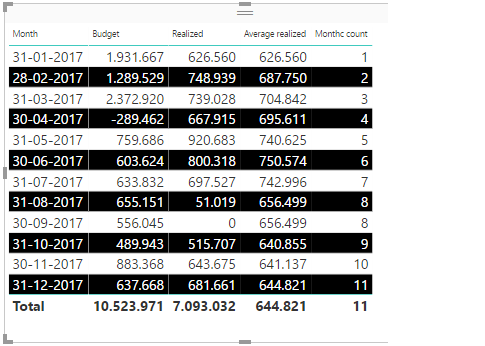
Regarding your second calculation not sure what you want and how you want to calculate. Where do you get the actuals and what value you want to assume for the month?
Regards,
MFelix
Regards
Miguel Félix
Did I answer your question? Mark my post as a solution!
Proud to be a Super User!
Check out my blog: Power BI em Português- Mark as New
- Bookmark
- Subscribe
- Mute
- Subscribe to RSS Feed
- Permalink
- Report Inappropriate Content
Thank you, @MFelix.
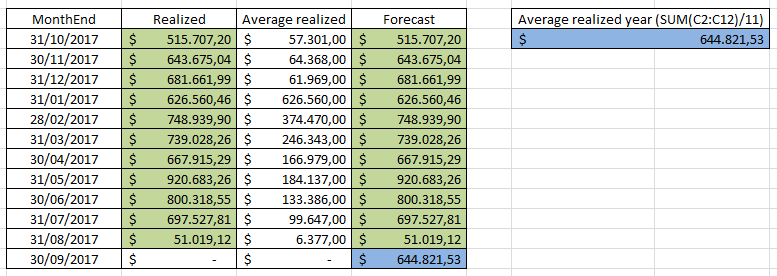
Item 1 solved with the formula that you sent, although the values were not equal monthly, the general average was correct (644.821,53).
For item 2, the forecast would be: when realized, the same as realized. When there is no, equal to the monthly average already found. According to the table below:
- Mark as New
- Bookmark
- Subscribe
- Mute
- Subscribe to RSS Feed
- Permalink
- Report Inappropriate Content
I didn't used the decimal places that's way the values are not exactly the same.
To make this change you want just use this.formula
FORECASTED = IF ( SUM(TABLE[REALIZED])= 0; [AVERAGE_REALIZED]; SUM( TABLE[REALIZED]))
Use the previous measure in your 2nd argument in your formula.
Regards
MFelix
Regards
Miguel Félix
Did I answer your question? Mark my post as a solution!
Proud to be a Super User!
Check out my blog: Power BI em Português- Mark as New
- Bookmark
- Subscribe
- Mute
- Subscribe to RSS Feed
- Permalink
- Report Inappropriate Content
Hi @MFelix
I tested it this way, but the unrealized month continues with a value equal to 0.00.
I noticed in your table "Average realized" has value in every month, mine only where realized.
- Mark as New
- Bookmark
- Subscribe
- Mute
- Subscribe to RSS Feed
- Permalink
- Report Inappropriate Content
I was able to apply the monthly average, but when I put the IF (Realized = 0; Average; Realized) the TOTAL does not add all the values.
How can I do it?

Note that the Forecast total is the same as Realized, but should also add up to 644,821.53, with the result equal to 7,737,858.41.
- Mark as New
- Bookmark
- Subscribe
- Mute
- Subscribe to RSS Feed
- Permalink
- Report Inappropriate Content
Hi @edson_souza,
Create the following measures:
Forecast_Total =
IF (
    SUM ( Average_Forecast[Realized] ) = 0;
    CALCULATE ( [Average realized]; ALLSELECTED ( Average_Forecast ) );
    SUM ( Average_Forecast[Realized] )
)
Forecast =
IF (
    SUM ( Average_Forecast[Realized] ) = 0;
    CALCULATE ( [Average realized]; ALLSELECTED ( Average_Forecast ) );
    SUMX (
        SUMMARIZE (
            Average_Forecast;
            Average_Forecast[Month];
            "Forecasted"; Average_Forecast[Forecast_Total]
        );
        [Forecasted]
    )
)
The first one is just auxiliary to calculate the total value for the year, then just add the Forecast to your table should give expected result.
Regards,
MFelix
Regards
Miguel Félix
Did I answer your question? Mark my post as a solution!
Proud to be a Super User!
Check out my blog: Power BI em Português- Mark as New
- Bookmark
- Subscribe
- Mute
- Subscribe to RSS Feed
- Permalink
- Report Inappropriate Content

Helpful resources

Join our Fabric User Panel
Share feedback directly with Fabric product managers, participate in targeted research studies and influence the Fabric roadmap.

Power BI Monthly Update - February 2026
Check out the February 2026 Power BI update to learn about new features.

FabCon Atlanta 2026
Join us at FabCon Atlanta, March 16-20, for the ultimate Fabric, Power BI, AI and SQL community-led event. Save $200 with code FABCOMM.

| User | Count |
|---|---|
| 65 | |
| 58 | |
| 45 | |
| 19 | |
| 15 |


| User | Count |
|---|---|
| 108 | |
| 106 | |
| 39 | |
| 29 | |
| 26 |


