Get Fabric or SQL Certified for Free.
Get certified for free when you join Fabric Data Days 2026 and dive into Fabric, Power BI, SQL, AI, and other essential data skills.
Join now- Power BI forums
- Get Help with Power BI
- Desktop
- Service
- Report Server
- Power Query
- Mobile Apps
- Developer
- DAX Commands and Tips
- Custom Visuals Development Discussion
- Health and Life Sciences
- Power BI Spanish forums
- Translated Spanish Desktop
- Training and Consulting
- Instructor Led Training
- Dashboard in a Day for Women, by Women
- Galleries
- Data Stories Gallery
- Themes Gallery
- Contests Gallery
- QuickViz Gallery
- Quick Measures Gallery
- Visual Calculations Gallery
- Fabric Apps Gallery
- Notebook Gallery
- Translytical Task Flow Gallery
- TMDL Gallery
- R Script Showcase
- Webinars and Video Gallery
- Ideas
- Custom Visuals Ideas (read-only)
- Issues
- Issues
- Events
- Upcoming Events
July 7 - July 17 | Round 2 of the Power BI Dataviz World Championships. Don't miss your chance! Learn more
- Power BI forums
- Forums
- Get Help with Power BI
- Desktop
- Re: Average and Count in same Graph
- Subscribe to RSS Feed
- Mark Topic as New
- Mark Topic as Read
- Float this Topic for Current User
- Bookmark
- Subscribe
- Printer Friendly Page

- Mark as New
- Bookmark
- Subscribe
- Mute
- Subscribe to RSS Feed
- Permalink
- Report Inappropriate Content
Average and Count in same Graph
I am not able to include sample files so I hope I can explain this correctly. I have a table with a column that the responses can range amoung several different answers. What I am trying to do is some of them I want to lump under the same answer but still graph off of this number. I tried putting them together under the same response using an IF but it is adding them all together. I am looking for an average for them.
Example
Response Count
1b 2
1c 1
1e 5
1d 4
2
3
4
5
6
7
1a 3
I want all the 1's to be listed as 1 and instead of giving me back a total of 15 I want the average of all of them but still be able to give the counts for the remainder 2 - 7. I hope I am explaining this well enough. Thanks for any help you can give.
Solved! Go to Solution.
- Mark as New
- Bookmark
- Subscribe
- Mute
- Subscribe to RSS Feed
- Permalink
- Report Inappropriate Content
Hi @Anonymous,
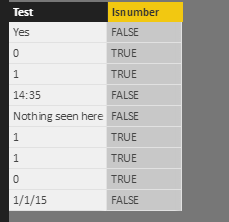
I think you can enter to query editor to add a column to check type and filter your formula to calculate average of rows which 'isnumber' is 'true'.
Sample:
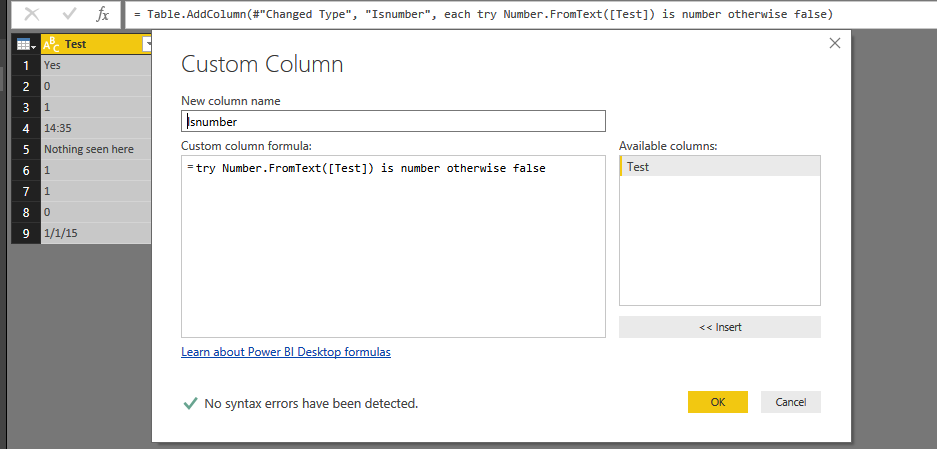
Query:
= Table.AddColumn(#"Changed Type", "Isnumber", each try Number.FromText([Test]) is number otherwise false)
Result:
Regards,
Xiaoxin Sheng
- Mark as New
- Bookmark
- Subscribe
- Mute
- Subscribe to RSS Feed
- Permalink
- Report Inappropriate Content
Hi @Anonymous,
You can try to use below measure to modify the total row to show average count:
AVG Count =
IF (
    COUNTROWS ( 'Sample' ) = COUNTROWS ( ALLSELECTED ( 'Sample' ) ),
    AVERAGEX (
        SUMMARIZE (
            ALLSELECTED ( 'Sample' ),
            [Response],
            "Count", COUNT ( 'Sample'[Response] )
        ),
        [Count]
    ),
    COUNT ( 'Sample'[Response] )
)
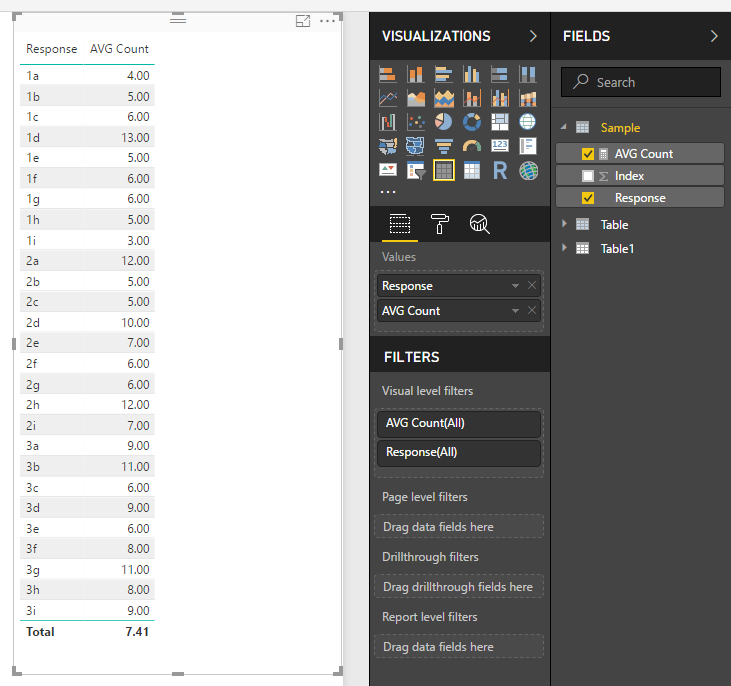
Regards,
Xiaoxin Sheng
- Mark as New
- Bookmark
- Subscribe
- Mute
- Subscribe to RSS Feed
- Permalink
- Report Inappropriate Content
I have one problem, the field I am trying to avg and count has some numbers and string values in it. I am only looking to average and count the number ones. I tried filtering the visual but I am pulling this directquery and telling me average is not used. I turned on the allwo restricted but it is still having the trouble with the string values.
- Mark as New
- Bookmark
- Subscribe
- Mute
- Subscribe to RSS Feed
- Permalink
- Report Inappropriate Content
Hi @Anonymous,
I'm no very clear for your description, can you please share the sample pbix file for test?
>> I am only looking to average and count the number ones.
If you want to deal with numeric part, I'd like to suggest you enter to query editor and add a custom column to store splitted numeric part to calculate.
PowerQuery | Extract Numbers from A string (eg ABCD1234)
Regards,
Xiaoxin Sheng
- Mark as New
- Bookmark
- Subscribe
- Mute
- Subscribe to RSS Feed
- Permalink
- Report Inappropriate Content
I see how this is very useful, but my problem us the field could have an answer of a number in one row and another string, not together in the same field.
Yes
0
1
14:35
Nothing seen here
1
1
0
1/1/15
That is the problem. I am just trying to average the numbers for a specific entry.
- Mark as New
- Bookmark
- Subscribe
- Mute
- Subscribe to RSS Feed
- Permalink
- Report Inappropriate Content
Hi @Anonymous,
I think you can enter to query editor to add a column to check type and filter your formula to calculate average of rows which 'isnumber' is 'true'.
Sample:
Query:
= Table.AddColumn(#"Changed Type", "Isnumber", each try Number.FromText([Test]) is number otherwise false)
Result:
Regards,
Xiaoxin Sheng
- Mark as New
- Bookmark
- Subscribe
- Mute
- Subscribe to RSS Feed
- Permalink
- Report Inappropriate Content
I did try this and it was working for on of my dashbaords, but the one I am trying to use it on is a DirectQuery and when I went into the Advanced Query Editor, it told me I could not do this adding a new query. Am I placing this in the wrong spot on the file. Please advise. Thanks
- Mark as New
- Bookmark
- Subscribe
- Mute
- Subscribe to RSS Feed
- Permalink
- Report Inappropriate Content
HI @Anonymous,
It seems like direct query not support to add custom columns. I haven't found other ways to work through this issue.
Regards,
Xiaoxin Sheng
Helpful resources

FabCon & SQLCon – Barcelona 2026
Join us in Barcelona for FabCon and SQLCon, the Fabric, Power BI, SQL, and AI community event. Save €200 with code FABCMTY200.

Data Days 2026
Join Data Days 2026: 60 days of free live/on-demand sessions, challenges, study groups, and certification opportunities.

Power BI DataViz World Championships - June 2026
A new Power BI DataViz World Championship is coming this June! Don't miss out on submitting your entry.

| User | Count |
|---|---|
| 30 | |
| 30 | |
| 25 | |
| 24 | |
| 16 |


| User | Count |
|---|---|
| 57 | |
| 40 | |
| 28 | |
| 24 | |
| 20 |


