cancel
Showing results for 
Search instead for 
Did you mean: 

The Power BI Data Visualization World Championships is back! Get ahead of the game and start preparing now! Learn more

Reply
bcampbell
Helper I
Helper I

Average Time with Filter / Measure

I have a measure that I am hoping to return in HH:MM;SS format instead of decimal.


The source value is currently in HH:MM;SS format


AVG DISP = CALCULATE(AVERAGE(rlmain[Time]),FILTER( rlmain, FIND( "DISP",rlmain[tencode],, 0) <> 0 ))
 
Is this possible ?
 
Thank You
1 ACCEPTED SOLUTION
Nolock
Resident Rockstar
Resident Rockstar

Hi @bcampbell,


that's a little bit tricky. If you have a computed column, it is simple to change the data type and format of a column. But because a measure is not a part of a table, you can't do the same. But, you can use the function TIME(hour; minute; second) for transforming your AVERAGE value. The average value is a part of day.

The simple solution were:


CalculateAvgAsTime = TIME(0; 0; [CalculateAvgFrom] * 24 * 3600)

But it doesn't work, because Time expects max 32565 as value!!! Don't ask me why when a day has 86400 seconds. But I will create an issue for it.


My workaround is following:


CalculateAvgAsTime =
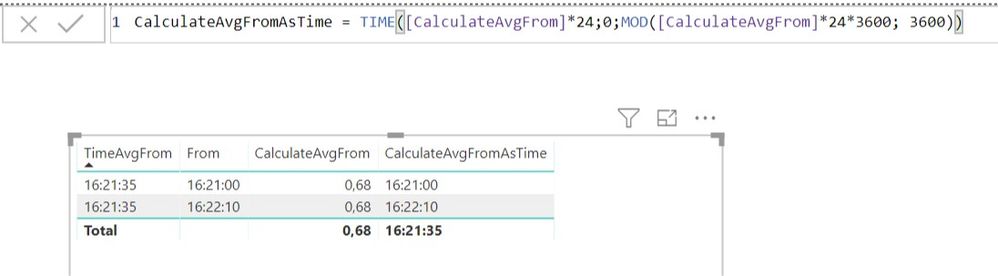
TIME ( [CalculateAvgFrom] * 24; 0; MOD ( [CalculateAvgFrom] * 24 * 3600; 3600 ) )

I use hours, ignore minutes and after that compute seconds in the hour with help of modulo.


Annotation 2019-02-26 170038.jpg

View solution in original post

4 REPLIES 4
Nolock
Resident Rockstar
Resident Rockstar

Hi @bcampbell,


that's a little bit tricky. If you have a computed column, it is simple to change the data type and format of a column. But because a measure is not a part of a table, you can't do the same. But, you can use the function TIME(hour; minute; second) for transforming your AVERAGE value. The average value is a part of day.

The simple solution were:


CalculateAvgAsTime = TIME(0; 0; [CalculateAvgFrom] * 24 * 3600)

But it doesn't work, because Time expects max 32565 as value!!! Don't ask me why when a day has 86400 seconds. But I will create an issue for it.


My workaround is following:


CalculateAvgAsTime =
TIME ( [CalculateAvgFrom] * 24; 0; MOD ( [CalculateAvgFrom] * 24 * 3600; 3600 ) )

I use hours, ignore minutes and after that compute seconds in the hour with help of modulo.


Annotation 2019-02-26 170038.jpg

Excellent That worked as needed!!!


but I was getting a syntax error using ; and instead used ,

Great.


To , and ; - it depends what locale your system uses. Mine PowerBI/Excel/... expects semicollon.

Nolock
Resident Rockstar
Resident Rockstar

An issue is created: https://community.powerbi.com/t5/Issues/DAX-TIME-function-raises-an-exception-if-the-second-part-is-...

Btw. the max value of seconds you can currently use is 32 767 - I wrote a wrong value in my last post 😞

Helpful resources

Announcements
Power BI DataViz World Championships

Power BI Dataviz World Championships

The Power BI Data Visualization World Championships is back! Get ahead of the game and start preparing now!

December 2025 Power BI Update Carousel

Power BI Monthly Update - December 2025

Check out the December 2025 Power BI Holiday Recap!

FabCon Atlanta 2026 carousel

FabCon Atlanta 2026

Join us at FabCon Atlanta, March 16-20, for the ultimate Fabric, Power BI, AI and SQL community-led event. Save $200 with code FABCOMM.