cancel
Showing results for 
Search instead for 
Did you mean: 

The Power BI Data Visualization World Championships is back! Get ahead of the game and start preparing now! Learn more

Reply
bld
Frequent Visitor

Average Time of Day an Event Happens

I'm looking to make a card that shows the average time an event happens, but am hitting a wall in Power BI.


I have the time an event happened as well as the times it happened in 15-minute increments.  I want to show the average time the event seems to occur.  I can do this easily in Excel but am having issues in Power BI.


There is a quick measure for weighted averages but it wants to do a count of the times, not an average.


Below is an example of the data I am working with to get this average time.


TimeEvents
4:00 AM3
4:15 AM5
4:30 AM7
4:45 AM4
5:00 AM2
5:15 AM5
5:30 AM4
5:45 AM5
6:00 AM1
6:15 AM1
6:30 AM2
6:45 AM3
7:00 AM3
7:30 AM1
7:45 AM1
8:15 AM1


Thanks in advance for any advice.

1 ACCEPTED SOLUTION
dedelman_clng
Community Champion
Community Champion

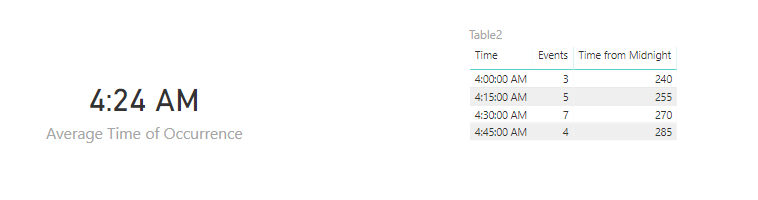
See if this works for you. We convert the time to the number of minutes from midnight, then calculate a weighted average.


Calculated Column

Time from Midnight = DATEDIFF(TODAY(), TODAY() & " " & Table2[Time], MINUTE)

Using the TIME() function with only the minutes value does all of the heavy lifting of converting number datatype to time datatype.


Measure

Average Time of Occurrence =
TIME ( 0, 
DIVIDE (       SUMX ( Table2, [Time from Midnight] * [Events] ),      SUM ( Table2[Events] ), 0),
0 )

Capture.PNG


Also be sure to format the measure with the desired time format


Hope this helps

David

View solution in original post

2 REPLIES 2
dedelman_clng
Community Champion
Community Champion

See if this works for you. We convert the time to the number of minutes from midnight, then calculate a weighted average.


Calculated Column

Time from Midnight = DATEDIFF(TODAY(), TODAY() & " " & Table2[Time], MINUTE)

Using the TIME() function with only the minutes value does all of the heavy lifting of converting number datatype to time datatype.


Measure

Average Time of Occurrence =
TIME ( 0, 
DIVIDE (       SUMX ( Table2, [Time from Midnight] * [Events] ),      SUM ( Table2[Events] ), 0),
0 )

Capture.PNG


Also be sure to format the measure with the desired time format


Hope this helps

David

This is great! Thanks, David!


I'm getting a slight difference between Excel and Power BI.  With PBI I get 5:22 and Excel I get 5:25 but I think I'm on the right track.  I'll play around with it to see if I can figure out the difference. Might be that the PBI calc is a bit more precise cause when I look at the 4am to 5am example you provided I get the same as you did.  I'd prefer more precision anyway.

Helpful resources

Announcements
Power BI DataViz World Championships

Power BI Dataviz World Championships

The Power BI Data Visualization World Championships is back! Get ahead of the game and start preparing now!

December 2025 Power BI Update Carousel

Power BI Monthly Update - December 2025

Check out the December 2025 Power BI Holiday Recap!

FabCon Atlanta 2026 carousel

FabCon Atlanta 2026

Join us at FabCon Atlanta, March 16-20, for the ultimate Fabric, Power BI, AI and SQL community-led event. Save $200 with code FABCOMM.