cancel
Showing results for 
Search instead for 
Did you mean: 

The Power BI Data Visualization World Championships is back! Get ahead of the game and start preparing now! Learn more

Reply
Anonymous
Not applicable

Average Count by hours

Hi,


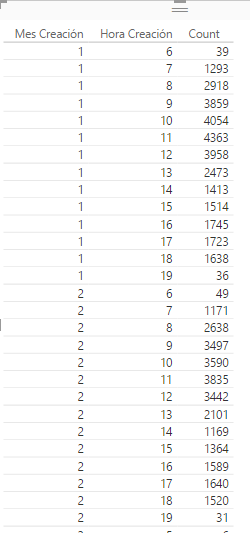
New to PBI and wondering how I can calculate the average number of cases by hour. Data is a list of cases and I've created a measure Count = countrows(Incident). Through this I can see the number of cases by month (mes) and hour (Hora):


Captura.PNG


What I'd like is to show the average amount of cases per hour, i.e. Average of Cases per Hour at 06:00 as per screenshot would be 39+49/2 = 44.


I have tried using averagex, summarize, calculate and create new table but not having any luck so far.


Any suggestions as to how this could be achieved?


Many thanks!


Matt


1 ACCEPTED SOLUTION
Vvelarde
Community Champion
Community Champion

hi @Anonymous


try with this:


Avgxhora =
VAR HoraCreacion =
    FIRSTNONBLANK ( Table1[Hora Creación], Table1[Hora Creación] )
RETURN
    DIVIDE (
        CALCULATE ( COUNTROWS ( Table1 ), ALLEXCEPT ( Table1, Table1[Hora Creación] ) ),
        COUNTROWS (
            SUMMARIZE (
                FILTER ( ALL ( Table1 ), Table1[Hora Creación] = HoraCreacion ),
                Table1[Hora Creación],
                Table1[Mes Creación]
            )
        )
    )


Lima - Peru

View solution in original post

4 REPLIES 4
Vvelarde
Community Champion
Community Champion

hi @Anonymous


try with this:


Avgxhora =
VAR HoraCreacion =
    FIRSTNONBLANK ( Table1[Hora Creación], Table1[Hora Creación] )
RETURN
    DIVIDE (
        CALCULATE ( COUNTROWS ( Table1 ), ALLEXCEPT ( Table1, Table1[Hora Creación] ) ),
        COUNTROWS (
            SUMMARIZE (
                FILTER ( ALL ( Table1 ), Table1[Hora Creación] = HoraCreacion ),
                Table1[Hora Creación],
                Table1[Mes Creación]
            )
        )
    )


Lima - Peru

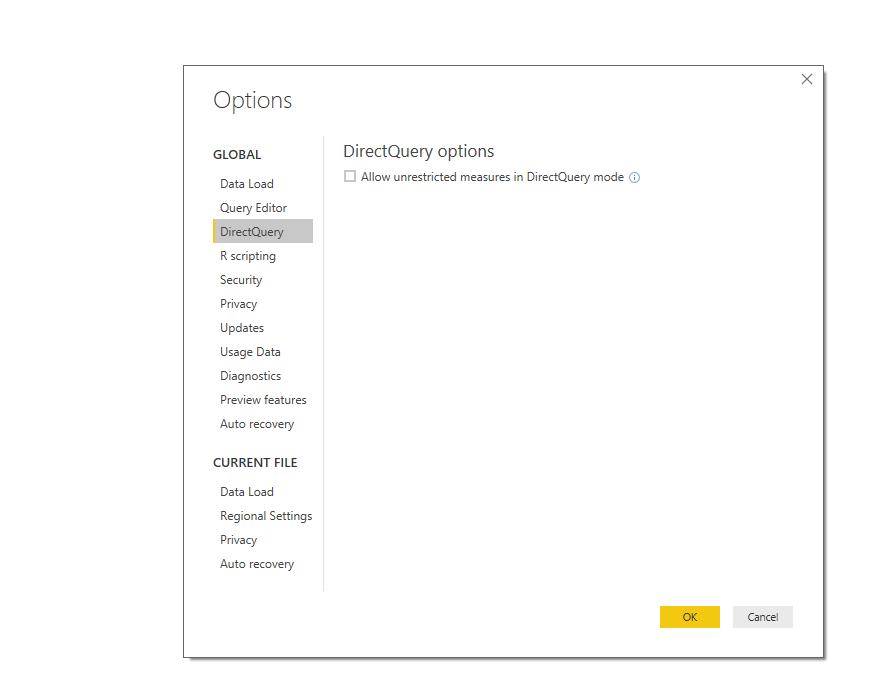
There will be some way to do this in direct query??????

@jorgeaguirre


Try this;


DQ Options.png


Lima - Peru
Anonymous
Not applicable

Hi @Vvelarde


That is absolutely fantastic, thank you very much for taking the time to help me with this one, it worked perfectly.


I need a lot more practice with this it seems 🙂


Saludos,


Matt

Helpful resources

Announcements
Power BI DataViz World Championships

Power BI Dataviz World Championships

The Power BI Data Visualization World Championships is back! Get ahead of the game and start preparing now!

December 2025 Power BI Update Carousel

Power BI Monthly Update - December 2025

Check out the December 2025 Power BI Holiday Recap!

FabCon Atlanta 2026 carousel

FabCon Atlanta 2026

Join us at FabCon Atlanta, March 16-20, for the ultimate Fabric, Power BI, AI and SQL community-led event. Save $200 with code FABCOMM.