cancel
Showing results for 
Search instead for 
Did you mean: 

Vote for your favorite vizzies from the Power BI Dataviz World Championship submissions. Vote now!

Reply
UK_User123456
Resolver I
Resolver I

Average Calculation

Hi All,


I have the below data, im just simply trying to do an average calulcation for each of the ID's that I have, normally I would have just put the "Amount" into the values field and used the average function, but it does not give me the average function to select, is there anothger way of doing this?


IDAmount
112
110
13
15
16
220
227
232
315
416
517
63
645


my outcome would be:


IDAmount
17.2
226.33333
315
416
517
624
1 ACCEPTED SOLUTION
Anonymous
Not applicable

@cosminc yeah. You can use the little down arrow there to change it to any other summarization type, such as average. Or of course write an explicit measure that does the same thing. Such as...


Avg Amount = AVERAGE(TableName[Amount])


View solution in original post

4 REPLIES 4
cosminc
Post Partisan
Post Partisan

Hi

the column Amount is number type and Modelling - Default summarization is Sum?


Hope it helps,

Cosmin


Anonymous
Not applicable

@cosminc yeah. You can use the little down arrow there to change it to any other summarization type, such as average. Or of course write an explicit measure that does the same thing. Such as...


Avg Amount = AVERAGE(TableName[Amount])


Hi All,


Thanks for the response, it just clicked to me after reading your responses that my amount for some reason when imported into power bi it changed the format to text when it should have been whole number which is the reason I couldnt summarise it.


Thanks

Anonymous
Not applicable

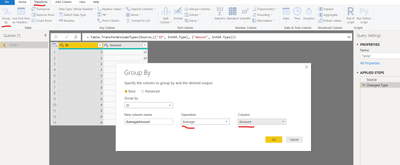
This is fairly easy in the Query Editor. Go to the Transform tab and use the Group By button. Group by your ID column and use sum of Amount as the aggregation type.


GroupBy Query Editor.png


That assumes you want a hard table with this aggregation pre-calculated. You can also do this in a report by either writing a measure that does an average of Amount, and just set that measure next to the ID column on your report page, or just drop the two columns side by side and set the aggregation on Amount to average, and ID to "do not summarize."

Helpful resources

Announcements
Power BI DataViz World Championships

Power BI Dataviz World Championships

Vote for your favorite vizzies from the Power BI World Championship submissions!

Sticker Challenge 2026 Carousel

Join our Community Sticker Challenge 2026

If you love stickers, then you will definitely want to check out our Community Sticker Challenge!

January Power BI Update Carousel

Power BI Monthly Update - January 2026

Check out the January 2026 Power BI update to learn about new features.

FabCon Atlanta 2026 carousel

FabCon Atlanta 2026

Join us at FabCon Atlanta, March 16-20, for the ultimate Fabric, Power BI, AI and SQL community-led event. Save $200 with code FABCOMM.