Don't miss your chance to take the Fabric Data Engineer (DP-700) exam on us!
Learn moreWe've captured the moments from FabCon & SQLCon that everyone is talking about, and we are bringing them to the community, live and on-demand. Starts on April 14th. Register now
Hello,
In my company we have multiple projects which produce one excel per quarter which contains financial data. The Excels are stored on a Microsoft Azure powered Data Lake.
I have created a set of 7 queries that can fetch and transform the data from one specific sheet of one Excel file into 7 different clean tables that i can then use to create visuals.
However this was done with one file from one project. I need to create an environment where every time a new Excel is added to the dataset in the data lake, Power Bi should be able to fetch the raw data from the specific sheet of the Excel file, make it go through the queries then extract the 7 tables I need and automatically append them to 7 Master Tables containing the history of those tables.
It is doable manually but I won't be able to handle this process once I have many projects uploading many Excels requiring 7 tables each. Hence, any suggestion is welcome.
Thanks
Solved! Go to Solution.
Hi @Amarinho777 ,
If we have multiple files that have the same schema, we can combine them into a single logical table by using Power Query.
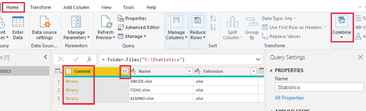
Select Content and select Home > Combine Files. Or you can just select the Combine Files icon next to Content.
Please reference the following document.
Combine files (binaries) in Power BI Desktop - Power BI | Microsoft Learn
Best Regards,
Community Support Team _ xiaosun
If this post helps, then please consider Accept it as the solution to help the other members find it more quickly.
Hi @Amarinho777 ,
If we have multiple files that have the same schema, we can combine them into a single logical table by using Power Query.
Select Content and select Home > Combine Files. Or you can just select the Combine Files icon next to Content.
Please reference the following document.
Combine files (binaries) in Power BI Desktop - Power BI | Microsoft Learn
Best Regards,
Community Support Team _ xiaosun
If this post helps, then please consider Accept it as the solution to help the other members find it more quickly.
If you have recently started exploring Fabric, we'd love to hear how it's going. Your feedback can help with product improvements.
A new Power BI DataViz World Championship is coming this June! Don't miss out on submitting your entry.
Share feedback directly with Fabric product managers, participate in targeted research studies and influence the Fabric roadmap.
| User | Count |
|---|---|
| 56 | |
| 39 | |
| 35 | |
| 19 | |
| 17 |
| User | Count |
|---|---|
| 73 | |
| 70 | |
| 37 | |
| 35 | |
| 26 |