This time we’re going bigger than ever. Fabric, Power BI, SQL, AI and more. We're covering it all. You won't want to miss it.
Learn moreDid you hear? There's a new SQL AI Developer certification (DP-800). Start preparing now and be one of the first to get certified. Register now
Hi,
I've unpivoted some columns that I need to use in such a way. When I add new columns to the original datasource (Excel file) those will automatically get unpivoted as well, resulting in an error (OLE DB #value). Is it expected? Either way, how can I get around it?
Thank you,
João Machado
Solved! Go to Solution.
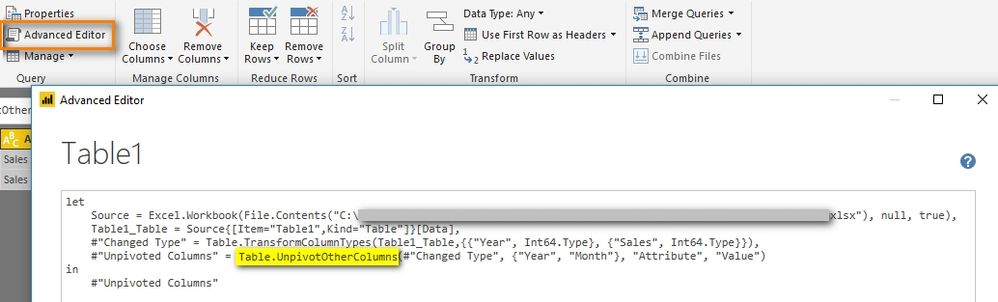
This should be as expected. You can go to Query Editor - Advanced Editor to see the detailed power query. By default, if you click 'Unpivot Columns', it will use 'Table.UnpivotOtherColumns'. When new columns are added to the original datasource, this new column will also be unpivoted.
To get around it, you can select the column and click 'Unpivot Only Selected Columns'. The generated power query will be Table.Unpivot.
Best Regards,
Herbert
This should be as expected. You can go to Query Editor - Advanced Editor to see the detailed power query. By default, if you click 'Unpivot Columns', it will use 'Table.UnpivotOtherColumns'. When new columns are added to the original datasource, this new column will also be unpivoted.
To get around it, you can select the column and click 'Unpivot Only Selected Columns'. The generated power query will be Table.Unpivot.
Best Regards,
Herbert
Hello, Herbert,
Thank you so very much for your help. It worked wonders!
Sincerely,
João Machado
Check out the April 2026 Power BI update to learn about new features.
If you have recently started exploring Fabric, we'd love to hear how it's going. Your feedback can help with product improvements.
| User | Count |
|---|---|
| 37 | |
| 37 | |
| 31 | |
| 21 | |
| 16 |
| User | Count |
|---|---|
| 66 | |
| 56 | |
| 31 | |
| 26 | |
| 23 |