cancel
Showing results for 
Search instead for 
Did you mean: 

The Power BI Data Visualization World Championships is back! Get ahead of the game and start preparing now! Learn more

Reply
pallaviahuja
Regular Visitor

Automatic dataset refresh

Hi,


I hve created several Reports on Power BI Desktop. I have to refresh it manually everyday whenever the dataset is updated and then agagin have to publish it on service so that my users, with who I have shared the reports can also see the updated version. Is here anyway to refresh the dataset automatically on Power bi service whenever the dataset (my datasource is updated). I am no developer so please finda solution from the data analyst perspective.


Thanks & Regards

Pallavi Ahuja

1 ACCEPTED SOLUTION

@pallaviahuja ,


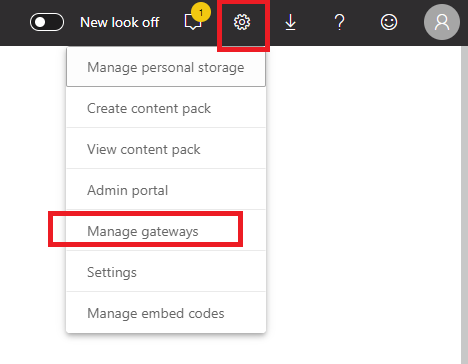
To configure the data source credentials, click the gear button on the top-right hand of web view, then click "manage gateway".

1.PNG 


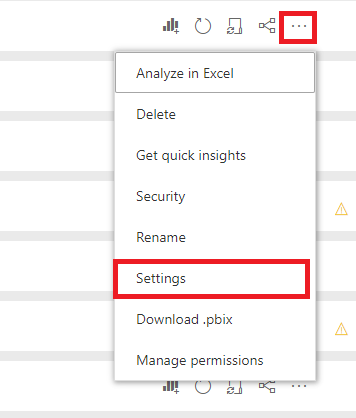
To configure the schedule refresh, click the ellipse and click Settings, then enable schedule refresh as below:

2.PNG3.PNG 


Community Support Team _ Jimmy Tao

If this post helps, then please consider Accept it as the solution to help the other members find it more quickly.


View solution in original post

5 REPLIES 5
v-yuta-msft
Community Support
Community Support

@pallaviahuja ,


Are you using import mode when connect to data source? If you are, please download a gateway here and install the gateway(on-premise or personal). Please refer to this doc to install and condigure the gateway on your server. Then you can publish your report and configure the data source credentails in power bi service. 


Finally, you can configure schedule refresh in power bi service, please refer to this doc. If you need to share the report to your colleague, you can share the report with them(need a pro license), please refer to this doc.


Community Support Team _ Jimmy Tao

If this post helps, then please consider Accept it as the solution to help the other members find it more quickly.

Hi,


thank you your response but I am not able to find manage option for my report and hence, can’t set the credential for my datasource. Please let me know where can I find this option on power bi service (Web View).


@pallaviahuja ,


To configure the data source credentials, click the gear button on the top-right hand of web view, then click "manage gateway".

1.PNG 


To configure the schedule refresh, click the ellipse and click Settings, then enable schedule refresh as below:

2.PNG3.PNG 


Community Support Team _ Jimmy Tao

If this post helps, then please consider Accept it as the solution to help the other members find it more quickly.


Hi,


Thank you for your reply. I installed and set up the gateway and scheduled daily refresh of the dataset. The problem in my office internet is proxy now. So I went through the below doc link and configured the proxy settings accordingly. But the gateway is not working, it always fails at the time of scheduled refresh.

https://docs.microsoft.com/en-us/data-integration/gateway/service-gateway-Proxy

Tahreem24
Super User
Super User

@pallaviahuja ,


You can definitely do it using Data Gateway. Download Data Gateway from PBI Service's Top right Download option button. Then configure it with Your data source and set the refresh time. With Pro license you can refresh automatically upto 8 times a day.

You can refer the below URL for more deets on Data Gateway:

https://docs.microsoft.com/en-us/power-bi/service-gateway-onprem


Don't forget to hit THUMBS UP and mark it as a solution if it helps you! 

Don't forget to give thumbs up and accept this as a solution if it helped you!!!

Please take a quick glance at newly created dashboards : Restaurant Management Dashboard , HR Analytics Report , Hotel Management Report, Sales Analysis Report , Fortune 500 Companies Analysis , Revenue Tracking Dashboard

Helpful resources

Announcements
Power BI DataViz World Championships

Power BI Dataviz World Championships

The Power BI Data Visualization World Championships is back! Get ahead of the game and start preparing now!

December 2025 Power BI Update Carousel

Power BI Monthly Update - December 2025

Check out the December 2025 Power BI Holiday Recap!

FabCon Atlanta 2026 carousel

FabCon Atlanta 2026

Join us at FabCon Atlanta, March 16-20, for the ultimate Fabric, Power BI, AI and SQL community-led event. Save $200 with code FABCOMM.